05-vue2组件封装

image-20200723170734421

参考资料:

1. 组件封装

1.1 rem布局公式

只需要在 index.html 加上这一句就可以实现尺寸基于量的像素适配不同的设备。

public/index.html

1
2
3
4
5
6
7
8
9
10
11
12
13
<!DOCTYPE html>
<html lang="">
<head>
...
<script>
// font-size 计算公式:越大的设备越大,越小的设备上越小。如 375 是设计稿宽度,16 是基准字体大小
document.documentElement.style.fontSize = document.documentElement.clientWidth / 375 * 16 + 'px'
</script>
</head>
<body>
...
</body>
</html>

src/App.vue

1
2
3
4
5
6
7
8
9
10
11
<style lang="scss">
*{
margin: 0;
padding: 0;
}
.banner{
width: 23.4375rem; // 量设计稿多少就写多少(Alt+Z转换): 375px
height: 12.055rem; // 量设计稿多少就写多少(Alt+Z转换): 192.88px
background: yellow;
}
</style>

关于插件 px to rem & rpx & vw (cssrem) 的设置:(全局 settings.json 末尾添加一行也可以作为基准字体大小,与index.html中的数字要一致

1
2
3
4
{
...,
"cssrem.rootFontSize": 16
}

插件默认字体大小就是 16px,按需修改即可。

amfe-flexible 可伸缩布局方案:https://github.com/amfe/lib-flexible

由于viewport单位得到众多浏览器的兼容,lib-flexible这个过渡方案已经可以放弃使用,不管是现在的版本还是以前的版本,都存有一定的问题。建议大家开始使用viewport来替代此方。

1.2 轮播图封装-swiper库

参考英文官方文档:https://swiperjs.com/get-started

  1. cnpm 安装添加 swiper 库到依赖库,并检查确认 swiper 库安装成功与否。
1
cnpm i swiper

package.json

1
2
3
4
5
"dependencies": {
...,
"swiper": "^x.y.z", // 此处会看到安装的版本号
...
},
  1. 轮播组件内元素插槽:script 中导入 swiper 库并挂载 swiper 实例。

FilmSwiper.vue - 插槽替换的是 <film-swiper-item>

1
2
3
4
5
6
7
8
9
10
11
12
13
14
15
16
17
18
19
20
21
22
23
24
25
26
27
28
29
30
31
32
33
34
35
36
37
38
39
40
41
42
43
44
45
<template>
<div class="swiper">
<div class="swiper-wrapper">
<slot></slot>
</div>
<!-- 如果需要分页器 -->
<div class="swiper-pagination"></div>
</div>
</template>

<script>
import Swiper from "swiper/bundle";
import "swiper/css/bundle"; //新版本 swiper 8+

export default {
props: {
loog: {
type: Boolean,
default: true,
},
},
mounted() {
new Swiper(".swiper", {
loop: this.loop, // 循环模式选项
// 如果需要分页器
pagination: {
el: ".swiper-pagination",
},
// 如果需要前进后退按钮
navigation: {
nextEl: ".swiper-button-next",
prevEl: ".swiper-button-prev",
},
// 自动轮播
autoplay: {
delay: 2000,
disableOnInteraction: false,
},
});
},
};
</script>

<style scoped></style>

  1. 轮播元素内图片插槽

FilmSwiperItem.vue - 插槽替换的是 <img >

1
2
3
4
5
<template>
<div class="swiper-slide">
<slot></slot>
</div>
</template>
  1. 使用轮播组件

Films.vue

1
2
3
4
5
6
7
8
9
10
11
12
13
14
15
16
17
18
19
20
21
22
23
24
25
26
27
28
29
30
31
32
33
34
35
36
37
38
39
40
41
42
43
44
45
46
47
48
<template>
<div>
<!-- <film-swiper :key="datalist.length"> -->
<film-swiper>
<film-swiper-item v-for="item in datalist" :key="item.id" class="filmswiperitem">
<img :src="item.img">
</film-swiper-item>
</film-swiper>

<router-view></router-view>
</div>
</template>

<script>
import filmSwiper from "@/components/films/FilmSwiper.vue";
import filmSwiperItem from "@/components/films/FilmSwiperItem.vue";
import axios from "axios";

export default {
components: {
filmSwiper,
filmSwiperItem,
},
data() {
return {
datalist: [],
};
},
mounted() {
console.log("以猫眼电影封面为例")
axios
.get(
"/maoyan/ajax/comingList?ci=73&token=&limit=10&optimus_uuid=424018A0DBF611F0B1298720294CD58A3B570872BF7C4455AF088EB790854A30&optimus_risk_level=71&optimus_code=10"
)
.then((res) => {
//console.log(res.data.coming);
this.datalist = res.data.coming
});
},
};
</script>

<style lang="scss" scoped>
.filmswiperitem img{
width: 100%;
}
</style>

注意:猫眼电影配置了反向代理

vue.config.js

1
2
3
4
5
6
7
8
9
10
11
12
13
14
15
16
17
...
module.exports = defineConfig({
...
// 配置反向代理
devServer: {
...
proxy: {
'/maoyan': {
target: 'https://m.maoyan.com',
changeOrigin: true,
pathRewrite: {
'^/maoyan': ''
}
}
}
},
})

效果

chrome-capture-2025-12-25 (1)

1.3 选项卡封装

1.3.1 字体图标×2方案

阿里巴巴矢量图标库:https://www.iconfont.cn/

登陆 → 找到自己想用图标加入购物车 → 从购物车添加至项目 → 在我发起的项目中点击下载至本地 → 解压压缩包拷贝自己项目下。

方案一

  • 放在 public 目录下,即 public/iconfont/* 可以直接在浏览器中通过 / 根目录就可以访问得到。

  • 引入方式如下:public/index.html

1
2
3
4
5
6
7
8
9
10
11
12
13
<!DOCTYPE html>
<html lang="">
<head>
...
<title><%= htmlWebpackPlugin.options.title %></title>
<!-- iconfont方案1:引入放在public目录下的字体图标 -->
<link rel="stylesheet" href="/iconfont/iconfont.css">
...
</head>
<body>
...
</body>
</html>

方案二:【推荐】

  • 放在 assets 目录下,即 assets/iconfont/* ,该目录主要维护的就是相关静态资源文件。
  • 引入方式如下:src/components/Tabbar.vue - 具体使用的组件
1
2
3
4
5
6
7
8
9
<template>
...
</template>

<script>
// iconfont方案2:导入放在assets目录下的字体图标
import '../assets/iconfont/iconfont.css'
export default {};
</script>

1.3.2 封装实现

vant 有现成的封装:

src/components/Tabbar.vue

1
2
3
4
5
6
7
8
9
10
11
12
13
14
15
16
17
18
19
20
21
22
23
24
25
26
27
28
29
30
31
32
33
34
35
36
37
38
39
40
41
42
43
44
45
46
47
48
49
50
51
52
53
54
55
56
57
58
59
60
61
62
63
64
65
66
67
68
69
<template>
<footer>
<ul>
<router-link to="/films" custom v-slot="{ navigate, isActive }">
<li @click="navigate" :class="isActive ? 'router-link-active' : ''">
<i class="iconfont icon-houtai"></i>
<span>电影</span>
</li>
</router-link>
<router-link to="/cinemas" custom v-slot="{ navigate, isActive }">
<li @click="navigate" :class="isActive ? 'router-link-active' : ''">
<i class="iconfont icon-daka"></i>
<span>影院</span>
</li>
</router-link>
<router-link to="/message" custom v-slot="{ navigate, isActive }">
<li @click="navigate" :class="isActive ? 'router-link-active' : ''">
<i class="iconfont icon-chucun"></i>
<span>资讯</span>
</li>
</router-link>
<router-link to="/center" custom v-slot="{ navigate, isActive }">
<li @click="navigate" :class="isActive ? 'router-link-active' : ''">
<i class="iconfont icon-anquan"></i>
<span>我的</span>
</li>
</router-link>
</ul>
</footer>
</template>

<script>
import "../assets/iconfont/iconfont.css";
export default {};
</script>

<style lang="scss" scoped>
footer {
position: fixed; //固定定位到底部
bottom: 0;
left: 0;
width: 100%; //宽度占满
height: 3.75rem; //高度量取,转rem
background: white; //背景按需
z-index: 100; //最顶,防止被盖住
ul {
display: flex; //弹性布局:默认横向排列
li {
flex: 1; //弹性元素各自比例相同
line-height: 1.5625rem; //行高为footer的一半
text-align: center; //文本居中
display: flex; //内部i和span也弹性布局
flex-direction: column; //纵向排列
color: gray;
margin-top: .625rem;
i {
font-size: 25px; //字体一般使用px,无需绑定rem
}
span {
font-size: 14px;
}
}
}
}
.router-link-active {
color: red;
}
</style>

src/App.vue

1
2
3
4
5
6
7
8
9
10
11
12
13
14
15
16
17
18
19
20
21
22
23
24
25
26
27
28
29
30
31
32
33
34
35
36
37
<template>
<div>
<!-- 底部选项卡 -->
<tabbar></tabbar>
<!-- 路由容器(类似插槽) -->
<router-view></router-view>
</div>
</template>

<script>
import Tabbar from "@/components/Tabbar.vue";

export default {
data() {
return {};
},
components: {
Tabbar,
},
methods: {},
};
</script>

<style lang="scss">
* {
margin: 0;
padding: 0;
}
html,body{
height: 100%;
}
ul {
list-style: none;
}

</style>

效果

chrome-capture-2025-12-25

1.4 页内导航封装

src/components/films/FilmHeader.vue

1
2
3
4
5
6
7
8
9
10
11
12
13
14
15
16
17
18
19
20
21
22
23
24
25
26
27
28
29
30
31
32
33
34
35
36
37
38
39
40
41
42
43
44
45
46
<template>
<ul>
<!-- li 标签上 active 效果(常规) -->
<router-link to="/films/nowplaying" custom v-slot="{ navigate, isActive }">
<li @click="navigate" :class="isActive ? 'film-header-active' : ''">
正在热映
</li>
</router-link>
<!-- span 标签上 active 效果(可选) -->
<router-link to="/films/comingsoon" custom v-slot="{ navigate, isActive }">
<li @click="navigate">
<span :class="isActive ? 'film-header-active1' : ''">
即将上映
</span>
</li>
</router-link>
</ul>
</template>

<script>
export default {

}
</script>

<style lang="scss" scoped>
$activeColor: red;
ul {
display: flex;
height: 3.0625rem;
line-height: 3.0625rem;
li {
flex: 1;
text-align: center;
}
}
.film-header-active {
color: $activeColor;
border-bottom: 1px solid $activeColor;
}
.film-header-active1 {
color: $activeColor;
border-bottom: 1px solid $activeColor;
padding-bottom: .625rem;
}
</style>

src/views/Films.vue

1
2
3
4
5
6
7
8
9
10
11
12
13
14
15
16
17
18
19
20
21
22
23
24
25
26
27
28
29
30
31
32
33
34
35
36
37
38
39
40
41
42
43
44
45
46
47
48
49
50
51
52
53
54
55
56
57
58
59
60
61
62
63
64
65
66
<template>
<div>
<!-- <film-swiper :key="datalist.length"> -->
<film-swiper>
<film-swiper-item
v-for="item in datalist"
:key="item.id"
class="filmswiperitem"
>
<img :src="item.img" />
</film-swiper-item>
</film-swiper>
<!-- 二级声明导航: class透传给组件 -->
<film-header class="sticky"></film-header>

<router-view></router-view>
</div>
</template>

<script>
import filmSwiper from '@/components/films/FilmSwiper.vue'
import filmSwiperItem from '@/components/films/FilmSwiperItem.vue'
import filmHeader from '@/components/films/FilmHeader.vue'
import axios from 'axios'

export default {
components: {
filmSwiper,
filmSwiperItem,
filmHeader
},
data () {
return {
datalist: []
}
},
mounted () {
console.log('mounted')
axios
.get(
'/maoyan/ajax/comingList?ci=73&token=&limit=10&optimus_uuid=424018A0DBF611F0B1298720294CD58A3B570872BF7C4455AF088EB790854A30&optimus_risk_level=71&optimus_code=10'
)
.then((res) => {
console.log(res.data.coming)
this.datalist = res.data.coming
})
}
}
</script>

<style lang="scss" scoped>
.filmswiperitem {
height: 11.25rem;
img {
width: 100%;
}
}
// 粘性定位
.sticky{
position: sticky;
top: 0;
background: white;
z-index: 100;
}
</style>

效果

chrome-capture-2025-12-25 (2)

1.5 列表页封装

src/views/films/Nowplaying.vue - 无懒加载

  • vue2过滤器 Vue.filter() / vue3计算属性computed + 返回匿名函数传参
  • 溢出显示省略号-固定用法
  • 空字段优化 或 隐藏但占位visibility: hidden;
1
2
3
4
5
6
7
8
9
10
11
12
13
14
15
16
17
18
19
20
21
22
23
24
25
26
27
28
29
30
31
32
33
34
35
36
37
38
39
40
41
42
43
44
45
46
47
48
49
50
51
52
53
54
55
56
57
58
59
60
61
62
63
64
65
66
67
68
69
70
71
72
73
74
75
76
77
78
79
80
81
82
83
84
85
86
87
88
89
90
91
92
93
94
95
96
97
98
99
100
101
102
103
104
105
106
107
108
109
<template>
<div>
<!-- Now playing... -->
<ul>
<li
v-for="(data, index) in datalist"
:key="data.filmId"
@click="handleChangePage(data.filmId)"
>
<img :src="data.poster" />
<div>
<div class="title">{{ data.name }}</div>
<div class="content">
<div :class="data.grade ? '' : 'hidden'">
观众评分:<span style="color: orange">{{ data.grade }}</span>
</div>
<!-- <div>{{data.actors | actorsFilter}}</div> -->
<div class="actors">{{ actorNameList(index) }}</div>
<div>{{ data.nation }} | {{ data.runtime }}分钟</div>
</div>
</div>
</li>
</ul>
</div>
</template>

<script>
import axios from "axios";
import Vue from "vue";
// vue2支持filter过滤器,vue3不支持-使用计算属性
Vue.filter("actorsFilter", (actors) => {
// 如果未给该字段或者该字段为空
if (actors == undefined || actors == null || actors == '') return '暂无主演'
return actors.map((item) => item.name).join("");
});

export default {
data() {
return {
datalist: [],
};
},
mounted() {
axios({
url: "https://m.maizuo.com/gateway?cityId=440300&pageNum=1&pageSize=10&type=1&k=4893413",
headers: {
"x-client-info":
'{"a":"3000","ch":"1002","v":"5.2.1","e":"1766027790872690109906945","bc":"440300"}',
"X-Host": "mall.film-ticket.film.list",
},
}).then((res) => {
this.datalist = res.data.data.films;
});
},
computed: {
actorNameList() {
// vue3计算属性:传参需要在返回的匿名函数里面传入形参【特殊注意!】
return (index) => {
let actors = this.datalist[index].actors
// 如果未给该字段或者该字段为空
if (actors == undefined || actors == null || actors == '') return '暂无主演'
return actors.map((item) => item.name).join(",");
};
},
},
methods: {
handleChangePage(id) {
// 通过命名路由跳转
this.$router.push({
name: "filmDetail",
params: {
id,
},
});
},
},
};
</script>

<style lang="scss" scoped>
ul {
li {
overflow: hidden;
padding: 0.9375rem;
img {
float: left;
width: 3.75rem;
margin-right: 0.625rem;
}
.title {
font-size: 16px;
}
.content {
font-size: 13px;
color: gray;
.actors {
width: 16.25rem;
white-space: nowrap; /* 2.不换行 */
overflow: hidden; /* 3.溢出隐藏 */
text-overflow: ellipsis; /* 4.溢出文本显示省略号 */
}
}
}
}
// 如果没有对应字段时,设置该样式隐藏并占位,不能使用display:none因为它不占位
.hidden {
visibility: hidden;
}
</style>

App.vue - 解决底部选项卡fixed占位导致遮挡问题

  • <section> 包裹,并设置 padding-bottom 样式,撑起底部
1
2
3
4
5
6
7
8
9
10
11
12
13
14
15
16
17
18
19
20
21
22
<template>
<div>
<!-- 底部选项卡 -->
<tabbar></tabbar>
<section>
<!-- 路由容器(类似插槽) -->
<router-view></router-view>
</section>
</div>
</template>

<script>
...
</script>

<style lang="scss">
...
// section 为了防止底部 fixed 选项卡遮挡内容
section {
padding-bottom: 3.75rem;
}
</style>

src/views/Films.vue - 粘性定位 position: stycky; top: 0;

1
2
3
4
5
6
7
8
9
10
11
12
13
14
15
16
17
18
19
<template>
<div>
...
<!-- 二级声明导航: class透传给组件 -->
<film-header class="sticky"></film-header>
<router-view></router-view>
</div>
</template>

<style lang="scss" scoped>
...
// 粘性定位
.sticky{
position: sticky;
top: 0;
background: white;
}
</style>

效果

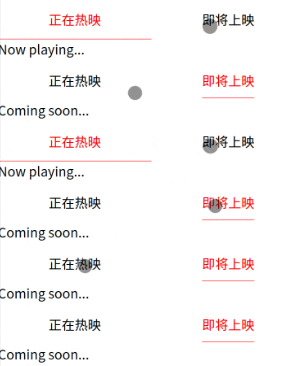
粘性定位(吸顶效果):

image-20251225120243309

底部解决遮挡:

image-20251225114859570

1.6 详情页封装

src/views/films/Nowplaying.vue - 列表页传参

1
2
3
4
5
6
7
8
9
10
11
12
13
14
15
16
17
18
19
20
21
22
23
24
25
26
27
28
29
30
31
<template>
<div>
<!-- Now playing... -->
<ul>
<li v-for="(data, index) in datalist" :key="data.filmId" @click="handleChangePage(data.filmId)">
...
</li>
</ul>
</div>
</template>

<script>
export default {
data() {
return {
datalist: [],
};
},
methods: {
handleChangePage(id) {
// 通过命名路由跳转
this.$router.push({
name: "filmDetail",
params: {
id,
},
});
},
},
};
</script>

src/views/Detail.vue - 详情页接参,发ajax请求拿到数据,渲染页面和样式

  • v-if 解决http请求还未有数据响应时默认取值问题
  • moment 库,官网,对日期时间很方便的格式化操作,安装:cnpm i moment
  • :style 绑定行内样式,可以用对象方式写背景图片
1
2
3
4
5
6
7
8
9
10
11
12
13
14
15
16
17
18
19
20
21
22
23
24
25
26
27
28
29
30
31
32
33
34
35
36
37
38
39
40
41
42
43
44
45
46
47
48
49
50
51
52
53
54
55
56
57
58
59
60
61
62
63
64
65
66
67
68
69
70
71
72
73
74
75
76
<template>
<!-- v-if 解决http请求还未有数据响应时默认取值问题 -->
<div v-if="filmInfo">
<!-- <img :src="filmInfo.poster" /> -->
<!-- 行内样式-对象方式,加上背景定位即可 -->
<div :style="{
backgroundImage: 'url(' + filmInfo.poster + ')'
}" class="poster"></div>
<div class="content">
<div>{{ filmInfo.name }}</div>
<div>
<div class="detail-text">{{ filmInfo.category }}</div>
<!-- <div class="detail-text">{{ filmInfo.premiereAt | dateFilter }}</div> -->
<div class="detail-text">{{ premiereAtDatetime }}</div>
<div class="detail-text">{{ filmInfo.nation }} | {{filmInfo.runtime}}分钟</div>
</div>
</div>
</div>
</template>

<script>
import axios from "axios";
import http from "@/util/http.js";
import moment from 'moment'
import Vue from 'vue'

// vue2过滤器
Vue.filter('dateFilter', (date) => {
// *1000 转毫秒数
return moment(date*1000).format('YYYY-MM-DD hh:mm:ss')
})

export default {
data() {
return {
filmInfo: null,
};
},
computed: {
// 计算属性
premiereAtDatetime() {
return moment(this.filmInfo.premiereAt*1000).format('YYYY-MM-DD hh:mm:ss')
}
},
created() {
// 当前匹配的路由 - 详情页
console.log("进入详情页,携带id ->", this.$route.params.id);
// axios 利用id发请求到详情接口,获取详情数据,布局页面 - 简易封装axios为http
http({
url: `/gateway?filmId=${this.$route.params.id}&k=7095046`,
headers: {
"X-Host": "mall.film-ticket.film.info",
},
}).then((res) => {
console.log(res.data.data.film);
this.filmInfo = res.data.data.film;
});
},
};
</script>

<style lang="scss" scoped>
.poster {
width: 100%;
height: 12.5rem;
background-position: center; //定位到图片中心
background-size: cover; //保持宽高比覆盖容器尺寸显示
}
.content {
padding: .9375rem;
.detail-text {
color: gray;
font-size: 13px;
}
}
</style>

axios的简单封装:src/util/http.js

1
2
3
4
5
6
7
8
9
10
11
12
13
14
// 数据请求封装方式2 - axios 自带的封装方法
import axios from 'axios'

const http = axios.create({
baseURL: 'https://m.maizuo.com',
timeout: 10000, // 超时10s
headers: {
"x-client-info":
'{"a":"3000","ch":"1002","v":"5.2.1","e":"1766027790872690109906945","bc":"440300"}',
}
});
// 发请求之前拦截 - showLoading
// 请求成功之后拦截 - hideLoading
export default http

顶部效果

image-20251225131351929

BUG场景:轮播冲突

  • 解决轮播冲突:从父组件传过来不同的 class 名,绑定新的 name 值,new出来对应不同的swiper轮播对象,互不影响
    • new Swiper("." + this.name, {...})

src/views/Detail.vue

1
2
3
4
5
6
7
8
9
10
11
12
13
14
15
16
17
18
19
20
21
22
23
24
25
26
27
28
29
30
31
32
33
34
35
36
37
38
39
40
41
42
43
44
45
46
47
48
49
50
51
52
53
54
55
56
57
58
59
60
61
62
63
64
65
66
67
68
69
70
71
72
73
74
75
76
77
78
79
80
81
82
83
84
85
86
87
88
89
90
91
92
93
94
95
96
97
98
99
100
101
102
103
104
105
106
107
108
109
110
111
112
113
114
115
116
117
118
119
120
121
122
123
124
125
126
<template>
<!-- v-if 解决http请求还未有数据响应时默认取值问题 -->
<div v-if="filmInfo">
<!-- <img :src="filmInfo.poster" /> -->
<!-- 行内样式-对象方式 -->
<div :style="{
backgroundImage: 'url(' + filmInfo.poster + ')'
}" class="poster"></div>
<div class="content">
<div>{{ filmInfo.name }}</div>
<div>
<div class="detail-text">{{ filmInfo.category }}</div>
<!-- <div class="detail-text">{{ filmInfo.premiereAt | dateFilter }}</div> -->
<div class="detail-text">{{ premiereAtDatetime }}</div>
<div class="detail-text">{{ filmInfo.nation }} | {{filmInfo.runtime}}分钟</div>
<!-- 静态class和动态绑定的:class 会共存! style 也同理 -->
<div class="detail-text" :class="isHidden ? 'hidden' : ''" style="line-height:20px;">{{ filmInfo.synopsis }}</div>
<div style="text-align:center">
<!-- 动态绑定:class与静态共存,控制字体图标的不同显示 -->
<i class="iconfont" :class="isHidden ? 'icon-fapiao' : 'icon-queren'" @click="isHidden = !isHidden"></i>
</div>
</div>
<!-- 演职人员 -->
<div>
<div>演职人员</div>
<!-- 父传子:perview-轮播数量,name-是class名字 -->
<detail-swiper :perview="3.5" name="actors">
<detail-swiper-item v-for="(data, index) in filmInfo.actors" :key="index">
<!-- <img :src="data.avatarAddress"> -->
<div :style="{
backgroundImage: 'url(' + data.avatarAddress + ')'
}" class="avatar"></div>
<div style="text-align:center; font-size:13px;">{{data.name}}</div>
<div style="text-align:center; font-size:10px; color:gray;">{{data.role}}</div>
</detail-swiper-item>
</detail-swiper>
</div>
<!-- 剧照 -->
<div>
<div>剧照</div>
<!-- 父传子:perview-轮播数量,name-是class名字 -->
<detail-swiper :perview="2" name="photos">
<detail-swiper-item v-for="(data, index) in filmInfo.photos" :key="index">
<!-- <img :src="data.avatarAddress"> -->
<div :style="{
backgroundImage: 'url(' + data + ')'
}" class="avatar"></div>
</detail-swiper-item>
</detail-swiper>
</div>
</div>
</div>
</template>

<script>
import axios from "axios";
import http from "@/util/http.js";
import moment from 'moment'
import Vue from 'vue'
import detailSwiper from '@/components/detail/DetailSwiper.vue'
import detailSwiperItem from '@/components/detail/DetailSwiperItem.vue'

// vue2过滤器
Vue.filter('dateFilter', (date) => {
// *1000 转毫秒数
return moment(date*1000).format('YYYY-MM-DD hh:mm:ss')
})

export default {
data() {
return {
filmInfo: null,
isHidden: true
};
},
components: {
detailSwiper,
detailSwiperItem
},
computed: {
premiereAtDatetime() {
return moment(this.filmInfo.premiereAt*1000).format('YYYY-MM-DD hh:mm:ss')
}
},
created() {
// 当前匹配的路由 - 详情页
console.log("进入详情页,携带id ->", this.$route.params.id);
// axios 利用id发请求到详情接口,获取详情数据,布局页面
http({
url: `/gateway?filmId=${this.$route.params.id}&k=7095046`,
headers: {
"X-Host": "mall.film-ticket.film.info",
},
}).then((res) => {
console.log(res.data.data.film);
this.filmInfo = res.data.data.film;
});
},
};
</script>

<style lang="scss" scoped>
.poster {
width: 100%;
height: 12.5rem;
background-position: center;
background-size: cover;
}
.content {
padding: .9375rem;
.detail-text {
color: gray;
font-size: 13px;
}
}
.hidden{
overflow: hidden;
height: 1.25rem;
}
.avatar{
width: 100%;
height: 85px;
background-position: center;
background-size: cover;
}
</style>

src/components/DetailSwiper.vue

1
2
3
4
5
6
7
8
9
10
11
12
13
14
15
16
17
18
19
20
21
22
23
24
25
26
27
28
29
30
31
32
33
34
35
36
<template>
<div class="swiper" :class="name">
<div class="swiper-wrapper">
<slot></slot>
</div>
</div>
</template>

<script>
import Swiper from "swiper/bundle";
import "swiper/css/bundle"; //新版本 swiper 8+

export default {
props: {
perview: {
type: Number,
default: 1
},
name: {
type: String,
default: 'actors'
}
},
mounted() {
// 解决轮播冲突:从父传过来不同的 class名,绑定新的name值,new出来对应不同的swiper轮播对象,互不影响
new Swiper("." + this.name, {
slidesPerView: this.perview,
spaceBetween: 30,
freeMode: true,
});
},
};
</script>

<style scoped></style>

src/components/DetailSwiperItem.vue

1
2
3
4
5
<template>
<div class="swiper-slide">
<slot></slot>
</div>
</template>

轮播效果

chrome-capture-2025-12-25 (3)

详情header-滚动显示吸顶

  • this.$router.back() 返回上一页:从哪页来返回哪页
  • v-scroll 自定义指令,注意 生命周期 inserted 与 unbind(解绑滚动事件)

src/component/detail/DetailHeader.vue

1
2
3
4
5
6
7
8
9
10
11
12
13
14
15
16
17
18
19
20
21
22
23
24
25
26
27
28
29
30
31
32
33
34
35
36
37
38
39
40
41
42
43
44
45
46
47
<template>
<div class="header">
<i class="left" @click="handleBack">&lt;</i>
<slot></slot>
<i class="iconfont icon-fenxiang right"></i>
</div>
</template>

<script>
export default {
methods: {
handleBack() {
// 返回上一页:从哪页来返回哪页
this.$router.back()
}
}
}
</script>

<style lang="scss" scoped>
.header {
position: fixed;
top: 0;
left: 0;
width: 100%;
height: 2.75rem;
line-height: 2.75rem;
text-align: center;
background: white;
.left {
font-size: 22px;
position: fixed;
left: .625rem;
top: 0;
height: 2.75rem;
line-height: 2.75rem;
}
.right {
font-size: 22px;
position: fixed;
right: .625rem;
top: 0;
height: 2.75rem;
line-height: 2.75rem;
}
}
</style>

src/views/Detail.vue

1
2
3
4
5
6
7
8
9
10
11
12
13
14
15
16
17
18
19
20
21
22
23
24
25
26
27
28
29
30
31
32
33
34
35
36
37
38
39
40
<template>
<!-- v-if 解决http请求还未有数据响应时默认取值问题 -->
<div v-if="filmInfo">

<detail-header v-scroll="50">
{{filmInfo.name}}
</detail-header>

...div...div...
</div>
</template>

<script>
import Vue from 'vue'
...

// 指令
Vue.directive("scroll", {
inserted(el, binding) {
el.style.display = 'none'
// 往下滚动超过50像素时显示 header 吸顶
window.onscroll = () => {
console.log("scroll")
if ((document.documentElement.scrollTop || document.body.scrollTop) > binding.value) {
el.style.display = 'block'
} else {
el.style.display = 'none'
}
}
},
unbind() {
window.onscroll = null
}
})

export default {
...
}
</script>

效果:

chrome-capture-2025-12-25 (4)

1.7 长列表滚动 better-scroll

better-scroll 一款重点解决移动端(已支持 PC)各种滚动场景需求的插件,列表再长也能流畅滚动(有轻微动画效果)。

官网:https://better-scroll.github.io/docs/zh-CN/

安装:

1
cnpm i better-scroll
  • 为了使用better-scroll需要用单独一个div包裹
  • 确保dom都上(渲染到)树后,才能初始化 better-scroll
  • 设置高度 height、溢出隐藏 overflow:hidden; 、相对定位 position: relative(解决滚动条错位问题)
  • 涉及动态绑定 :style 属性,支持对象复制
  • 注意事项:适配不同设备需要动态计算高度 = 视口高度 - 底部选项卡高度, 注意一定要加单位 'px'

src/views/Cinemas.vue

1
2
3
4
5
6
7
8
9
10
11
12
13
14
15
16
17
18
19
20
21
22
23
24
25
26
27
28
29
30
31
32
33
34
35
36
37
38
39
40
41
42
43
44
45
46
47
48
49
50
51
52
53
54
55
56
57
58
59
60
61
62
63
64
65
66
67
68
69
70
71
72
73
74
75
76
77
78
79
80
81
82
83
84
85
86
87
88
89
90
91
92
93
94
95
96
<template>
<div>
<!-- 为了使用better-scroll需要用单独一个div包裹 -->
<div class="box" :style="{
height: height
}">
<ul>
<li v-for="data in cinemaslist" :key="data.cinemaId">
<div class="left">
<div class="cinema_name">{{ data.name }}</div>
<div class="cinema_text">{{ data.address }}</div>
</div>
<div class="right">
<div class="cinema_name" style="color: red">
¥{{ data.lowPrice / 100 }}起
</div>
<div class="cinema_text">距离未知</div>
</div>
</li>
</ul>
</div>
</div>
</template>

<script>
import http from "@/util/http.js";
import BetterScroll from 'better-scroll'
export default {
data() {
return {
cinemaslist: [],
height: '0px'
};
},
mounted() {
// 动态计算高度: 视口高度 - 底部选项卡高度, 注意一定要加单位 'px'
this.height = document.documentElement.clientHeight - document.querySelector("footer").offsetHeight + 'px'

http({
url: "https://m.maizuo.com/gateway?cityId=440300&ticketFlag=1&k=6136159",
headers: {
"X-Host": "mall.film-ticket.cinema.list",
},
}).then((res) => {
console.log(res.data.data.cinemas);
this.cinemaslist = res.data.data.cinemas;
console.log(document.getElementsByTagName('li').length)
// 确保dom都上树后,才能初始化 better-scroll
this.$nextTick(() => {
// better-scroll 初始化
new BetterScroll('.box', {
scrollbar: {
fade: true //显示滚动条
}
})
})
});
},
};
</script>

<style lang="scss" scoped>
li {
padding: 0.9375rem;
display: flex;
justify-content: space-between;
.left {
width: 13.75rem;
}
.right {
text-align: right;
}
.cinema_name {
font-size: 15px;
white-space: nowrap; /* 2.不换行 */
overflow: hidden; /* 3.溢出隐藏 */
text-overflow: ellipsis; /* 4.溢出文本显示省略号 */
}
.cinema_text {
color: gray;
font-size: 12px;
margin-top: 0.3125rem;
white-space: nowrap; /* 2.不换行 */
overflow: hidden; /* 3.溢出隐藏 */
text-overflow: ellipsis; /* 4.溢出文本显示省略号 */
}
}
.box {
// 配合better-scroll使用,必须设置高度 和 溢出隐藏
//height: 38.625rem; // 理想高度:视口高度 减 底部固定导航高度,rem是基于宽度,所以高度需要js动态计算
overflow: hidden;
// 防止better-scroll的滚动条错位:加定位
position: relative;
}
</style>

效果

chrome-capture-2025-12-25 (5)

1.8 全屏预览-vant组件库

依赖vant组件库,使用的是 ImagePreview 图片预览 组件。

src/views/Detail.vue - 只需要引入 vant 组件,给图片添加 click 事件即可。

1
2
3
4
5
6
7
8
9
10
11
12
13
14
15
16
17
18
19
20
21
22
23
24
25
26
27
28
29
30
31
32
33
34
35
36
37
38
39
40
<template>
<!-- v-if 解决http请求还未有数据响应时默认取值问题 -->
<div v-if="filmInfo">
...
<!-- 剧照 -->
<div>
<div>剧照</div>
<!-- 父传子:perview-轮播数量,name-是class名字 -->
<detail-swiper :perview="2" name="photos">
<detail-swiper-item v-for="(data, index) in filmInfo.photos" :key="index">
<!-- <img :src="data.avatarAddress"> -->
<div :style="{
backgroundImage: 'url(' + data + ')'
}" class="avatar" @click="handlePreview(index)"></div>
</detail-swiper-item>
</detail-swiper>
</div>
</div>
</div>
</template>

<script>
...
import { ImagePreview } from 'vant';
...
export default {
...
methods: {
handlePreview(index) {
ImagePreview({
images: this.filmInfo.photos, // 图片数组
startPosition: index,
closeable: true,
closeIconPosition: "top-right"
});
}
}
}
</script>
...

效果

image-20251226114834181

1.9 列表懒加载

List 列表 包含懒加载功能。参考文档

BUG场景:首页显示到底了

  • 总长度判断-触发到底问题: onload立即触发,mounted是异步请求回来,会导致在详情页有滚动条时返回到列表,列表会在第一页就直接显示到底了,因此需要 total>0 的判断

src/views/films/Nowplaying.vue

1
2
3
4
5
6
7
8
9
10
11
12
13
14
15
16
17
18
19
20
21
22
23
24
25
26
27
28
29
30
31
32
33
34
35
36
37
38
39
40
41
42
43
44
45
46
47
48
49
50
51
52
53
54
55
56
57
58
59
60
61
62
63
64
65
66
67
68
69
70
71
72
73
74
75
<template>
<div>
<!-- van-list 对应ul,van-cell 对应li -->
<van-list
v-model="loading"
:finished="finished"
finished-text="我是有底线的..."
@load="onLoad"
:immediate-check="false"
>
<van-cell
v-for="(data, index) in datalist"
:key="data.filmId"
@click="handleChangePage(data.filmId)"
>
...
</van-cell>
</van-list>
</div>
</template>

<script>
...
import { List } from "vant";
Vue.use(List);

export default {
data() {
return {
datalist: [],
loading: false,
finished: false,
current: 1,
total: 0
};
},
mounted() {
http({
url: "/gateway?cityId=440300&pageNum=1&pageSize=10&type=1&k=4893413",
headers: {
"X-Host": "mall.film-ticket.film.list",
},
}).then((res) => {
this.datalist = res.data.data.films;
});
},
methods: {
onLoad() {
console.log("到底了");
//总长度拦截,触发到底: onload立即触发,mounted异步请求回来,会导致在有滚动条时,列表会第一页直接到底,需要total>0时判断
if(this.datalist.length === this.total && this.total > 0) {
this.finished = true
return
}

this.current++;
http({
url: `/gateway?cityId=440300&pageNum=${this.current}&pageSize=10&type=1&k=4893413`,
headers: {
"X-Host": "mall.film-ticket.film.list",
},
}).then((res) => {
//展开合并
console.log(res.data.data.total, res.data.data.films)
this.total = res.data.data.total
this.datalist = [...this.datalist, ...res.data.data.films];
//需要重置为false
this.loading = false;
});
},
...
},
};
</script>
...

效果

懒加载功能正常,达到最大total数量时,显示底线提示。

image-20251226123208911

image-20251226123034316

1.10 loading 加载&axios拦截器

src/util/http.js - 主要使用的 axios 的拦截器功能,参考github源码使用文档

  • 请求前拦截显示 vant 的 Toast loading 提示,请求成功和请求失败均需要清除 Toast loading 提示。
1
2
3
4
5
6
7
8
9
10
11
12
13
14
15
16
17
18
19
20
21
22
23
24
25
26
27
28
29
30
31
32
33
34
35
36
37
38
39
40
41
42
43
44
45
46
47
48
49
50
51
52
// 数据请求封装方式2 - axios 自带的封装方法
import axios from 'axios'
import Vue from 'vue';
import { Toast } from "vant";

Vue.use(Toast);

const http = axios.create({
baseURL: 'https://m.maizuo.com',
timeout: 10000, // 超时10s
headers: {
'x-client-info':
'{"a":"3000","ch":"1002","v":"5.2.1","e":"1766027790872690109906945","bc":"440300"}'
}
})

// 发请求之前拦截 - showLoading
http.interceptors.request.use(function (config) {
// console.log("config->", config)
Toast.loading({
message: "加载中...",
forbidClick: true,
duration: 0 //0-toast不消失
});
return config;
// 可以在请求前追加一些内容带到请求中。
// return {
// ...config,
// 'aaa': 'jerryA'
// }
}, function (error) {
return Promise.reject(error);
});


// 请求成功之后拦截 - hideLoading
http.interceptors.response.use(function (response) {
// console.log("response->", response)
Toast.clear() //请求成功需要清除loading
return response;
// 可以在响应后追加一些内容带到请求中。
// return {
// ...response,
// 'bbb': 'jerryB'
// }
}, function (error) {
Toast.clear() //请求失败也需要清除loading
return Promise.reject(error);
});

export default http

效果

chrome-capture-2025-12-26

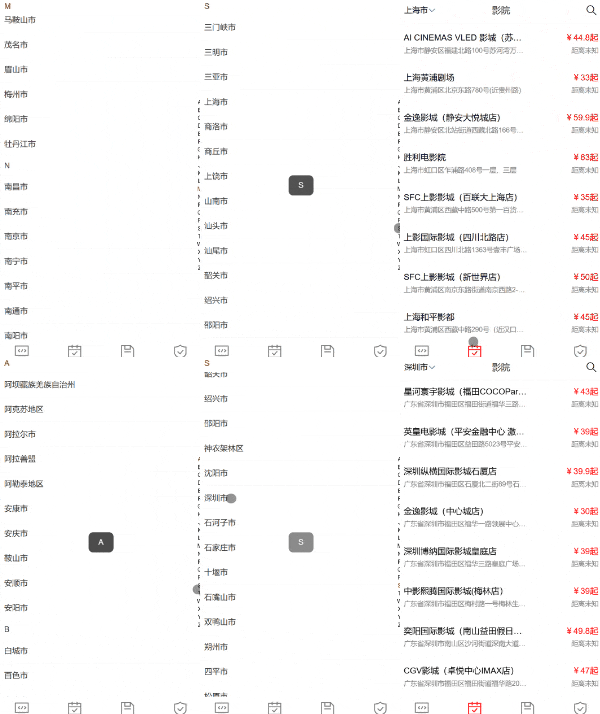
1.11 city组件

IndexBar 索引栏组件,点击索引栏里的索引值可以跳到锚点位置。参考文档

  • 索引字母列表的计算属性处理
  • 城市列表的过滤和便利最终输出渲染需要的带字母索引的数据结构 cityList: [{ type: 'A', list: ['A1', 'A2', ...] }, ...]

src/views/City.vue - 样式和数据渲染版

1
2
3
4
5
6
7
8
9
10
11
12
13
14
15
16
17
18
19
20
21
22
23
24
25
26
27
28
29
30
31
32
33
34
35
36
37
38
39
40
41
42
43
44
45
46
47
48
49
50
51
52
53
54
55
56
57
58
59
60
61
62
63
64
65
66
67
68
69
70
71
72
73
74
75
76
<template>
<van-index-bar :index-list="computedCityList" @change="handleChange">
<div v-for="data in cityList" :key="data.type">
<van-index-anchor :index="data.type" />
<van-cell :title="item.name" v-for="item in data.list" :key="item.cityId" />
</div>
</van-index-bar>
</template>

<script>
import http from "@/util/http.js";
import Vue from 'vue';
import { Toast } from 'vant';

Vue.use(Toast);

export default {
data() {
return {
cityList: [],
};
},
computed: {
computedCityList() {
// 过滤出收集到的字母:目的为了排除掉无城市值的索引字母
return this.cityList.map((item) => item.type);
},
},
mounted() {
http({
url: "https://m.maizuo.com/gateway?k=1105782",
headers: {
"x-host": "mall.film-ticket.city.list",
},
}).then((res) => {
//解析组装城市数据结构
this.cityList = this.renderCity(res.data.data.cities);
console.log(this.cityList);
});
},
methods: {
renderCity(list) {
//console.log(list);
let cityList = [];
let letterList = [];
for (let i = 0; i < 26; i++) {
letterList.push(String.fromCharCode(65 + i)); // 26个大写
// letterList.push(String.fromCharCode(97 + i)) // 26个小写
}
//console.log(letterList);
letterList.forEach((letter) => {
let newList = list.filter(
(item) => item.pinyin.substring(0, 1) === letter
);
newList.length > 0 &&
cityList.push({
type: letter,
list: newList,
});
});
return cityList;
},
handleChange(data) {
// console.log("change->", data) // data是字母
Toast(data);
}
},
};
</script>

<style lang="scss">
// 控制vant toast显示字母的宽度,覆盖默认样式需要去掉 scoped - 但防影响范围要做好充分的测试
.van-toast--html, .van-toast--text {
min-width: 20px;
}
</style>

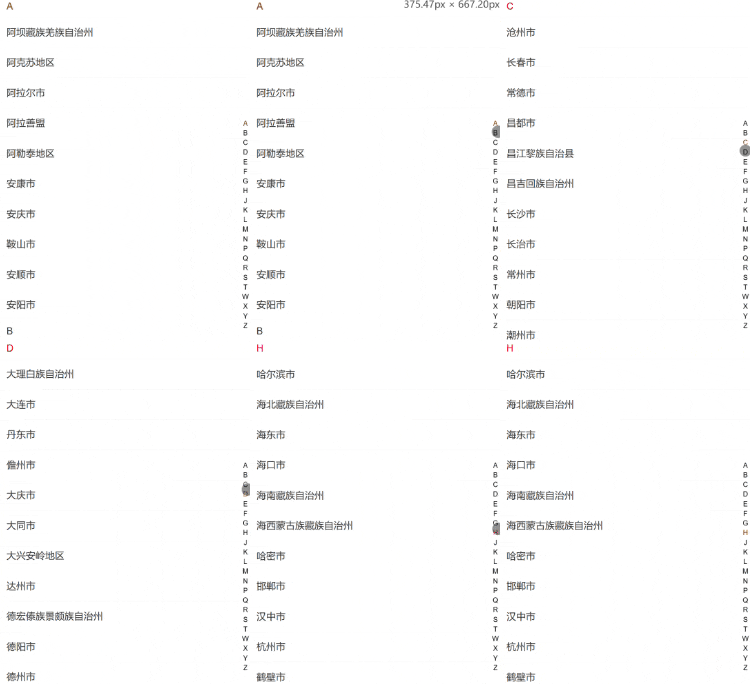
效果 - 样式和数据渲染

chrome-capture-2025-12-26 (1)

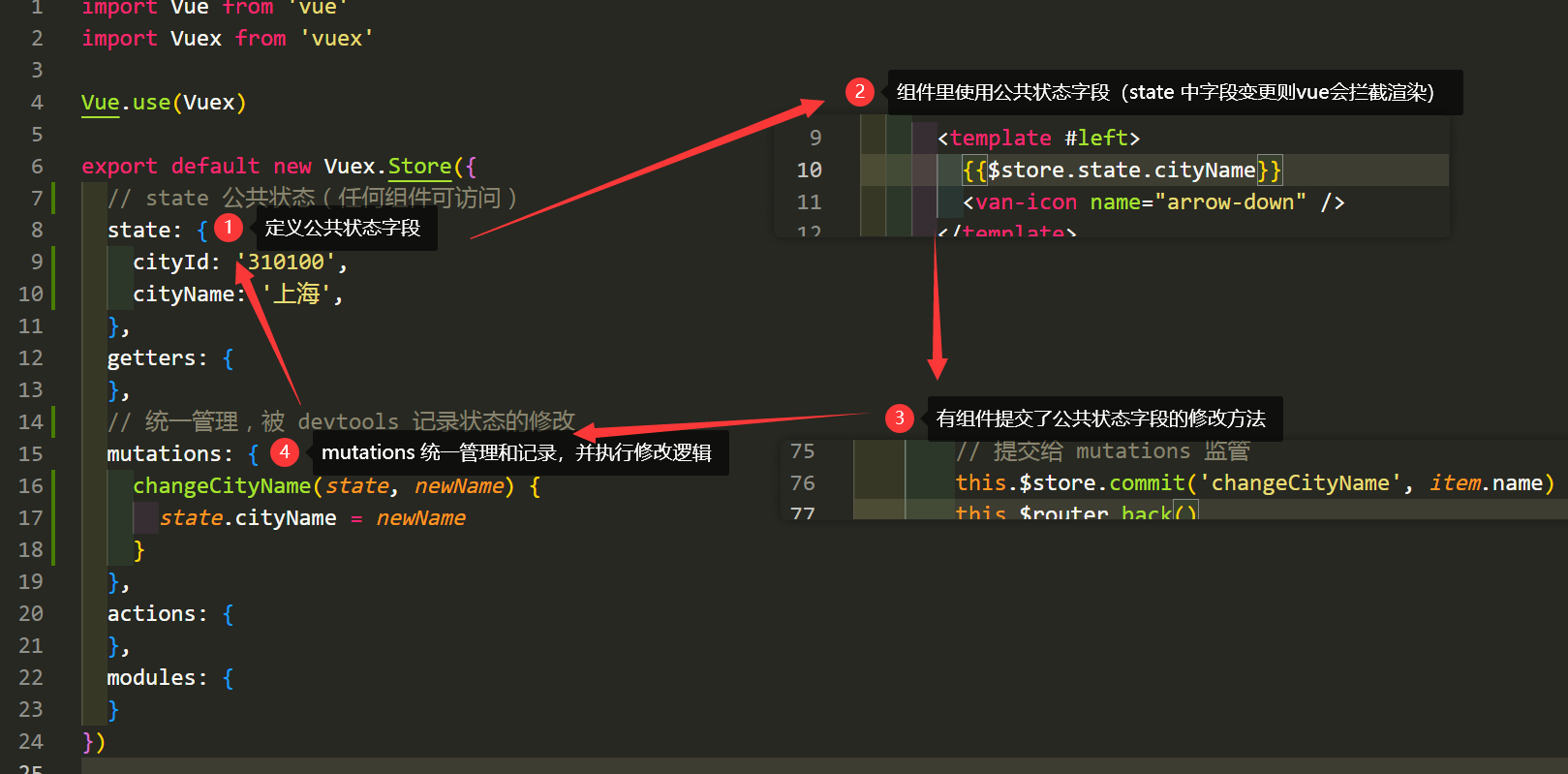
基于vuex传值

image-20251226170914203

src/store/index.js - vuex 状态管理器

  • this.$store.dispatch("function", param) 用于调用 store 状态管理中的 actions 方法(支持异步和同步)
    • actions 中异步 axios 返回是 promise 对象,因此可以在 acitons 方法中 return 出去,在 dispatch 处可以继续 .then(res => {...}) 做其他处理
1
2
3
4
5
6
7
8
9
10
11
12
13
14
15
16
17
18
19
20
21
22
23
24
25
26
27
28
29
30
31
32
33
34
35
36
37
38
39
40
41
42
43
44
45
46
import Vue from 'vue'
import Vuex from 'vuex'
import http from "@/util/http.js";

Vue.use(Vuex)

export default new Vuex.Store({
// state 公共状态(任何组件可访问)
state: {
cityId: '310100',
cityName: '上海',
cinemasList: []
},
getters: {
},
// 统一管理,被 devtools 记录状态的修改(只支持同步)
mutations: {
changeCityName(state, newName) {
state.cityName = newName
},
changeCityId(state, newId) {
state.cityId = newId
},
changeCinemaData(state, list) {
state.cinemasList = list
},
},
// 支持异步和同步
actions: {
getCinemaData(store, cityId) {
console.log("getCinemaData->http")
// return 的是 promise 对象
return http({
url: `/gateway?cityId=${cityId}&ticketFlag=1&k=6136159`,
headers: {
"X-Host": "mall.film-ticket.cinema.list",
},
}).then((res) => {
console.log("res->", res.data.data.cinemas)
store.commit("changeCinemaData", res.data.data.cinemas)
});
}
},
modules: {
}
})

src/views/Cinemas.vue

1
2
3
4
5
6
7
8
9
10
11
12
13
14
15
16
17
18
19
20
21
22
23
24
25
26
27
28
29
30
31
32
33
34
35
36
37
38
39
40
41
42
43
44
45
46
47
48
49
50
51
52
53
54
55
56
57
58
59
60
61
62
63
64
65
66
67
68
69
70
71
72
73
74
75
76
77
78
79
80
81
82
83
84
85
86
87
88
89
90
91
92
93
94
95
96
97
98
99
100
101
<template>
<div>
<van-nav-bar
title="影院"
@click-left="onClickLeft"
@click-right="onClickRight"
ref="navbar"
>
<template #left>
{{ $store.state.cityName }}
<van-icon name="arrow-down" />
</template>
<template #right>
<van-icon name="search" size="22" color="black" />
</template>
</van-nav-bar>
<!-- 为了使用better-scroll用单独一个div包裹 -->
<div
class="box"
:style="{
height: height,
}"
>
<ul>
<li v-for="data in $store.state.cinemasList" :key="data.cinemaId">
<div class="left">
<div class="cinema_name">{{ data.name }}</div>
<div class="cinema_text">{{ data.address }}</div>
</div>
<div class="right">
<div class="cinema_name" style="color: red">
¥{{ data.lowPrice / 100 }}起
</div>
<div class="cinema_text">距离未知</div>
</div>
</li>
</ul>
</div>
</div>
</template>

<script>
import BetterScroll from "better-scroll";
import { Toast } from "vant";


export default {
data() {
return {
// cinemasList: [],
height: "0px",
};
},
mounted() {
// 动态计算高度: 视口高度 - 底部选项卡高度, 注意一定要加单位 'px'
this.height =
document.documentElement.clientHeight -
this.$refs.navbar.$el.offsetHeight - //还需要减去顶部的高度
document.querySelector("footer").offsetHeight +
"px";

// 长度==0时的判断,后面还能看到数据是利用的 store 中的缓存
if (this.$store.state.cinemasList.length === 0) {
// 分发
this.$store
.dispatch("getCinemaData", this.$store.state.cityId)
.then((res) => {
console.log("异步请求结束,数据拿到");
this.$nextTick(() => {
new BetterScroll(".box", {
// better-scroll 初始化
scrollbar: {
fade: true, // 显示滚动条
},
});
});
});
} else {
// 缓存:但是第一次无法滚动,所以异步请求结束时,也需要对 better-scroll 初始化
this.$nextTick(() => {
new BetterScroll(".box", {
// better-scroll 初始化
scrollbar: {
fade: true, // 显示滚动条
},
});
});
}
},
methods: {
onClickLeft() {
Toast("城市");
this.$router.push("/city");
},
onClickRight() {
Toast("搜索");
},
},
};
</script>
...

src/views/City.vue - 终版

1
2
3
4
5
6
7
8
9
10
11
12
13
14
15
16
17
18
19
20
21
22
23
24
25
26
27
28
29
30
31
32
33
34
35
36
37
38
39
40
41
42
43
44
45
46
47
48
49
50
51
52
53
54
55
56
57
58
59
60
61
62
63
64
65
66
67
68
69
70
71
72
73
74
75
76
77
78
79
80
81
82
83
84
85
86
87
88
89
90
91
92
93
94
<template>
<van-index-bar :index-list="computedCityList" @change="handleChange">
<div v-for="data in cityList" :key="data.type">
<van-index-anchor :index="data.type" />
<van-cell :title="item.name" v-for="item in data.list" :key="item.cityId" @click="handleCityClick(item)" />
</div>
</van-index-bar>
</template>

<script>
import http from "@/util/http.js";
import Vue from 'vue';
import { Toast } from 'vant';

Vue.use(Toast);

export default {
data() {
return {
cityList: [],
};
},
computed: {
computedCityList() {
// 过滤出收集到的字母:目的为了排除掉无城市值的索引字母
return this.cityList.map((item) => item.type);
},
},
mounted() {
http({
url: "https://m.maizuo.com/gateway?k=1105782",
headers: {
"x-host": "mall.film-ticket.city.list",
},
}).then((res) => {
//解析组装城市数据结构
this.cityList = this.renderCity(res.data.data.cities);
console.log(this.cityList);
});
},
methods: {
renderCity(list) {
//console.log(list);
let cityList = [];
let letterList = [];
for (let i = 0; i < 26; i++) {
letterList.push(String.fromCharCode(65 + i)); // 26个大写
// letterList.push(String.fromCharCode(97 + i)) // 26个小写
}
//console.log(letterList);
letterList.forEach((letter) => {
let newList = list.filter(
(item) => item.pinyin.substring(0, 1) === letter
);
newList.length > 0 &&
cityList.push({
type: letter,
list: newList,
});
});
return cityList;
},
handleChange(data) {
// console.log("change->", data) // data是字母
Toast(data);
},
handleCityClick(item) {
console.log(item.name)
// 多页面方案:方式1-拼接到路径,方式2-cookie,方式3-localStorage
// location.href = '#/cinemas?cityname=' + item.name;
// 单页面方案:方式1-中间人模式,方式2-bus总线 $on,$emit
// vuex-状态管理模式
// this.$store.state.cityName = item.name //不要去直接修改,无法被vuex监控到

// 提交给 mutations 监管
this.$store.commit('changeCityName', item.name)
this.$store.commit('changeCityId', item.cityId)

// 给 $router.back() 传参,使用 $route.params
// this.$route.params.cityId = item.cityId
// 方式1:点击城市的时候触发 vuex 的 action 去获取影院列表,同步就渲染了影院列表dom数据
this.$store.dispatch("getCinemaData", item.cityId)
this.$router.back()
}
},
};
</script>

<style lang="scss">
// 控制vant toast显示字母的宽度,覆盖默认样式需要去掉 scoped - 但防影响范围要做好充分的测试
.van-toast--html, .van-toast--text {
min-width: 20px;
}
</style>

切换城市触发清空列表操作,列表则重新请求,方式2:src/views/Cinemas.vue

1
2
3
4
5
6
7
methods: {
onClickLeft() {
this.$router.push("/city");
// 方式2:清空列表-触发切换城市后第一次数据请求
this.$store.commit("clearCinemasList")
}
},

对应 store/index.js

1
2
3
4
5
6
mutations: {
...
clearCinemasList(state) {
state.cinemasList = []
}
},

效果 - 逻辑和数据交互(缓存效果)

chrome-capture-2025-12-26 (2)

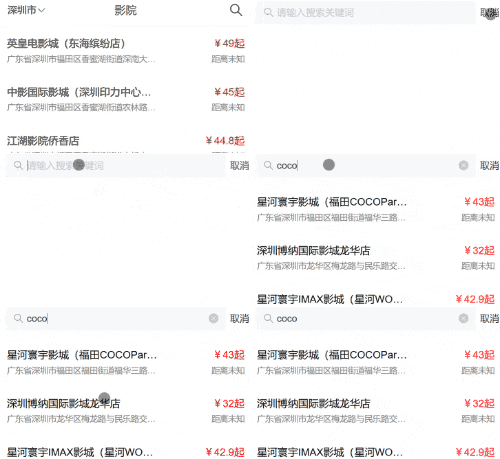
1.12 搜索组件

src/views/Search.vue

1
2
3
4
5
6
7
8
9
10
11
12
13
14
15
16
17
18
19
20
21
22
23
24
25
26
27
28
29
30
31
32
33
34
35
36
37
38
39
40
41
42
43
44
45
46
47
48
49
50
51
52
53
54
55
56
57
58
59
60
61
62
63
64
65
66
67
68
69
70
71
72
73
74
75
76
77
78
79
80
81
82
83
84
85
86
87
88
89
<template>
<div>
<van-search
v-model="value"
show-action
placeholder="请输入搜索关键词"
@search="onSearch"
@cancel="onCancel"
/>

<!-- 与列表一样的结构和样式,理应再次封装为组件:复用 -->
<ul v-if="value">
<li v-for="data in computedList" :key="data.cinemaId">
<div class="left">
<div class="cinema_name">{{ data.name }}</div>
<div class="cinema_text">{{ data.address }}</div>
</div>
<div class="right">
<div class="cinema_name" style="color: red">
¥{{ data.lowPrice / 100 }}起
</div>
<div class="cinema_text">距离未知</div>
</div>
</li>
</ul>
</div>
</template>

<script>
export default {
data() {
return {
value: "",
};
},
computed: {
computedList() {
// 计算属性,效率更高
return this.$store.state.cinemasList.filter(item =>
item.name.toUpperCase().includes(this.value.toUpperCase()) ||
item.address.toUpperCase().includes(this.value.toUpperCase()) )
}
},
methods: {
onSearch() {
console.log("search");
},
onCancel() {
this.$router.back()
},
},
mounted() {
if (this.$store.state.cinemasList.length === 0) {
// 分发
this.$store.dispatch("getCinemaData", this.$store.state.cityId);
} else {
console.log("走缓存");
}
},
};
</script>

<style lang="scss" scoped>
li {
padding: 0.9375rem;
display: flex;
justify-content: space-between;
.left {
width: 13.75rem;
}
.right {
text-align: right;
}
.cinema_name {
font-size: 15px;
white-space: nowrap; /* 2.不换行 */
overflow: hidden; /* 3.溢出隐藏 */
text-overflow: ellipsis; /* 4.溢出文本显示省略号 */
}
.cinema_text {
color: gray;
font-size: 12px;
margin-top: 0.3125rem;
white-space: nowrap; /* 2.不换行 */
overflow: hidden; /* 3.溢出隐藏 */
text-overflow: ellipsis; /* 4.溢出文本显示省略号 */
}
}
</style>

效果

chrome-capture-2025-12-29

1.13 位置定位

H5中提供的BOM方法:

1
navigator.geolocation.getCurrentPosition()

05-vue2组件封装
https://janycode.github.io/2022/05/22/04_大前端/04_Vue/05-Vue2组件封装/
作者
Jerry(姜源)
发布于
2022年5月22日
许可协议