99-vue工具库&组件库

image-20200723170734421

1. 工具库

1.0 lodash - 工具库

Lodash 是一个一致性、模块化、高性能的 JavaScript 实用工具库,官网:https://www.lodashjs.com/

安装:npm i lodash

使用:(习惯使用 _ 作为其对象名称来引入。)

1
import _ from 'lodash'

如验证 groupBy 使用

示例1:

1
2
3
4
const numbers = [1, 2, 3, 4, 5, 6];
// 使用 groupBy 按「奇偶性」分组
const grouped = _.groupBy(numbers, (num) => num % 2 === 0 ? '偶数' : '奇数');
console.log(grouped);
1
2
3
4
{
奇数: [1, 3, 5],
偶数: [2, 4, 6]
}

示例2:

1
2
3
4
5
6
7
8
9
const users = [
{ name: '张三', age: 20 },
{ name: '李四', age: 30 },
{ name: '王五', age: 20 },
{ name: '赵六', age: 30 }
];
// 按「年龄」分组(直接传属性名字符串,更简洁)
const groupedByAge = _.groupBy(users, 'age');
console.log(groupedByAge);
1
2
3
4
{
'20': [{ name: '张三', age: 20 }, { name: '王五', age: 20 }],
'30': [{ name: '李四', age: 30 }, { name: '赵六', age: 30 }]
}

1.1 axios - 请求库

axios 基于 Promise 的网络请求库,官网: https://www.axios-http.cn/

npm i axios

一般封装使用,封装工具类

1.1.1 http.js 工具类

1
2
3
4
5
6
7
8
9
10
11
12
13
14
15
16
17
18
19
20
21
22
23
24
25
26
27
28
29
30
31
32
33
34
35
36
37
38
39
40
41
42
43
44
45
46
47
48
49
50
51
52
53
54
55
56
57
58
59
60
61
62
63
64
65
66
67
68
69
70
71
72
73
74
75
76
77
78
79
80
81
82
83
84
85
86
87
88
89
90
91
92
93
94
95
96
97
98
99
100
101
102
103
104
105
106
107
108
109
110
111
112
113
114
115
116
117
118
119
120
121
122
123
124
125
126
127
128
129
130
131
132
133
134
135
136
137
138
139
140
141
142
143
144
145
146
147
148
149
150
151
152
153
154
155
156
157
158
159
160
161
162
163
164
165
166
167
168
169
170
171
172
173
174
175
176
177
178
179
180
181
182
183
184
185
186
187
188
189
190
191
192
193
194
195
196
197
198
199
200
201
202
203
204
205
206
207
208
209
210
211
212
213
214
215
216
217
218
219
220
221
222
223
224
225
226
227
228
229
230
231
232
233
234
235
236
237
238
239
240
241
242
243
244
245
246
247
248
249
250
251
252
253
254
import axios from 'axios'
import { Message, MessageBox } from 'element-ui' // 适配Vue2+ElementUI的提示组件
import store from '@/store' // 如需获取token,引入vuex(可根据项目调整)
import router from '@/router' // 路由跳转(登录失效时用)

// 1. 创建axios实例
const service = axios.create({
baseURL: process.env.VUE_APP_BASE_API, // 环境变量区分接口前缀(推荐)
timeout: 10000, // 请求超时时间
headers: {
'Content-Type': 'application/json;charset=utf-8'
}
})

// 2. 请求取消令牌:防止重复提交
const pendingMap = new Map()
/**
* 生成请求唯一标识
* @param {Object} config axios配置
*/
const getPendingKey = (config) => {
let { url, method, params, data } = config
if (typeof data === 'string') data = JSON.parse(data) // 处理序列化后的data
return [url, method, JSON.stringify(params), JSON.stringify(data)].join('&')
}
/**
* 添加请求到待取消队列
*/
const addPending = (config) => {
const key = getPendingKey(config)
config.cancelToken = config.cancelToken || new axios.CancelToken(cancel => {
if (!pendingMap.has(key)) {
pendingMap.set(key, cancel)
}
})
}
/**
* 移除并取消重复请求
*/
const removePending = (config) => {
const key = getPendingKey(config)
if (pendingMap.has(key)) {
const cancel = pendingMap.get(key)
cancel(`重复请求已取消:${config.url}`)
pendingMap.delete(key)
}
}

// 3. 请求拦截器:添加token、取消重复请求
service.interceptors.request.use(
(config) => {
// 取消重复请求
removePending(config)
addPending(config)

// 添加token(根据项目鉴权方式调整)
if (store.getters.token) {
config.headers['Authorization'] = `Bearer ${store.getters.token}`
}
return config
},
(error) => {
console.error('请求拦截器错误:', error)
return Promise.reject(error)
}
)

// 4. 响应拦截器:统一错误处理、数据解构
service.interceptors.response.use(
(response) => {
// 移除已完成的请求
removePending(response.config)

const res = response.data
// 业务码判断(根据后端约定调整,示例:200为成功)
if (res.code !== 200) {
// 提示错误信息
Message({
message: res.msg || '请求失败',
type: 'error',
duration: 3 * 1000
})

// 常见业务异常处理
switch (res.code) {
case 401: // 未登录/登录过期
MessageBox.confirm(
'登录状态已失效,请重新登录',
'系统提示',
{
confirmButtonText: '重新登录',
cancelButtonText: '取消',
type: 'warning'
}
).then(() => {
store.dispatch('user/logout').then(() => {
router.push(`/login?redirect=${router.currentRoute.fullPath}`)
})
})
break
case 403: // 权限不足
Message({
message: '暂无操作权限',
type: 'error',
duration: 3 * 1000
})
break
case 404: // 接口不存在
Message({
message: '请求资源不存在',
type: 'error',
duration: 3 * 1000
})
break
case 500: // 服务器错误
Message({
message: '服务器内部错误,请稍后重试',
type: 'error',
duration: 3 * 1000
})
break
}
return Promise.reject(new Error(res.msg || '请求失败'))
} else {
// 成功时直接返回数据(简化业务层调用)
return res
}
},
(error) => {
// 移除失败的请求
if (error.config) {
removePending(error.config)
}

// 网络/超时错误处理
console.error('响应错误:', error)
let msg = ''
if (axios.isCancel(error)) {
console.warn('请求已取消:', error.message)
return Promise.reject(error)
} else if (error.message.includes('timeout')) {
msg = '请求超时,请稍后重试'
} else if (error.message.includes('Network Error')) {
msg = '网络异常,请检查网络连接'
} else {
msg = error.msg || '请求失败'
}

Message({
message: msg,
type: 'error',
duration: 3 * 1000
})

// 401状态码单独处理(网络层的401)
if (error.response && error.response.status === 401) {
MessageBox.confirm(
'登录状态已失效,请重新登录',
'系统提示',
{
confirmButtonText: '重新登录',
cancelButtonText: '取消',
type: 'warning'
}
).then(() => {
store.dispatch('user/logout').then(() => {
location.reload() // 强制刷新,避免路由缓存问题
})
})
}
return Promise.reject(error)
}
)

// 5. 暴露核心请求方法(封装常用请求类型)
export default {
/**
* GET请求
* @param {string} url 接口地址
* @param {Object} params 请求参数
* @param {Object} config 额外配置
*/
get(url, params = {}, config = {}) {
return service({
url,
method: 'get',
params,
...config
})
},

/**
* POST请求
* @param {string} url 接口地址
* @param {Object} data 请求体
* @param {Object} config 额外配置
*/
post(url, data = {}, config = {}) {
return service({
url,
method: 'post',
data,
...config
})
},

/**
* PUT请求
* @param {string} url 接口地址
* @param {Object} data 请求体
* @param {Object} config 额外配置
*/
put(url, data = {}, config = {}) {
return service({
url,
method: 'put',
data,
...config
})
},

/**
* DELETE请求
* @param {string} url 接口地址
* @param {Object} params 请求参数
* @param {Object} config 额外配置
*/
delete(url, params = {}, config = {}) {
return service({
url,
method: 'delete',
params,
...config
})
},

/**
* 上传文件(FormData)
* @param {string} url 接口地址
* @param {FormData} data 表单数据(包含文件)
* @param {Object} config 额外配置(如进度回调)
*/
upload(url, data, config = {}) {
return service({
url,
method: 'post',
data,
headers: {
'Content-Type': 'multipart/form-data'
},
...config
})
}
}

1.1.2 .env 环境变量

.env.development / .env.production

1
2
3
4
5
# 开发环境
VUE_APP_BASE_API = '/dev-api' # 开发环境接口前缀(配合vue-cli代理)

# 生产环境
VUE_APP_BASE_API = '/prod-api' # 生产环境接口前缀

1.1.3 vue.config.js反向代理

vue.config.js

1
2
3
4
5
6
7
8
9
10
11
12
13
module.exports = {
devServer: {
proxy: {
'/dev-api': {
target: 'https://xxx.xxx.com/api', // 后端真实接口地址
changeOrigin: true,
pathRewrite: {
'^/dev-api': '' // 移除前缀
}
}
}
}
}

1.1.4 组件使用

1
2
3
4
5
6
7
8
9
10
11
12
13
14
15
16
17
18
19
20
21
22
23
24
25
26
import http from '@/utils/http.js'

// GET请求
http.get('/user/list', { page: 1, size: 10 })
.then(res => {
console.log('用户列表:', res.data)
})
.catch(err => {
console.error('请求失败:', err)
})

// POST请求
http.post('/user/add', { name: '张三', age: 20 })
.then(res => {
Message.success('添加成功')
})

// 文件上传
const formData = new FormData()
formData.append('file', file) // file为<input type="file">选择的文件
http.upload('/file/upload', formData, {
onUploadProgress: (progressEvent) => {
const progress = (progressEvent.loaded / progressEvent.total) * 100
console.log('上传进度:', progress + '%')
}
})

1.2 swiper - 轮播库

swiper 各种轮播样式库,官网: https://swiper.com.cn/

npm i swiper

考虑版本兼容:

1
2
# 安装swiper@5(swiper6+对Vue2支持不友好)
npm install swiper@5.4.5 --save

demo

1
2
3
4
5
6
7
8
9
10
11
12
13
14
15
16
17
18
19
20
21
22
23
24
25
26
27
28
29
30
31
32
33
34
35
36
37
38
39
40
41
42
43
44
45
46
47
48
49
50
51
52
53
54
55
56
57
58
59
60
<template>
<!-- 轮播容器:必须设置宽度/高度 -->
<div class="swiper-container" style="width: 100%; height: 300px;">
<!-- 轮播内容列表 -->
<div class="swiper-wrapper">
<div class="swiper-slide" style="background: #f00;">
轮播图1
</div>
<div class="swiper-slide" style="background: #0f0;">
轮播图2
</div>
<div class="swiper-slide" style="background: #00f;">
轮播图3
</div>
</div>
<!-- 分页器(可选) -->
<div class="swiper-pagination"></div>
<!-- 左右切换按钮(可选) -->
<div class="swiper-button-prev"></div>
<div class="swiper-button-next"></div>
</div>
</template>

<script>
// 1. 导入swiper核心和样式(ES6语法)
import Swiper from 'swiper/bundle'
import 'swiper/css/bundle' // 新版本 swiper 8+

export default {
name: 'SwiperDemo',
// 2. 挂载完成后初始化swiper
mounted() {
// 最简初始化:仅保留核心轮播功能
new Swiper('.swiper-container', {
loop: true, // 循环播放
autoplay: {
delay: 3000, // 自动切换间隔(毫秒)
disableOnInteraction: false // 点击后仍自动播放
},
pagination: {
el: '.swiper-pagination' // 分页器元素
},
navigation: {
nextEl: '.swiper-button-next', // 下一页按钮
prevEl: '.swiper-button-prev' // 上一页按钮
}
})
}
}
</script>

<style scoped>
/* 可选:调整按钮样式,避免被遮挡 */
.swiper-button-prev, .swiper-button-next {
color: gray; /* 按钮颜色 */
}
.swiper-pagination-bullet-active {
background: orange; /* 激活的分页器颜色 */
}
</style>

App.vue

1
2
3
4
5
6
7
8
9
10
11
12
13
<template>
<div id="app">
<SwiperDemo/>
</div>
</template>

<script>
import SwiperDemo from './components/SwiperDemo.vue'

export default {
components: { SwiperDemo }
}
</script>
  1. 核心步骤:导入 Swiper → 写固定 DOM 结构 → mounted 中初始化;
  2. 必须给轮播容器设置宽高,否则无法渲染。

轮播冲突

同一个页面多个轮播对象。

1
2
3
4
5
6
// 解决轮播冲突:从父传过来不同的 class名,绑定新的name值,new出来对应不同的swiper轮播对象,互不影响
new Swiper('.' + this.name, {
slidesPerView: this.perview,
spaceBetween: 30,
freeMode: true
})
1
2
3
<!-- 父传子:perview-轮播数量,name-是class名字 -->
<detail-swiper :perview="3.5" name="actors">...</detail-swiper>
<detail-swiper :perview="1.5" name="photos">...</detail-swiper>

1.3 moment - 时间库

moment 时间处理库,官网: https://momentjs.cn/

npm i moment

demo

1
2
3
4
5
6
7
8
9
10
11
12
13
14
15
16
17
18
19
20
21
22
23
24
25
26
27
28
29
30
31
32
<template>
<div>
<p>当前时间(格式化):{{ formattedNow }}</p>
<p>指定时间转换:{{ formattedDate }}</p>
<p>时间差计算:{{ dateDiff }}</p>
</div>
</template>

<script>
// ES6 导入 moment
import moment from 'moment'

export default {
data() {
return {
formattedNow: '',
formattedDate: '',
dateDiff: ''
}
},
created() {
// 1. 格式化当前时间(最常用)
this.formattedNow = moment().format('YYYY-MM-DD HH:mm:ss') // 20xx-12-28 10:30:00
// 2. 格式化指定时间(时间戳/字符串转标准格式)
const targetDate = '20xx-12-28'
this.formattedDate = moment(targetDate).format('YYYY年MM月DD日') // 20xx年12月28日
// 3. 计算时间差(例如:距离指定日期还有多少天)
const diffDays = moment(targetDate).diff(moment(), 'days')
this.dateDiff = `距离${targetDate}还有${diffDays}天` // 距离20xx-12-28还有1天
}
}
</script>

1.4 better-scroll - 流畅滚动库

better-scroll 更好的滚动库, 官网:https://better-scroll.github.io/docs/zh-CN/

npm i better-scroll

demo

1
2
3
4
5
6
7
8
9
10
11
12
13
14
15
16
17
18
19
20
21
22
23
24
25
26
27
28
29
30
31
32
33
34
35
36
37
38
39
40
41
42
43
44
45
46
47
48
49
50
51
52
53
54
55
56
57
58
59
60
61
62
63
64
65
66
67
68
69
70
71
72
73
74
75
76
77
78
79
<template>
<div>
<!-- 为了使用better-scroll用单独一个div包裹 -->
<div class="box" :style="{ height: height }">
<ul>
<li v-for="data in $store.state.cinemasList" :key="data.cinemaId">
<div class="left">
<div class="cinema_name">{{ data.name }}</div>
<div class="cinema_text">{{ data.address }}</div>
</div>
<div class="right">
<div class="cinema_name" style="color: red">
¥{{ data.lowPrice / 100 }}起
</div>
<div class="cinema_text">距离未知</div>
</div>
</li>
</ul>
</div>
</div>
</template>

<script>
import BetterScroll from "better-scroll";

export default {
data() {
return {
height: "0px",
};
},
mounted() {
// 动态计算高度: 视口高度 - 底部选项卡高度, 注意一定要加单位 'px'
this.height =
document.documentElement.clientHeight -
this.$refs.navbar.$el.offsetHeight - //还需要减去顶部的高度
document.querySelector("footer").offsetHeight +
"px";

// 长度==0时的判断,后面还能看到数据是利用的 store 中的缓存
if (this.$store.state.cinemasList.length === 0) {
// 分发
this.$store
.dispatch("getCinemaData", this.$store.state.cityId)
.then((res) => {
console.log("异步请求结束,数据拿到");
this.$nextTick(() => {
new BetterScroll(".box", {
// better-scroll 初始化
scrollbar: {
fade: true, // 显示滚动条
},
});
});
});
} else {
// 缓存:但是第一次无法滚动,所以异步请求结束时,也需要对 better-scroll 初始化
this.$nextTick(() => {
new BetterScroll(".box", {
// better-scroll 初始化
scrollbar: {
fade: true, // 显示滚动条
},
});
});
}
}
};
</script>

<style lang="scss" scoped>
.box {
// 配合better-scroll使用,必须设置高度 和 溢出隐藏
// height: 38.625rem; // 理想高度:视口高度 减 底部固定导航高度,rem是基于宽度,所以高度需要js动态计算
overflow: hidden;
// 防止better-scroll的滚动条错位:加定位
position: relative;
}
</style>

1.5 综合

  1. 通用工具首选:Lodash(全能)、Underscore(轻量)、Ramda(函数式);
  2. 日期处理主流:date-fns(TypeScript 优先)、dayjs(轻量兼容);
  3. 数据验证推荐:Zod(前端 / TS 项目)、Joi(后端 Node.js 项目);
  4. 网络请求标配:Axios(浏览器 / Node.js 通用);
  5. 历史 / 传统项目:jQuery(DOM 操作)、Moment.js(不推荐新项目,用 dayjs/date-fns 替代)。

2. 交互集

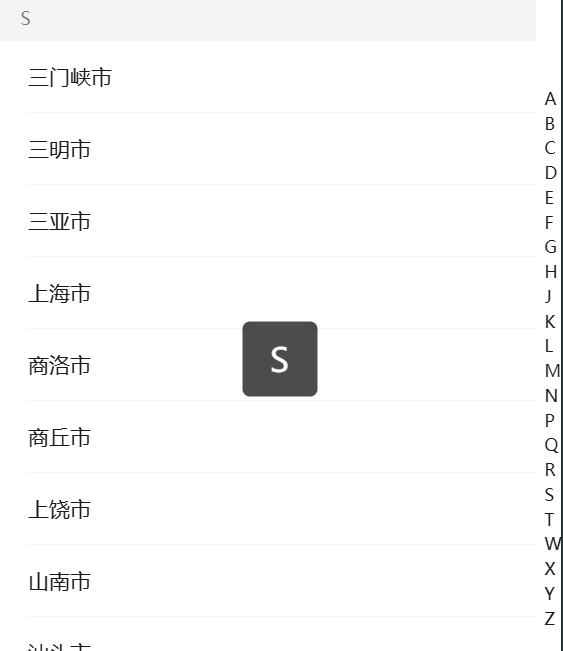
2.1 索引城市

demo

1
2
3
4
5
6
7
8
9
10
11
12
13
14
15
16
17
18
19
20
21
22
23
24
25
26
27
28
29
30
31
32
33
34
35
36
37
38
39
40
41
42
43
44
45
46
47
48
49
50
51
52
53
54
55
56
57
58
59
60
61
62
63
64
65
66
67
68
69
70
71
72
73
74
75
76
77
78
79
80
81
82
83
84
85
86
87
88
89
90
91
92
93
94
95
<template>
<van-index-bar :index-list="computedCityList" @change="handleChange">
<div v-for="data in cityList" :key="data.type">
<van-index-anchor :index="data.type" />
<van-cell :title="item.name" v-for="item in data.list" :key="item.cityId" @click="handleCityClick(item)" />
</div>
</van-index-bar>
</template>

<script>
import http from "@/util/http.js";
import Vue from 'vue';
import { Toast } from 'vant';

Vue.use(Toast);

export default {
data() {
return {
cityList: [], //[{type: 'A', list:[{cityId: 111, isHot: 0, name: '', pinyin:''}, ...]}, ...]
};
},
computed: {
computedCityList() {
// 过滤出收集到的字母:目的为了排除掉无城市值的索引字母
return this.cityList.map((item) => item.type);
},
},
mounted() {
http({
url: "https://m.maizuo.com/gateway?k=1105782",
headers: {
"x-host": "mall.film-ticket.city.list",
},
}).then((res) => {
console.log("res->cities: ", res.data.data.cities)
//解析组装城市数据结构
this.cityList = this.renderCity(res.data.data.cities);
console.log(this.cityList);
});
},
methods: {
renderCity(list) {
//console.log(list);
let cityList = [];
let letterList = [];
for (let i = 0; i < 26; i++) {
letterList.push(String.fromCharCode(65 + i)); // 26个大写
// letterList.push(String.fromCharCode(97 + i)) // 26个小写
}
//console.log(letterList);
letterList.forEach((letter) => {
let newList = list.filter(
(item) => item.pinyin.substring(0, 1) === letter
);
newList.length > 0 &&
cityList.push({
type: letter,
list: newList,
});
});
return cityList;
},
handleChange(data) {
// console.log("change->", data) // data是字母
Toast(data);
},
handleCityClick(item) {
console.log(item.name)
// 多页面方案:方式1-拼接到路径,方式2-cookie,方式3-localStorage
// location.href = '#/cinemas?cityname=' + item.name;
// 单页面方案:方式1-中间人模式,方式2-bus总线 $on,$emit
// vuex-状态管理模式
// this.$store.state.cityName = item.name //不要去直接修改,无法被vuex监控到

// 提交给 mutations 监管
this.$store.commit('changeCityName', item.name)
this.$store.commit('changeCityId', item.cityId)

// 给 $router.back() 传参,使用 $route.params
// this.$route.params.cityId = item.cityId
// 点击城市的时候触发 vuex 的 action 去获取影院列表,同步就渲染了影院列表dom数据
this.$store.dispatch("getCinemaData", item.cityId)
this.$router.back()
}
},
};
</script>

<style lang="scss">
// 控制vant toast显示字母的宽度,覆盖默认样式需要去掉 scoped - 但防影响范围要做好充分的测试
.van-toast--html, .van-toast--text {
min-width: 20px;
}
</style>

image-20251228220036213

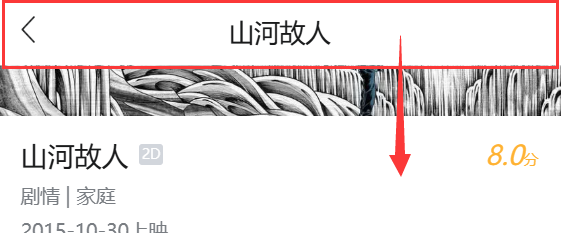
2.2 滑动吸顶

DetailHeader.vue - 可用 vant Navbar导航栏 组件代替。

1
2
3
4
5
6
7
8
9
10
11
12
13
14
15
16
17
18
19
20
21
22
23
24
25
26
27
28
29
30
31
32
33
34
35
36
37
38
39
40
41
42
43
44
45
46
47
48
<template>
<div class="header">
<i class="left" @click="handleBack">&lt;</i>
<slot></slot>
<i class="iconfont icon-fenxiang right"></i>
</div>
</template>

<script>
export default {
methods: {
handleBack () {
// 返回上一页:从哪页来返回哪页
this.$router.back()
}
}
}
</script>

<style lang="scss" scoped>
.header {
position: fixed;
top: 0;
left: 0;
width: 100%;
height: 2.75rem;
line-height: 2.75rem;
text-align: center;
background: white;
.left {
font-size: 22px;
position: fixed;
left: .625rem;
top: 0;
height: 2.75rem;
line-height: 2.75rem;
}
.right {
font-size: 22px;
position: fixed;
right: .625rem;
top: 0;
height: 2.75rem;
line-height: 2.75rem;
}
}
</style>

使用自定义指令实现:

1
2
3
4
5
6
7
8
9
10
11
12
13
14
15
16
17
18
19
20
21
22
23
24
25
26
27
28
29
30
31
32
33
34
35
36
<template>
<!-- v-if 解决http请求还未有数据响应时默认取值问题 -->
<div v-if="filmInfo">
<detail-header v-scroll="50">
{{ filmInfo.name }}
</detail-header>
...
</div>
</template>

<script>
...
import detailHeader from "@/components/detail/DetailHeader.vue";
// 指令
Vue.directive("scroll", {
inserted(el, binding) {
el.style.display = "none";
// 往下滚动超过50像素时显示 header 吸顶
window.onscroll = () => {
console.log("scroll");
if (
(document.documentElement.scrollTop || document.body.scrollTop) >
binding.value
) {
el.style.display = "block";
} else {
el.style.display = "none";
}
};
},
unbind() {
window.onscroll = null;
},
});
...
</script>

image-20251228215933272

2.3 折叠|展开

1
2
3
4
5
6
7
8
9
10
11
12
13
14
15
16
17
18
19
20
21
22
23
24
25
26
27
28
29
30
31
32
33
34
35
36
37
38
<template>
<!-- v-if 解决http请求还未有数据响应时默认取值问题 -->
<div v-if="filmInfo">
...
<div class="content">
<div>{{ filmInfo.name }}</div>
<div>
...
<!-- 静态class和动态绑定的:class 会共存! style 也同理 -->
<div class="detail-text" :class="isHidden ? 'hidden' : ''" style="line-height: 20px">
{{ filmInfo.synopsis }}
</div>
<div style="text-align: center">
<!-- 动态绑定:class与静态共存,控制字体图标的切换显示 -->
<i class="iconfont" :class="isHidden ? 'icon-down' : 'icon-up'" @click="isHidden = !isHidden"></i>
</div>
</div>
</div>
</div>
</template>

<script>
export default {
data() {
return {
isHidden: true,
}
}
}
</script>

<style lang="scss" scoped>
.hidden {
overflow: hidden;
height: 1.25rem;
}
</style>

image-20251228215831651

3. 主流开源组件库

1. Tailwind CSS(工具类优先的原子化 CSS 框架)

  • 定位:不是传统组件库,而是原子化 CSS 工具集,可快速定制任意风格的用户端页面(官网 / 商城首选)
  • 核心优势:高度灵活、无预设样式束缚、响应式适配极佳,适合需要定制化设计的商城 / 品牌官网
  • 企业应用:Shopify、Netflix、Twitch、阿里 / 字节等大厂大量使用
  • 官网https://tailwindcss.com/
  • 补充:搭配 daisyUI(基于 Tailwind 的组件库)使用更高效:https://daisyui.com/

2. Ant Design(AntD,阿里出品)

  • 定位:不仅支持后台,也深度适配用户端场景(商城、官网、用户中心),设计体系成熟
  • 核心优势:组件丰富(含导航、轮播、商品卡片、表单等用户端核心组件)、交互规范统一、支持响应式
  • 企业应用:阿里系产品、知乎、B 站等大量使用
  • 官网https://ant.design/
  • 补充:Vue 版本:https://www.antdv.com/(适配 Vue2/Vue3)

3. Vuetify(Vue 生态用户端首选)

  • 定位:基于 Material Design 的 Vue 专属组件库,专为用户端场景优化(商城、官网、移动端 H5)
  • 核心优势:组件覆盖全(商品列表、轮播、购物车、支付组件等)、响应式原生支持、移动端适配优秀
  • 企业应用:大量中小电商、品牌官网使用,Vue 生态用户端场景渗透率极高
  • 官网https://vuetifyjs.com/

4. Bootstrap(经典通用型)

  • 定位:最老牌的响应式 CSS 框架,适配所有用户端场景(官网、商城、营销页)
  • 核心优势:生态极广、文档完善、学习成本低,适合快速搭建商城 / 官网
  • 企业应用:全球数百万网站使用,包括 NASA、Twitter 早期版本
  • 官网https://getbootstrap.com/

5. Element Plus(扩展用户端场景)

  • 定位:虽以后台为主,但 V2 版本大幅增强用户端组件(商品卡片、轮播、导航、优惠券等)
  • 核心优势:Vue3 生态最成熟,组件风格可定制,适合需要统一前后端风格的商城 / 官网
  • 企业应用:国内大量中小电商、品牌官网使用
  • 官网https://element-plus.org/

6. MUI(Material UI,React 生态首选)

  • 定位:基于 Material Design 的 React 组件库,专为用户端场景设计(商城、官网、移动端 H5)
  • 核心优势:组件精美、交互流畅、响应式适配优秀,适合 React 技术栈的商城 / 官网
  • 企业应用:Google 系产品、Airbnb、Netflix 等使用
  • 官网https://mui.com/

7. Vant(移动端用户端专用)

  • 定位:有赞出品,专为移动端 H5 / 小程序设计的 Vue 组件库(商城、电商 H5、会员中心)
  • 核心优势:轻量、高性能、适配各种移动端机型,电商场景组件全覆盖(购物车、支付、优惠券)
  • 企业应用:有赞生态、京东、拼多多部分移动端页面
  • 官网https://vant-ui.github.io/vant/

8. Layui(轻量通用型)

  • 定位:国产轻量 UI 框架,无框架依赖(原生 JS),适配官网 / 商城 / 营销页
  • 核心优势:学习成本极低、开箱即用,适合非前后端分离的传统官网 / 商城
  • 企业应用:国内大量中小企业官网、小型商城使用
  • 官网https://layui.dev/

场景选型

场景 首选组件库 次选组件库
Vue3 + 商城 / 官网 Vuetify / Element Plus Tailwind CSS + daisyUI
React + 商城 / 官网 MUI (Material UI) Ant Design
移动端 H5 / 小程序 Vant MUI (移动端适配版)
高度定制化官网 / 商城 Tailwind CSS Bootstrap
快速搭建 / 低学习成本 Bootstrap Layui

总结

  1. 通用首选:Tailwind CSS(高度定制)、Bootstrap(快速搭建)是所有用户端场景的基础选择,适配性最广;
  2. 框架绑定型:Vue 生态选 Vuetify/Element Plus,React 生态选 MUI/Ant Design,移动端选 Vant;
  3. 企业级适配:Ant Design、Element Plus、Vuetify 是国内企业做商城 / 官网最常用的三大组件库,兼顾功能、美观和维护性。

99-vue工具库&组件库
https://janycode.github.io/2022/05/22/04_大前端/04_Vue/99-vue工具库&组件库/
作者
Jerry(姜源)
发布于
2022年5月22日
许可协议