参考:
1. Cookie+Session 1.1 应用 Cookie+Session :安全、易管控,但服务端有存储压力、跨域差,适合小型、前后端未分离、安全性要求高的项目。
1.2 流程
HTTP 是无状态的,也就是 HTTP请求方和响应方之间无法维护状态,都是一次性的,它不知道前后的请求都发生了什么。
但在登陆这种场景下,我们需要维护状态,因此需要对用户登录状态进行标记。
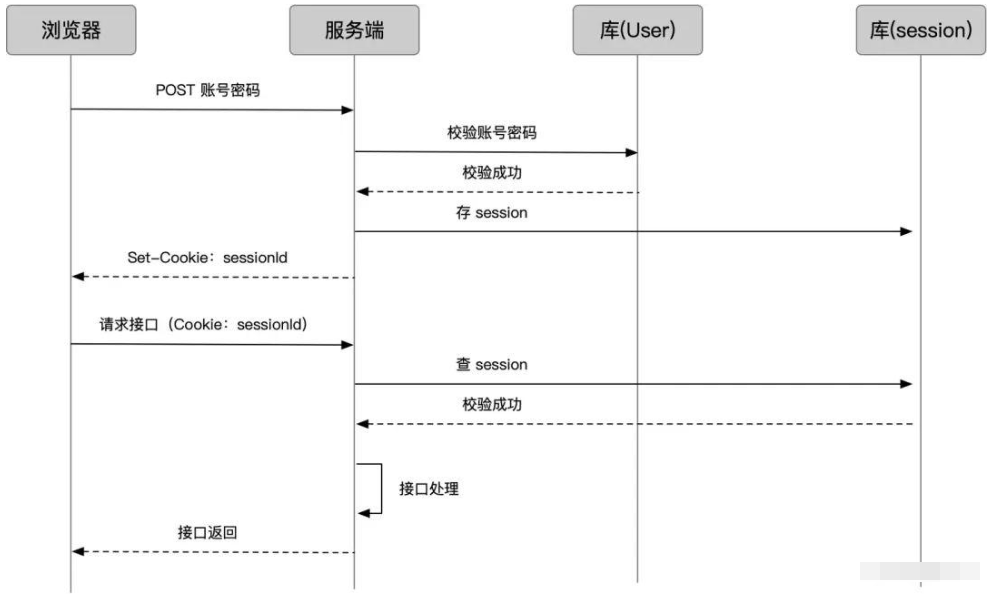
浏览器登录发送账号密码,服务端查用户库,校验用户
服务端把用户登录状态存为 Session,生成一个 sessionId
通过登录接口返回,把 sessionId set 到 cookie 上
此后浏览器再请求业务接口,sessionId 随 cookie 带上
服务端查 sessionId 校验 session
成功后正常做业务处理,返回结果
即:服务端存储用户身份信息(Session),客户端只存一个随机标识(SessionID)在 Cookie 里;每次请求时,客户端带 SessionID 到服务端,服务端通过 ID 查 Session 确认身份。
1.3 实现 安装1:npm i express-session@1 - 支持 session
安装2:npm i connect-mongo@4 - 支持 session 存储到 mongo
版本兼容 node18.20+, mongo3.6+, mongoose6.13+, express-session1.18+, connect-mongo4.6.0
app.js
1 2 3 4 5 6 7 8 9 10 11 12 13 14 15 16 17 18 19 20 21 22 23 24 25 26 27 28 29 30 31 32 33 34 35 36 37 38 39 40 41 42 43 44 45 46 47 48 var session = require ('express-session' )const MongoStore = require ("connect-mongo" );var app = express ();use (cookieParser ());use (express.static (path.join (__dirname, 'public' )));use (session ({name : 'jerry-system' , secret : 'hello123world456' , cookie : {maxAge : 1000 * 60 * 60 , secure : false resave : true , saveUninitialized : true , rolling : true , store : MongoStore .create ({mongoUrl : 'mongodb://127.0.0.1:27017/jerry_session' , ttl : 1000 * 60 * 10 use ((req, res, next ) => {if (req.url .includes ("login" )) {next ()return if (req.session .user ) {session .mydate = Date .now ()next () else {url .includes ("api" ) ? res.status (401 ).json ({ ok : -1 }) : res.redirect ("/login" )use ('/' , indexRouter);use ('/api' , usersRouter);use ('/login' , loginRouter);
routes/login.js
1
2
3
4
5
6
7
8
9
var express = require ('express' );var router = express.Router ();get ('/' , function (req, res, next ) {render ('login' , { title : 'Express' });module .exports = router;
views/login.ejs
1
2
3
4
5
6
7
8
9
10
11
12
13
14
15
16
17
18
19
20
21
22
23
24
25
26
27
28
29
30
31
32
33
<h1>登陆</h1>
routes/users.js
1
2
3
4
5
6
7
8
9
10
var express = require ('express' );const UserModel = require ('../model/UserModel' );const UserController = require ('../controllers/UserController' );var router = express.Router ();post ("/login" , UserController .login );get ("/logout" , UserController .logout );module .exports = router;
controllers/UserController.js
1
2
3
4
5
6
7
8
9
10
11
12
13
14
15
16
17
18
19
20
21
22
23
24
25
const UserService = require ("../services/UserService" );const UserController = {login : async (req, res) => {const { username, password } = req.body const data = await UserService .login (username, password)if (data.length === 0 ) {send ({ ok : -1 })else {session .user = data[0 ] send ({ ok : 1 })logout : async (req, res) => {session .destroy (() => {send ({ ok : 1 })module .exports = UserController
services/UserService.js
1
2
3
4
5
6
7
8
9
10
11
const UserModel = require ("../model/UserModel" );const UserService = {login : (username, password ) => {return UserModel .find ({ username, password })module .exports = UserService
model/UserModel.js
1
2
3
4
5
6
7
8
9
10
11
12
const mongoose = require ("mongoose" )const Schema = mongoose.Schema const UserType = {username : String ,password : String ,age : Number const UserModel = mongoose.model ("user" , new Schema (UserType ))module .exports = UserModel
2. JWT-JSON Web Token 2.1 应用 JWT :无状态、跨域友好、易扩展,但安全性低(拷走设置到浏览器里)、无法主动作废,适合前后端分离、分布式、多端的项目。
2.2 流程
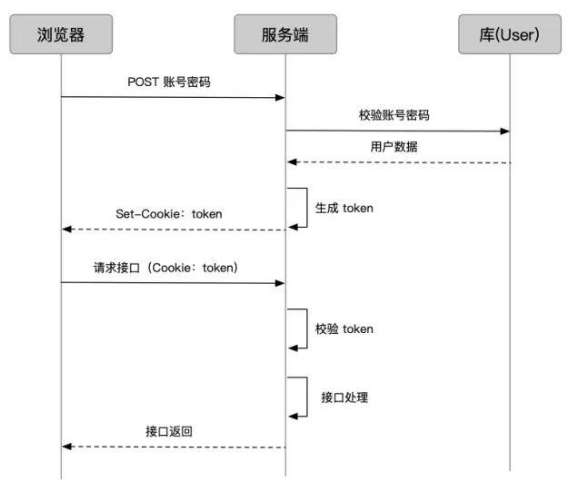
即:服务端不存储任何用户信息,而是把用户身份(如 ID、用户名)加密成一个 Token 字符串返回给客户端;客户端存 Token(Cookie / 本地存储),每次请求带 Token,服务端解密验证即可,无需查库。
2.3 实现 安装1:npm i jsonwebtoken@9 - JWT-npm仓库和文档
即最新版 jsonwebtoken 9.x 都能兼容。
安装2:npm i axios - 需要 axios 拦截器
试一试:
1 2 3 4 5 6 7 8 9 10 11 12 13 14 15 var jwt = require ('jsonwebtoken' );var token = jwt.sign ({data : 'jerry' 'anydata-secret' , { expiresIn : '10s' }); console .log ("token->" , token);setTimeout (() => {var decoded = jwt.verify (token, "anydata-secret" )console .log ('9s ->' , decoded);9000 ) setTimeout (() => {var decoded = jwt.verify (token, "anydata-secret" )console .log ('11s ->' , decoded);11000 )
JWT.js - 工具类 util/JWT.js
1
2
3
4
5
6
7
8
9
10
11
12
13
14
15
16
17
const jwt = require ("jsonwebtoken" )const secret = "jerry-anydata" const JWT = {generate (value, expires ) {return jwt.sign (value, secret, { expiresIn : expires })verify (token ) {try {return jwt.verify (token, secret)catch (error) {console .error (error.message ); return false module .exports = JWT
验证:
1 2 3 4 5 6 7 8 9 10 11 12 var token = JWT .generate ({ name : "jerry" }, "10s" )console .log ("token->" , token);setTimeout (() => {var decoded = JWT .verify (token, "anydata-secret" )console .log ('9s ->' , decoded);9000 ) setTimeout (() => {var decoded = JWT .verify (token, "anydata-secret" )console .log ('11s ->' , decoded);11000 )
具体实现 页面上使用 script axios 引入:
1 <script src="https://cdn.jsdelivr.net/npm/axios@1.6.7/dist/axios.min.js" ></script>
登录页 views/login.ejs - 引入 axios 和 拦截器。
1
2
3
4
5
6
7
8
9
10
11
12
13
14
15
16
17
18
19
20
21
22
23
24
25
26
27
28
29
30
31
32
33
34
35
36
37
38
39
40
41
42
43
44
45
46
47
48
49
50
51
52
53
54
55
56
57
58
59
60
61
62
<!DOCTYPE html>
登陆后跳转首页 views/index.ejs
1 2 3 4 5 6 7 8 9 10 11 12 13 14 15 16 17 18 19 20 21 22 23 24 25 26 27 28 29 30 31 32 33 34 35 36 37 38 39 40 41 42 43 44 45 46 47 48 49 50 51 52 53 54 55 56 57 58 59 60 61 62 63 64 65 66 67 68 69 70 71 72 73 74 75 76 77 78 79 80 81 82 83 84 85 86 87 88 89 90 91 92 93 94 95 96 97 98 99 100 101 102 103 104 105 106 107 108 109 110 111 112 113 114 115 116 117 118 119 120 121 122 123 124 125 126 127 128 129 130 131 132 133 134 <!DOCTYPE html>
controllers/UserController.js
1
2
3
4
5
6
7
8
9
10
11
12
13
14
15
16
17
18
19
20
21
22
23
24
const UserService = require ("../services/UserService" );const JWT = require ("../util/JWT" );const UserController = {login : async (req, res) => {const { username, password } = req.body const data = await UserService .login (username, password)if (data.length === 0 ) {send ({ ok : -1 })else {const token = JWT .generate ({_id : data[0 ]._id ,username : data[0 ].username "1h" )header ("Authorization" , token)send ({ ok : 1 })module .exports = UserController
app.js
1 2 3 4 5 6 7 8 9 10 11 12 13 14 15 16 17 18 19 20 21 22 23 24 25 26 27 28 29 30 31 32 33 34 35 36 37 38 39 40 41 42 ...const JWT = require ('./util/JWT' ); var app = express ();use (cookieParser ());use (express.static (path.join (__dirname, 'public' )));use ((req, res, next ) => {if (req.url .includes ("login" )) {next ()return const token = req.headers ["authorization" ]?.split (" " )[1 ]console .log (req.headers ["authorization" ]); if (token) {const payload = JWT .verify (token)console .log ("当前登录用户信息: " , payload);if (payload) {const newToken = JWT .generate ({_id : payload._id ,username : payload.username "1h" )header ("Authorization" , newToken)next ()else {status (401 ).send ({ errCode : -1 , errMessage : "token过期" })else {next ()use ('/' , indexRouter);use ('/api' , usersRouter);use ('/login' , loginRouter);