1
2
3
4
5
6
7
8
9
10
11
12
13
14
15
16
17
18
19
20
21
22
23
24
25
26
27
28
29
30
31
32
33
34
35
36
37
38
39
40
41
42
43
44
45
46
47
48
49
50
51
52
53
54
55
56
57
58
59
60
61
62
63
64
65
66
67
68
69
70
71
72
73
74
75
76
77
78
79
80
81
82
83
84
85
86
87
88
89
90
91
92
93
94
95
96
97
98
99
100
101
102
103
104
105
106
107
108
109
110
111
112
113
114
115
116
117
118
119
120
121
122
123
124
125
126
127
128
129
130
131
132
133
134
135
136
137
138
139
140
141
142
143
144
145
146
147
| <!DOCTYPE html>
<html>
<head>
<title>
<%= title %>
</title>
<link rel='stylesheet' href='/stylesheets/style.css' />
<script src="https://cdn.jsdelivr.net/npm/axios@1.6.7/dist/axios.min.js"></script>
<script>
//axios 拦截器配置示例
// 请求拦截
axios.interceptors.request.use(function (config) {
console.log("请求发出前,先执行的方法");
// 所有请求携带 token
const token = localStorage.getItem("token")
config.headers.Authorization = `Bearer ${token}` //常规规范拼接 Bearer
return config;
}, function (error) {
return Promise.reject(error);
});
// 响应拦截
axios.interceptors.response.use(function (response) {
console.log("响应成功后,先执行的方法");
const { authorization } = response.headers
authorization && localStorage.setItem("token", authorization)
return response;
}, function (error) {
console.log(error.response.status);
if (error.response.status === 401) {
localStorage.removeItem("token")
location.href = "/login"
}
return Promise.reject(error);
});
</script>
</head>
<body>
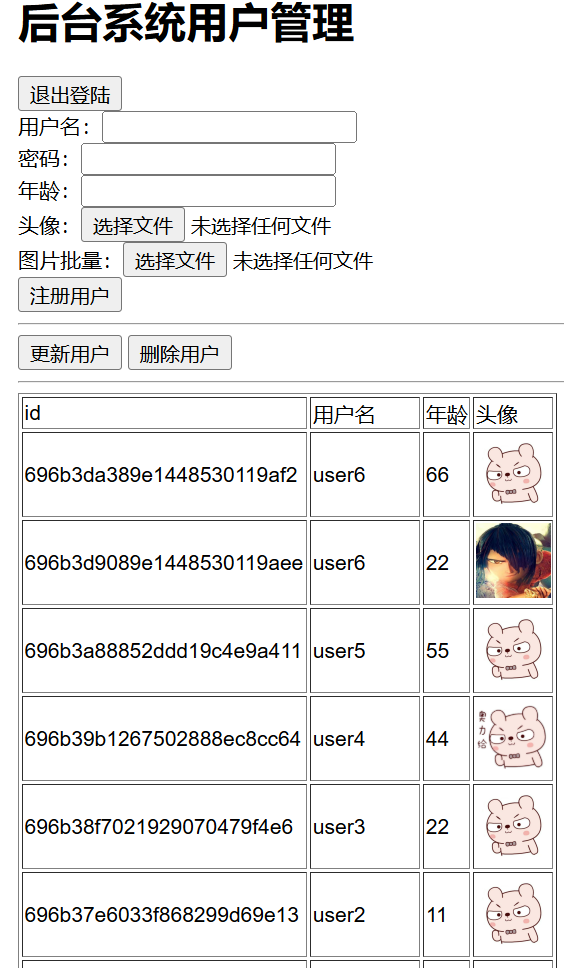
<h1>后台系统用户管理</h1>
<div><button id="logout">退出登陆</button></div>
<div>
<div>用户名:<input type="text" id="username"></div>
<div>密码:<input type="password" id="password"></div>
<div>年龄:<input type="number" id="age"></div>
<div>头像:<input type="file" id="avatar"></div>
<!-- 批量上传 -->
<div>图片批量:<input type="file" id="avatars" multiple></div>
<div>
<button id="register">注册用户</button>
</div>
</div>
<hr>
<div>
<button id="update">更新用户</button>
<button id="delete">删除用户</button>
</div>
<hr>
<table border="1px">
<thead>
<tr>
<td>id</td>
<td>用户名</td>
<td>年龄</td>
<td>头像</td>
</tr>
</thead>
<tbody></tbody>
</table>
<script>
var resigter = document.querySelector("#register")
var logout = document.querySelector("#logout")
var updateBtn = document.querySelector("#update")
var deleteBtn = document.querySelector("#delete")
var username = document.querySelector("#username")
var password = document.querySelector("#password")
var age = document.querySelector("#age")
var avatar = document.querySelector("#avatar")
// 请求新增-POST
resigter.onclick = () => {
// 头像文件在 avatar.files[0] 文件对象
const formsData = new FormData()
formsData.append("username", username.value)
formsData.append("password", password.value)
formsData.append("age", age.value)
formsData.append("avatar", avatar.files[0])
axios.post("/api/user", formsData, {
headers: {
"Content-Type": "multipart/form-data"
}
}).then(res => {
console.log("新增:", res.data);
if (res.data.ok < 0) {
location.href = "/login"
}
})
}
// 请求更新-PUT
updateBtn.onclick = () => {
axios.put("/api/user/696aeb1f3261b94d1d3a83e9", {
username: "修改的名称",
password: "修改的密码",
age: 1
}).then(res => {
console.log("更新:", res.data);
if (res.ok < 0) {
location.href = "/login"
}
})
}
// 请求删除-DELETE
deleteBtn.onclick = () => {
axios.delete("/api/user/696aeb1f3261b94d1d3a83e9").then(res => {
console.log("删除:", res.data);
if (res.data.ok < 0) {
location.href = "/login"
}
})
}
// 请求列表-GET
axios.get("/api/user?page=1&pageSize=10").then(res => {
console.log("列表:", res.data);
let tbody = document.querySelector("tbody")
tbody.innerHTML = res.data.data.list.map(item => `
<tr>
<td>${item._id}</td>
<td>${item.username}</td>
<td>${item.age}</td>
<td><img src="${item.avatar}" style="width:50px;"></td>
</tr>
`).join("")
})
logout.onclick = () => {
localStorage.removeItem("token")
location.href = "/login"
}
</script>
</body>
</html>
|