04-React生命周期

re269r227-react-logo-react-logo-import-io

参考:

1. 生命周期

v17 & v19

组件的生命周期可分成三个状态:

  • Mounting(挂载|初始化):已插入真实 DOM (constructorrendercomponentDidMount)
  • Updating(更新|运行中):正在被重新渲染 (rendercomponentDidUpdate)
  • Unmounting(卸载|销毁):已移出真实 DOM (componentWillUnmount)
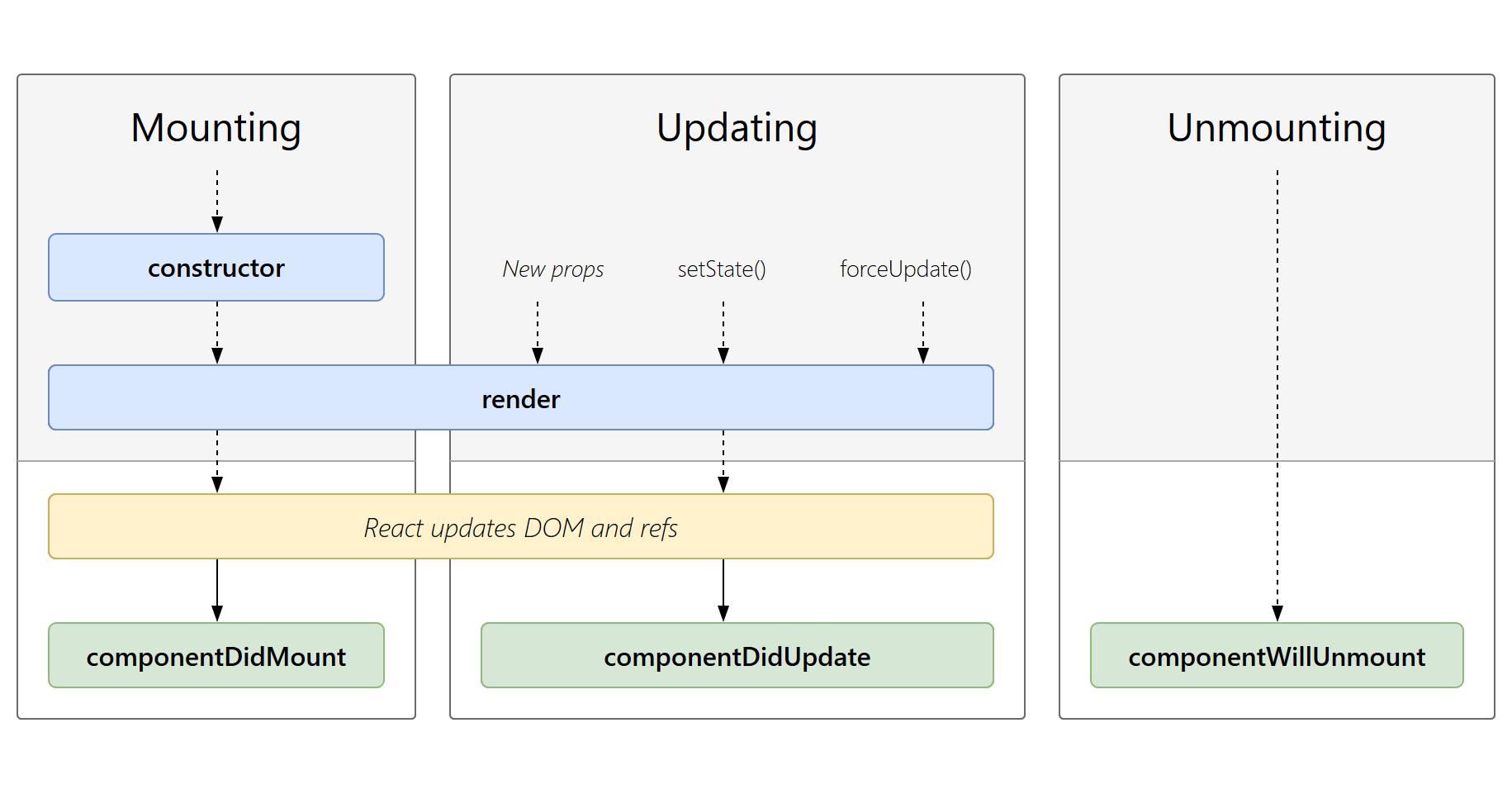
react生命周期

生命周期 具体方法 React 17 支持情况 React 19 支持情况 核心说明
挂载阶段 constructor ✅ 完全支持 ✅ 完全支持 初始化 state / 绑定事件,17/19 用法一致
static getDerivedStateFromProps ✅ 支持(慎用) ✅ 支持(功能不变) 极少使用,17/19 均不推荐(用 Hooks 替代)
render ✅ 核心支持 ✅ 核心支持 渲染 UI,17/19 完全一致
componentDidMount ✅ 核心支持 ✅ 完全支持 挂载后执行(请求数据 / 操作 DOM),通用
更新阶段 static getDerivedStateFromProps ✅ 支持 ✅ 支持 同上
shouldComponentUpdate ✅ 支持(性能优化) ✅ 完全支持 控制是否重渲染,通用
render ✅ 核心支持 ✅ 核心支持 同上
getSnapshotBeforeUpdate ✅ 支持(极少用) ✅ 支持 更新前获取 DOM 快照,17/19 均极少使用
componentDidUpdate ✅ 核心支持 ✅ 完全支持 更新后执行(更新 DOM / 请求数据),通用
卸载阶段 componentWillUnmount ✅ 核心支持 ✅ 完全支持 卸载前清理(取消请求 / 移除监听),通用
错误处理 componentDidCatch ✅ 支持 ✅ 完全支持 捕获子组件错误,通用
过时 / 不安全 API UNSAFE_componentWillMount ✅ 支持(带警告) ❌ 彻底移除 17 中已标记 UNSAFE,19 直接移除,改用 componentDidMount
UNSAFE_componentWillReceiveProps ✅ 支持(带警告) ❌ 彻底移除 17 中已标记 UNSAFE,19 移除,改用 getDerivedStateFromProps 或 Hooks
UNSAFE_componentWillUpdate ✅ 支持(带警告) ❌ 彻底移除 17 中已标记 UNSAFE,19 移除,改用 getSnapshotBeforeUpdate 或 Hooks
废弃 API componentDidCatch 的第二个参数 errorInfo ✅ 支持 ✅ 支持,但 React 19 推荐用 useErrorBoundary(Hooks)替代 类组件仍可用,19 更推荐 Hooks 写法

老的生命周期的问题:

(1) componentWillMount, 在ssr中这个方法将会被多次调用,所以会重复触发多遍,同时在这里如果绑定事件,将无法解绑,导致内存泄漏,变得不够安全高效逐步废弃。

(2) componentWillReceiveProps,外部组件多次频繁更新传入多次不同的 props,会导致不必要的异步请求

(3) componetWillupdate, 更新前记录 DOM 状态, 可能会做一些处理,与componentDidUpdate相隔时间如果过长,会导致状态不太信

1.1【挂载】(1/3)

顺序:

①contructor

  • contructor - 构造函数
    • 应用:初始化 state、绑定 this、绑定事件处理函数、
1
2
3
4
5
6
7
8
9
10
11
12
13
14
15
16
17
18
19
20
21
22
23
24
25
26
27
28
29
30
31
32
33
34
35
import React from 'react'

class Counter extends React.Component {
constructor(props) {
super(props) // 必须调用 super,否则无法使用 this
// 1. 初始化 state(最核心用途)
this.state = {
count: 0,
name: props.initName || '默认名称', // 结合 props 初始化 state
}
// 2. 绑定事件处理函数的 this 指向(避免 render 中重复绑定)
this.handleIncrement = this.handleIncrement.bind(this)
}

// 事件处理函数
handleIncrement() {
// 此处 this 能正确指向组件实例,归功于 constructor 中的 bind
this.setState({ count: this.state.count + 1 })
}

render() {
return (
<div>
<p>名称:{this.state.name}</p>
<p>计数:{this.state.count}</p>
<button onClick={this.handleIncrement}>+1</button>
</div>
)
}
}

// 使用组件(传入初始化 props)
export default function App() {
return <Counter initName="测试计数器" />
}

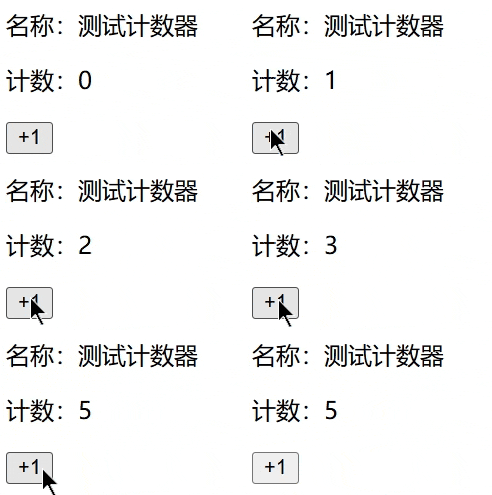
效果:

chrome-capture-2026-01-22 (1)

componentWillMount-废弃

  • componentWillMount - render 之前最后一次修改状态的机会 (v19移除,改用 componentDidMount

②getDerivedStateFromProps-新

  • static getDerivedStateFromProps - 在调用 render 方法之前调用,并且在初始挂载及后续更新时都会被调用。
    • 应用:子组件 State 依赖父组件 Props,且需随 Props 自动更新
    • 说么:极少使用,v17/v19 均不推荐(用 Hooks 替代)

③render

  • render - 必须实现,只能访问 this.props 和 this.state ,不允许直接修改状态和DOM输出

④componentDidMount

  • componentDidMount - 成功 render 并渲染完成真实 DOM 之后触发,可以修改 DOM,初始化DOM,只执行一次
    • 应用:axios数据请求、事件监听、订阅函数调用、setInterval、基于创建完的DOM进行初始化如 BetterScroll 等
1
2
3
4
5
6
7
8
9
10
11
12
13
14
15
16
17
18
19
20
import React from 'react'

class DataFetchDemo extends React.Component {
state = { data: null } // 初始化状态存数据

// 组件挂载后请求数据(核心用法)
componentDidMount() {
// 模拟接口请求(真实场景替换为 fetch/axios)
fetch('https://jsonplaceholder.typicode.com/todos/1')
.then(res => res.json())
.then(data => this.setState({ data })) // 请求成功更新状态
}

render() {
const { data } = this.state
return <div>{data ? `标题:${data.title}` : '加载中...'}</div>
}
}

export default DataFetchDemo

输出:

1
2
3
render()
第一次 componentDidMount()
render() #setState()触发

案例:better-scroll 使用

1
2
3
4
5
6
7
8
9
10
11
12
13
14
15
16
17
18
19
20
21
22
23
24
25
import React, { Component } from 'react'
import BetterScroll from 'better-scroll'

export default class App extends Component {
state = {
list: ['11', '22', '33', '44', '55', '66', '77', '88', '99', '1010'],
}
componentDidMount() {
console.log('dom count:', document.querySelector('li'))
new BetterScroll('.wrapper')
}
render() {
return (
<div>
<div className="wrapper" style={{ height: '100px', overflow: 'hidden', backgroundColor: 'yellow' }}>
<ul>
{this.state.list.map(item => (
<li key={item}>{item}</li>
))}
</ul>
</div>
</div>
)
}
}

1.2【更新】(2/3)

componentWillReceiveProps-废弃

  • componentWillReceiveProps - 父组件修改属性触发子组件中该属性方法 (v19 移除,改用 getDerivedStateFromProps 或 Hooks)

①getDerivedStateFromProps-新

  • static getDerivedStateFromProps - 在调用 render 方法之前调用,并且在初始挂载及后续更新时都会被调用。
    • 应用:子组件 State 依赖父组件 Props,且需随 Props 自动更新
    • 说么:极少使用,v17/v19 均不推荐(用 Hooks 替代)
1
2
3
4
5
6
7
8
9
10
11
12
13
14
15
16
17
18
19
20
21
22
23
24
25
26
27
28
29
30
31
32
33
34
35
36
37
38
39
40
41
42
43
44
45
46
47
48
49
50
51
52
53
54
import React from 'react'

// 子组件:依赖父组件 Props 更新自身 State
class DetailComponent extends React.Component {
// 初始化 State
state = {
title: '', // 标题依赖父组件传的 id
}

// 核心:根据 Props 推导 State(静态方法,无 this)
static getDerivedStateFromProps(nextProps, prevState) {
// 仅当 id 变化时,更新 title
if (nextProps.id !== prevState.currentId) {
// 模拟根据 id 映射标题(真实场景可结合接口请求)
const titleMap = {
1: 'React 入门',
2: 'React 生命周期',
3: 'React Hooks',
}
// 返回新 State,更新子组件状态
return {
currentId: nextProps.id, // 记录当前 id,用于对比
title: titleMap[nextProps.id] || '默认标题',
}
}
return null // Props 未变化,不更新 State
}

render() {
return <div>当前内容:{this.state.title}</div>
}
}

// 父组件:控制传递给子组件的 id
class ParentComponent extends React.Component {
state = { id: 1 }

// 切换 id,触发子组件 Props 变化
changeId = () => {
this.setState(prev => ({ id: prev.id === 3 ? 1 : prev.id + 1 }))
}

render() {
return (
<div>
<button onClick={this.changeId}>切换内容</button>
<DetailComponent id={this.state.id} />
</div>
)
}
}

export default ParentComponent

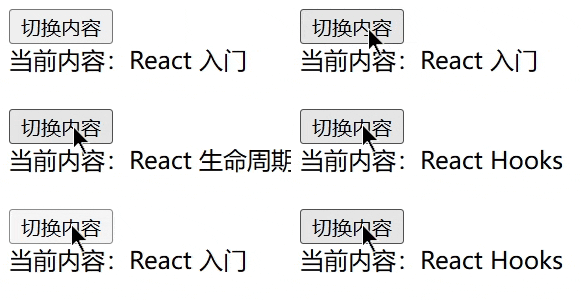
效果:

chrome-capture-2026-01-22 (2)

②shouldComponentUpdate

  • shouldComponentUpdate(nextProps, nextState, nextContext) - SCU,逻辑判断返回 false ,以阻止 render 重复渲染调用

    • 应用:性能优化(阻止无意义重渲染),多用在子组件中

    • 对象判断前后 state 是否有差异(状态字段较多的情况):

      • ```js
        if (JSON.stringify(this.state) !== JSON.stringify(nextState)) {
        return true
        }
        return false
        1
        2
        3
        4
        5
        6
        7
        8
        9
        10
        11
        12
        13
        14
        15
        16
        17
        18
        19
        20
        21
        22
        23
        24
        25
        26
        27
        28
        29
        30
        31
        32
        33
        34
        35
        36
        37
        38
        39
        40
        41
        42
        43
        44
        45
        46

        ```js
        import React from 'react'

        // 子组件:控制仅当 username 变化时才重渲染
        class UserItem extends React.Component {
        // 核心:判断是否需要重渲染
        shouldComponentUpdate(nextProps, nextState) {
        // 仅当新Props的username和当前Props不同时,才允许重渲染
        return nextProps.username !== this.props.username
        }
        render() {
        // 打印渲染日志,验证是否触发重渲染
        console.log('UserItem 渲染了')
        return <div>用户名:{this.props.username}</div>
        }
        }

        // 父组件:控制传递的Props和自身State
        class Parent extends React.Component {
        state = {
        username: '张三',
        count: 0, // 无关状态,仅用于测试
        }
        // 点击按钮仅修改count(不影响子组件)
        changeCount = () => {
        this.setState(prev => ({ count: prev.count + 1 }))
        }
        // 点击按钮修改username(影响子组件)
        changeName = () => {
        this.setState({ username: '李四' })
        }
        render() {
        return (
        <div>
        <p>计数:{this.state.count}</p>
        <button onClick={this.changeCount}>修改计数(不触发子组件渲染)</button>
        <button onClick={this.changeName}>修改用户名(触发子组件渲染)</button>
        {/* 子组件仅接收username Props */}
        <UserItem username={this.state.username} />
        </div>
        )
        }
        }

        export default Parent

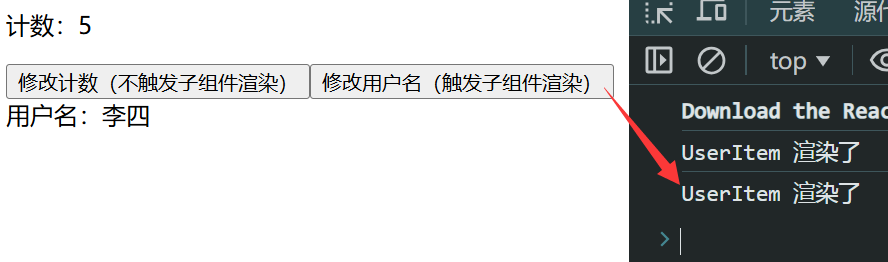
效果:

image-20260122172843733

③render

  • render - 必须实现,只能访问 this.props 和 this.state ,不允许直接修改状态和DOM输出

componentWillUpdate-废弃

  • componentWillUpdate - 在 DOM 更新前(render 之后、真实 DOM 刷新前)执行,不能修改属性和状态 (v19 移除,改用 getSnapshotBeforeUpdate(prevProps, prevState) 或 Hooks)
    • 应用:记录 DOM 更新前状态(如滚动位置)

④getSnapshotBeforeUpdate-新

  • getSnapshotBeforeUpdate - 在最近一次渲染输出(提交到 DOM 节点)之前调用。
    • 应用:捕获 DOM 更新前的状态(如滚动位置),更新后恢复该状态
    • 注意:该方法极少用,仅在「需要获取 DOM 更新前状态」时使用,React 19 中仍兼容,但函数组件可通过 useRef + useEffect 实现等价逻辑
1
2
3
4
5
6
7
8
9
10
11
12
13
14
15
16
17
18
19
20
21
22
23
24
25
26
27
28
29
30
31
32
33
34
35
36
37
38
39
40
41
42
43
44
45
46
47
48
49
50
51
52
53
54
55
56
57
58
59
60
61
62
63
64
65
66
67
68
69
70
71
72
73
74
75
76
77
78
79
80
81
82
83
84
85
import React from 'react'

class ScrollList extends React.Component {
constructor(props) {
super(props)
this.state = { list: [1, 2, 3, 4, 5] }
this.listRef = React.createRef()
}

// 每次生成5个唯一新数字
loadMore = () => {
const lastNum = this.state.list[this.state.list.length - 1]
const newList = Array.from({ length: 5 }, (_, i) => lastNum + 1 + i)
this.setState({ list: [...this.state.list, ...newList] })
}

// 核心优化:捕获「可视区域的滚动偏移比例」而非固定高度
getSnapshotBeforeUpdate(prevProps, prevState) {
if (prevState.list.length !== this.state.list.length) {
const listDom = this.listRef.current
// 计算滚动偏移比例 = 当前滚动距离 / 可滚动总高度(关键!适配多次加载)
const scrollRatio = listDom.scrollTop / (listDom.scrollHeight - listDom.clientHeight)
// 返回「更新前的可滚动总高度」+「滚动比例」,供后续计算
return {
prevScrollHeight: listDom.scrollHeight,
scrollRatio: scrollRatio,
}
}
return null
}

// 按比例恢复滚动位置,适配多次加载
componentDidUpdate(prevProps, prevState, snapshot) {
if (snapshot) {
const listDom = this.listRef.current
// 新的可滚动总高度 = 更新后的总高度 - 容器可视高度
const newScrollableHeight = listDom.scrollHeight - listDom.clientHeight
// 按比例设置滚动位置(核心:保证每次加载后可视区域不变)
listDom.scrollTop = newScrollableHeight * snapshot.scrollRatio
}
}

render() {
return (
<div
ref={this.listRef}
style={{
width: '150px',
maxHeight: '400px',
overflow: 'auto',
border: '1px solid #ccc',
padding: '8px',
}}
>
{this.state.list.map(item => (
<div
key={item}
style={{
height: '50px',
lineHeight: '50px',
textAlign: 'center',
borderBottom: '1px solid #eee',
marginBottom: '4px',
}}
>
列表项 {item}
</div>
))}
<button
onClick={this.loadMore}
style={{
marginTop: '10px',
width: '100%',
padding: '8px 0',
cursor: 'pointer',
}}
>
加载更多
</button>
</div>
)
}
}

export default ScrollList

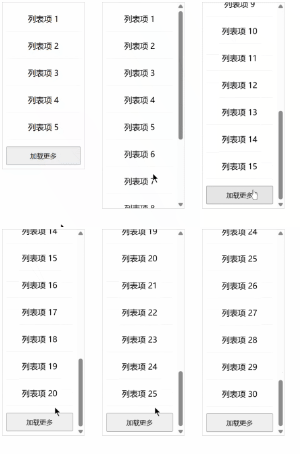
效果:

chrome-capture-2026-01-22 (3)

⑤componentDidUpdate

  • componentDidUpdate(prevProps, prevState, snapshot) - 可以修改 DOM,会多次执行,需要对多次执行进行判断以限制
    • 应用:依赖 props/state 变化的二次请求、DOM 更新
1
2
3
4
5
6
7
8
9
10
11
12
13
14
15
16
17
18
19
20
21
22
23
24
25
26
import React, { Component } from 'react'

export default class App extends Component {
constructor(props) {
super(props)
this.state = { count: 0 }
}

click = () => this.setState({ count: this.state.count + 1 })

// 最简快照:返回更新前的 count 值
getSnapshotBeforeUpdate(prevProps, prevState) {
console.log('更新前的 count:', prevState.count)
return prevState.count // 快照值:更新前的 count
}

// 接收快照值
componentDidUpdate(prevProps, prevState, snapshot) {
console.log('快照值(更新前的 count):', snapshot)
console.log('更新后的 count:', this.state.count)
}

render() {
return <button onClick={this.click}>count: {this.state.count}</button>
}
}

输出:

1
2
3
更新前的 count: 0
快照值(更新前的 count): 0
更新后的 count: 1

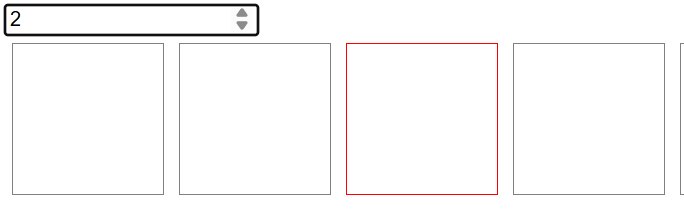
案例:阻止重复渲染

1
2
3
4
5
6
7
8
9
10
11
12
13
14
15
16
17
18
19
20
21
22
23
24
25
26
27
28
29
30
31
32
33
34
35
36
37
38
39
40
41
42
43
44
45
46
47
48
49
50
51
52
import React, { Component } from 'react'

export default class App extends Component {
state = {
list: ['11', '22', '33', '44', '55', '66', '77', '88', '99', '1010'],
current: 0,
}
render() {
return (
<div>
<input
type="number"
onChange={evt => {
this.setState({
current: Number(evt.target.value),
}) /* 此处需要转换为数字,默认输入结果是字符串 */
}}
value={this.state.current}
/>
<div style={{ overflow: 'hidden' }}>
{this.state.list.map((item, index) => (
<Box key={item} current={this.state.current} index={index}></Box>
))}
</div>
</div>
)
}
}

class Box extends Component {
shouldComponentUpdate(nextProps, nextState, nextContext) {
// 上一次和这一次(next)需要进行渲染,其他的阻止渲染,以提升性能
if (this.props.current === this.props.index || nextProps.current === nextProps.index) {
return true
}
return false
}
render() {
console.log('box render()')
return (
<div
style={{
width: '100px',
height: '100px',
border: this.props.current === this.props.index ? '1px solid red' : '1px solid gray',
float: 'left',
margin: '5px',
}}
></div>
)
}
}

效果:

image-20260122141721792

1.3【卸载】(3/3)

①componentWillUnmount

  • componentWillUnmount - 在删除组件之前进行清理操作,比如计时器和事件监听器
    • 应用:取消请求、移除事件监听、清理定时器、置空回收如window.onresize=null
1
2
3
4
5
6
7
8
9
10
11
12
13
14
15
16
17
18
19
20
21
22
23
24
25
26
27
28
29
30
31
32
33
34
35
36
37
import React, { Component } from 'react'

export default class App extends Component {
state = {
isCreated: true,
}
render() {
return (
<div>
<button onClick={() => {
this.setState({
isCreated: !this.state.isCreated,
})
}}
>
click
</button>
{this.state.isCreated ? <Child></Child> : ''}
</div>
)
}
}

class Child extends Component {
render() {
return <div>Child</div>
}
componentDidMount = () => {
window.onresize = () => {
console.log('resize')
}
}
componentWillUnmount = () => {
console.log('componentWillUnmount')
window.onresize = null
}
}

1.4 错误处理

componentDidCatch

  • componentDidCatch - 捕获子组件错误,通用
    • 应用:捕获子组件错误、上报错误日志、兜底展示错误 UI避免整个应用白屏崩溃
1
2
3
4
5
6
7
8
9
10
11
12
13
14
15
16
17
18
19
20
21
22
23
24
25
26
27
28
29
30
31
32
33
34
35
36
37
38
39
40
41
42
43
44
45
46
47
48
49
50
51
52
53
54
55
56
57
58
59
60
61
62
63
64
65
66
67
68
69
70
71
72
73
74
75
76
77
import React from 'react'

// 1. 错误边界组件(核心:用 componentDidCatch 捕获错误)
class ErrorBoundary extends React.Component {
state = { hasError: false, errorMsg: '' }

// 核心:捕获子组件错误,更新状态
componentDidCatch(error, errorInfo) {
console.error('捕获到子组件错误:', error, errorInfo) // 上报错误日志(可选)
this.setState({
hasError: true,
errorMsg: error.message, // 提取错误信息
})
}

// 重置错误状态(可选,优化体验)
resetError = () => {
this.setState({ hasError: false, errorMsg: '' })
}

render() {
// 有错误时展示兜底 UI,无错误时渲染子组件
if (this.state.hasError) {
return (
<div style={{ padding: '20px', border: '1px solid red' }}>
<h3>出错啦!😱</h3>
<p>错误信息:{this.state.errorMsg}</p>
<button onClick={this.resetError}>刷新重试</button>
</div>
)
}
return this.props.children // 正常渲染子组件
}
}

// 2. 可能出错的子组件
class BuggyComponent extends React.Component {
state = { count: 0 }

// 模拟点击触发错误(比如故意访问不存在的属性)
triggerError = () => {
this.setState({ count: this.state.count + 1 })
// 当 count > 2 时,渲染会抛出错误
if (this.state.count > 2) {
throw new Error('子组件渲染出错:count 超过阈值')
}
}

render() {
// 故意制造渲染错误(count>2 时,undefined.prop 会报错)
if (this.state.count > 2) {
return <div>{undefined.prop}</div>
}
return (
<div style={{ padding: '20px', border: '1px solid #ccc' }}>
<p>当前计数:{this.state.count}</p>
<button onClick={this.triggerError}>点击增加计数(点3次触发错误)</button>
</div>
)
}
}

// 3. 根组件:用错误边界包裹易出错的子组件
function App() {
return (
<div style={{ width: '400px', margin: '20px auto' }}>
<h2>错误边界演示</h2>
{/* 核心:用 ErrorBoundary 包裹可能出错的组件 */}
<ErrorBoundary>
<BuggyComponent />
</ErrorBoundary>
</div>
)
}

export default App

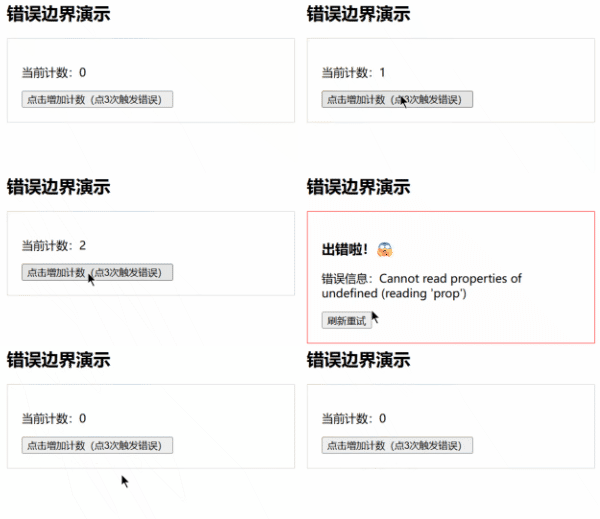
效果:

chrome-capture-2026-01-22 (4)

2. 性能优化

2.1 shouldComponentUpdate

SCU,控制组件自身或者子组件是否需要更新,尤其在子组件非常多的情况下,需要进行优化。

2.2 PureComponent

PureComponent 会帮你比较新props 跟旧的props,新的state和老的state(值相等,或者对象含有相同的属性、且属性值相等),决定shouldcomponentUpdate 返回true 或者false,从而决定要不要调用 render 去重新渲染。

注意:如果你的 state 或 props 『永远都会变』,那 PureComponent 并不会比较快,因为 shallowEqual 也需要花时间。

1
2
3
4
5
6
7
import React, { PureComponent } from 'react'

export default class App extends PureComponent {
render() {
return <div>app</div>
}
}

案例:React 封装 Swiper 轮播

安装:npm i swiper@8 - 以大版本 8 为例

验证

1
2
3
4
5
6
7
8
9
10
11
12
13
14
15
16
17
18
19
20
21
22
23
24
25
26
27
28
29
30
31
32
33
34
35
36
37
38
39
40
41
42
43
44
45
46
47
48
49
50
51
52
import { Component } from 'react'
import Swiper from 'swiper/bundle' //swiper@8
import 'swiper/css/bundle' //swiper@8

export default class App extends Component {
state = {
list: [],
}
componentDidMount = () => {
// 异步获取数据,如 axios
setTimeout(() => {
this.setState({
list: ['111', '222', '333'],
})

//异步中,setState 是同步的
//方式一:此位置 new Swiper() 也可以,没问题
}, 1000)
}

// 方式二:DOM 都更新完之后,再 new Swiper(),OK
componentDidUpdate = (prevProps, prevState) => {
const swiper = new Swiper('.swiper', {
loop: true,
// 如果需要分页器
pagination: {
el: '.swiper-pagination',
},
autoplay: {
delay: 2000,
disableOnInteraction: false,
},
})
}

render() {
return (
<div>
<div className="swiper" style={{ backgroundColor: 'yellow', height: '300px', width: '500px' }}>
<div className="swiper-wrapper">
{this.state.list.map(item => (
<div className="swiper-slide" key={item}>
{item}
</div>
))}
</div>
<div className="swiper-pagination"></div>
</div>
</div>
)
}
}

封装

目录:

1
2
3
4
swiper/
Swiper.js
SwiperItem.js
index.js

index.js

1
2
3
4
5
6
7
8
9
10
11
12
13
14
15
16
17
18
19
20
21
22
23
24
25
26
27
28
import React, { Component } from 'react'
import JerrySwiper from './swiper/Swiper'
import SwiperItem from './swiper/SwiperItem'

export default class JerryApp extends Component {
state = {
list: [],
}
componentDidMount = () => {
setTimeout(() => {
this.setState({
list: ['aaa', 'bbb', 'ccc'],
})
}, 1000)
}

render() {
return (
<div>
<JerrySwiper>
{this.state.list.map(item => (
<SwiperItem key={item}>{item}</SwiperItem>
))}
</JerrySwiper>
</div>
)
}
}

swiper/Swiper.js

1
2
3
4
5
6
7
8
9
10
11
12
13
14
15
16
17
18
19
20
21
22
23
24
25
26
27
28
29
30
31
import { Component } from 'react'
import Swiper from 'swiper/bundle' //swiper@8
import 'swiper/css/bundle' //swiper@8

export default class JerrySwiper extends Component {
// new Swiper() 最好写在 update 里,DOM有数据了,才能正常初始化swiper
componentDidUpdate = (prevProps, prevState) => {
const swiper = new Swiper('.swiper', {
loop: true,
// 如果需要分页器
pagination: {
el: '.swiper-pagination',
},
autoplay: {
delay: 1000,
disableOnInteraction: false,
},
})
}

render() {
return (
<div>
<div className="swiper" style={{ backgroundColor: 'yellow', height: '100px', width: '200px' }}>
<div className="swiper-wrapper">{this.props.children}</div>
<div className="swiper-pagination"></div>
</div>
</div>
)
}
}

swiper/SwiperItem.js

1
2
3
4
5
6
7
8
9
10
11
import React, { Component } from 'react'

export default class SwiperItem extends Component {
render() {
return (
<div className="swiper-slide">
{this.props.children}
</div>
)
}
}

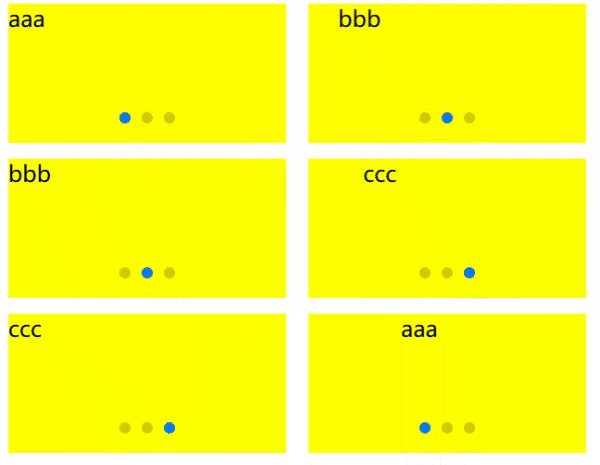
效果:

chrome-capture-2026-01-22 (5)


04-React生命周期
https://janycode.github.io/2022/05/22/04_大前端/07_React/04-React生命周期/
作者
Jerry(姜源)
发布于
2022年5月22日
许可协议