参考:
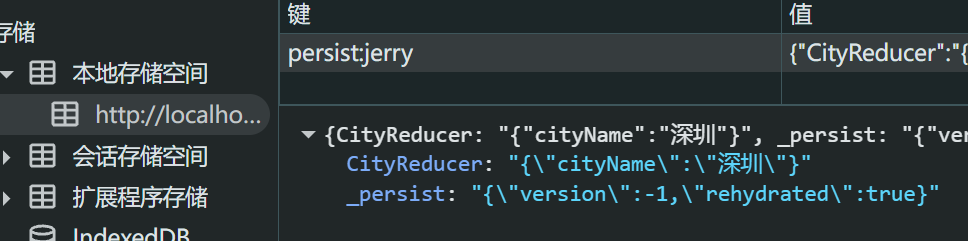
1. Flux 架构
介绍
Flux 是一种架构思想,专门解决软件的结构问题。它跟MVC架构是同一类东西,但是更加简单和清晰。
Redux
Redux 是 Flux 的其中一种实现方式,最主要是用作应用状态的管理。【推荐】
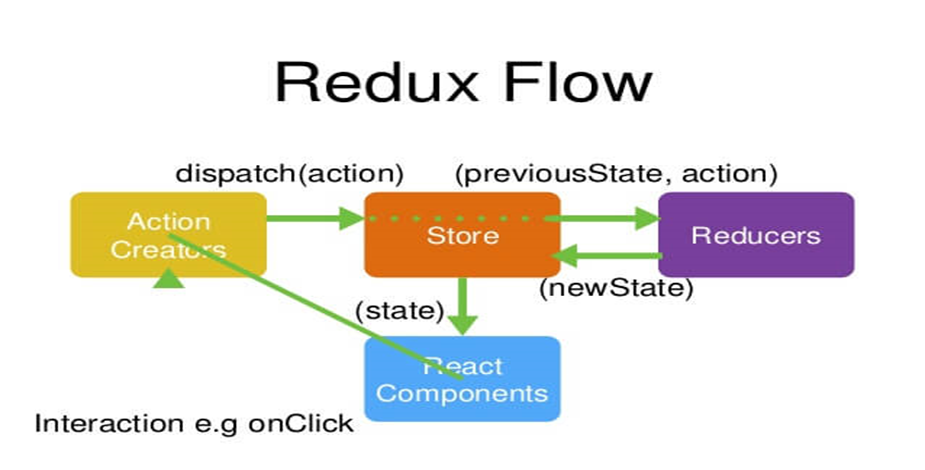
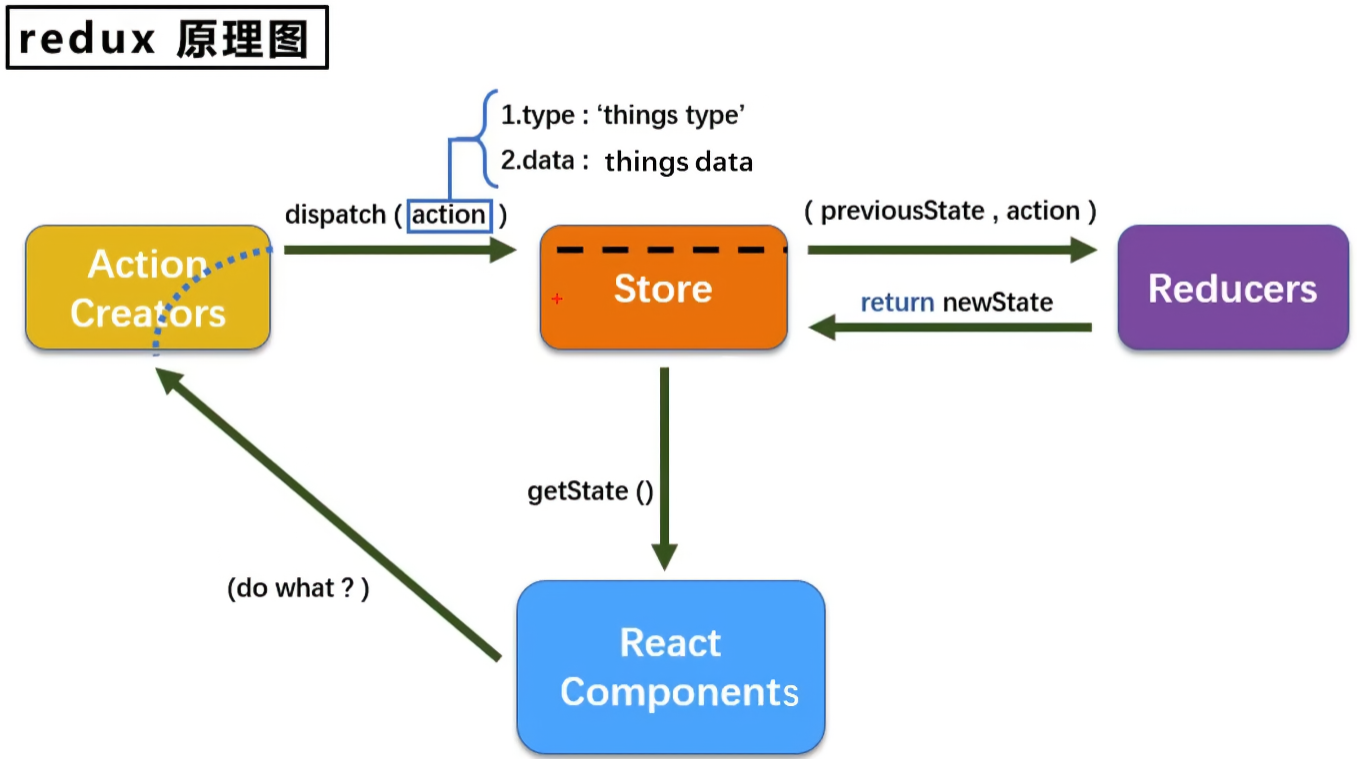
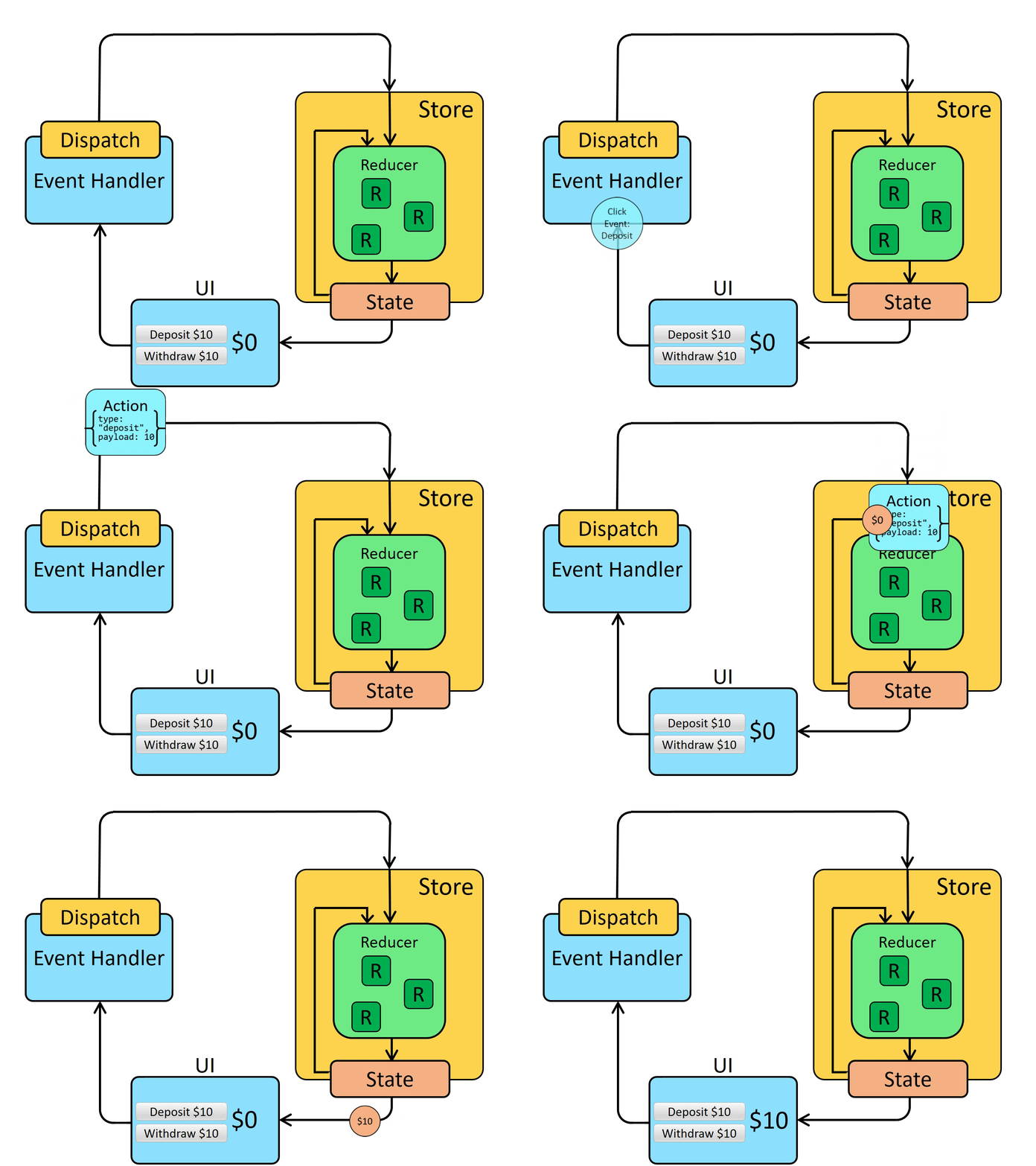
简言之,Redux 用一个单独的常量状态树(state对象)保存这一整个应用的状态,这个对象不能直接被改变。当一些数据变化了,一个新的对象就会被创建(使用 actions 和 reducers ),这样就可以进行数据追踪,实现时光旅行。
- state 以单一对象存储在 store 对象中
- state 只读(每次都返回一个新的对象)
- 使用纯函数 reducer 执行 state 更新
Redux 工作流(原理)
2. Redux 公共状态管理
2.1 安装
安装:npm i redux@4.1.2 - 以 v4.1.2 为例
2.2 使用(新vs旧用法)
场景:显示或隐藏 Tabbar,即进入详情页隐藏页面底部 Tabbar 为例,其他页面默认还是保持展示页面底部 Tabbar。
App.js >> store.js(订阅发布机制) << Detail.js
案例源码:https://github.com/janycode/react-router-v6-demo/commit/c9c4bc00fcaa394db7a853cf82d5f0be06402e39
目录:
1
2
3
4
5
6
7
8
| src/
redux/
actionCreator/
TabbarActionCreator.js
store.js
views/
Detail.js
App.js
|
redux/store.js
- 旧版本 redux 创建 store 使用:
import { createStore } from 'redux'
- 新版本 redux 创建 store 使用:
import { legacy_createStore as createStore } from 'redux'
1
2
3
4
5
6
7
8
9
10
11
12
13
14
15
16
17
18
19
20
21
| import { createStore } from 'redux'
const reducer = (prevState = {
show: true,
//...
}, action) => {
console.log("action:", action);
let newState = {...prevState}
switch (action?.type) {
case "hide-tabbar":
newState.show = false
return newState
case "show-tabbar":
newState.show = true
return newState
default:
return prevState
}
return prevState
}
const store = createStore(reducer)
|
views/Detail.js
1
2
3
4
5
6
7
8
9
10
11
12
13
14
15
16
17
18
19
20
21
22
23
24
25
26
27
28
| import { useEffect } from 'react';
import { useNavigate, useParams } from 'react-router-dom';
import store from '../redux/store';
import { hide, show } from '../redux/actionCreator/TabbarActionCreator';
export default function Detail() {
const params = useParams()
console.log(params.myid);
const navigate = useNavigate()
useEffect(() => {
console.log("create");
store.dispatch(hide())
return () => {
console.log("destory");
store.dispatch(show())
}
}, [])
return (
<div>Detail
<button onClick={() => {
navigate("/detail/888") //跳转当前组件,解析新的参数渲染新的内容
}}>猜你喜欢</button>
</div>
)
}
|
App.js
1
2
3
4
5
6
7
8
9
10
11
12
13
14
15
16
17
18
19
20
21
22
23
24
25
26
| import { BrowserRouter } from 'react-router-dom'
import './App.css'
import MRouter from './router/index'
import Tabbar from './components/Tabbar'
import store from './redux/store'
import { useEffect, useState } from 'react'
function App() {
const [isShow, setIsShow] = useState(true)
useEffect(() => {
store.subscribe(() => {
console.log("app subscribe 订阅:", store.getState());
setIsShow(store.getState().show)
})
}, [])
return (
<BrowserRouter> {/* 指定 BrowserRouter 路由模式 */}
<MRouter /> {/* 路由组件封装 router/index.js */}
{isShow && <Tabbar />}
</BrowserRouter>
)
}
export default App
|
actionCreator/TabbarActionCreator.js
1
2
3
4
5
6
7
8
9
10
| function hide() {
return { type: "hide-tabbar" }
}
function show() {
return { type: "show-tabbar" }
}
export {
hide,
show
}
|
2.3 store 原理
自定义实现 createJerryStore(reducer) 实现 和 官方 createStore 相同的效果,逻辑来源于源码。
- 原理:订阅 subscribe/dispatch 发布机制。
- subscribe 订阅并传入回调函数 callback
- dispatch 发布并触发 callback 执行,但会经过 action 的 switch-case 分支处理修改 state 值
- getState 返回最新的 state
1
2
3
4
5
6
7
8
9
10
11
12
13
14
15
16
17
18
19
20
21
22
23
24
25
26
27
28
29
30
31
32
33
34
35
36
37
38
39
40
41
42
43
44
45
46
47
48
49
50
51
52
53
54
55
56
|
import { createStore } from 'redux'
const reducer = (prevState = {
show: true,
cityName: "北京" //当前在内存中,需要持久化存储
//...
}, action) => {
console.log("action:", action);
let newState = { ...prevState }
switch (action?.type) {
case "hide-tabbar":
newState.show = false
return newState
case "show-tabbar":
newState.show = true
return newState
case "change-city":
newState.cityName = action.payload
return newState
default:
return prevState
}
return prevState
}
const store = createJerryStore(reducer)
function createJerryStore(reducer) {
let list = []
let state = reducer()
function subscribe(callback) {
list.push(callback)
}
function dispatch(action) {
state = reducer(state, action)
for (let i in list) {
list[i] && list[i]()
}
}
function getState() {
return state
}
return {
subscribe,
dispatch,
getState
}
}
export default store
|
2.4 reducer 合并 combineReducers()
如果如果不同的 action 所处理的状态之间没有联系,就可以把 Reducer 函数拆分。不同的函数负责处理不同属性,最终把它们合并成一个大的 Reducer 即可。
combineReducers({...}),合并 reducer 后取值需要加上 XxxReducer 名字空间来访问 state,但 dispatch 会自动匹配无需添加合并的名字。
- eg:
store.getState().CityReducer.cityName
1
2
3
4
5
6
7
8
9
10
11
12
| import {combineReducers} from "redux";
const reducer = combineReducers({
a: functionA,
b: functionB,
c: functionC
})
(state)=>{
return {
jerrystate:state.a (不同的命名空间)
}
}
|
目录:
1
2
3
4
5
6
7
8
9
10
| src/
redux/
reducers/
CityReducers.js
TabbarReducers.js
store.js
views/
Cinema.js
City.js
App.js
|
redux/store.js
1
2
3
4
5
6
7
8
9
10
11
| import { combineReducers, createStore } from 'redux'
import CityReducer from './reducers/CityReducer';
import TabbarReducer from './reducers/TabbarReducer';
const reducer = combineReducers({
CityReducer,
TabbarReducer
})
const store = createStore(reducer)
|
redux/reducers/CityReducers.js
1
2
3
4
5
6
7
8
9
10
11
12
13
14
15
16
| const CityReducer = (prevState = {
cityName: "北京" //当前在内存中,需要持久化存储
}, action) => {
console.log("action:", action);
let newState = { ...prevState }
switch (action?.type) {
case "change-city":
newState.cityName = action.payload
return newState
default:
return prevState
}
return prevState
}
export default CityReducer
|
redux/reducers/TabbarReducers.js
1
2
3
4
5
6
7
8
9
10
11
12
13
14
15
16
17
18
19
| const TabbarReducer = (prevState = {
show: true,
}, action) => {
console.log("action:", action);
let newState = { ...prevState }
switch (action?.type) {
case "hide-tabbar":
newState.show = false
return newState
case "show-tabbar":
newState.show = true
return newState
default:
return prevState
}
return prevState
}
export default TabbarReducer
|
views/Cinema.js
1
2
3
4
5
6
7
8
9
10
11
12
13
14
15
16
17
| import React, { useState } from 'react'
import store from '../redux/store'
import { useNavigate } from 'react-router-dom'
export default function Cinema(props) {
const [cityName] = useState(store.getState().CityReducer.cityName)
const navigate = useNavigate()
return (
<div>
<button onClick={() => {
navigate(`/city`)
}}>{cityName}</button>
Cinema
</div>
)
}
|
views/City.js
1
2
3
4
5
6
7
8
9
10
11
12
13
14
15
16
17
18
19
20
21
22
23
24
25
26
| import React, { useState } from 'react'
import store from '../redux/store'
import { useNavigate } from 'react-router-dom'
export default function City() {
const [list] = useState(["北京", "上海", "广州", "深圳"])
const navigate = useNavigate()
return (
<div>City
<ul>
{
list.map(item =>
<li key={item} onClick={() => {
store.dispatch({ // 发布(通知),让公共 store 处理 type 返回新的 state
type: "change-city",
payload: item // 自定义字段 payload
})
//navigate("/cinemas") //进入 /cinemas 或 返回上一页
navigate(-1) //返回上一页,即 /cinemas 会自动再次读取 store 中新的 state 显示 cityName
}}>{item}</li>
)
}
</ul>
</div>
)
}
|
App.js
1
2
3
4
5
6
7
8
9
10
11
12
13
14
15
16
17
18
19
20
21
22
23
24
25
26
27
|
import { BrowserRouter } from 'react-router-dom'
import './App.css'
import MRouter from './router/index'
import Tabbar from './components/Tabbar'
import store from './redux/store'
import { useEffect, useState } from 'react'
function App() {
const [isShow, setIsShow] = useState(true)
useEffect(() => {
store.subscribe(() => {
console.log("app subscribe 订阅:", store.getState());
setIsShow(store.getState().TabbarReducer.show)
})
}, [])
return (
<BrowserRouter> {/* 指定 BrowserRouter 路由模式 */}
<MRouter /> {/* 路由组件封装 router/index.js */}
{isShow && <Tabbar />}
</BrowserRouter>
)
}
export default App
|
效果:

3. Redux 异步中间件
在 Redux 里,action 仅仅是携带了数据的普通 js 对象。action creator 返回的值是这个 action 类型的对象。然后通过 store.dispatch() 进行分发。同步的情况下一切都很完美,但是 reducer 无法处理异步的情况。
那么就需要在 action 和 reducer 中间架起一座桥梁来处理异步,这就是middleware。
中间件的原理:
1
2
3
4
| export default function thunkMiddleware({ dispatch, getState }) {
return next => action =>
typeof action === 'function' ? action(dispatch, getState) : next(action);
}
|
这段代码的意思是,中间件这个桥梁接受到的参数 action,如果不是 function 则和过去一样直接执行 next 方法(下一步处理),相当于中间件没有做任何事。如果 action 是 function,则先执行 action,action 的处理结束之后,再在 action 的内部调用 dispatch。
3.1 redux-thunk
安装:npm i redux-thunk@2 - 兼容版本,为了兼容 redux 4.1.2
案例源码:https://github.com/janycode/react-router-v6-demo/commit/ff79daf706d8dd5a063186f5adaf9450cebf8065
目录:
1
2
3
4
5
6
7
8
9
| src/
redux/
actionCreator/
getCinemaListAction.js
reducers/
CinemaListReducer.js
store.js
views/
Cinema.js
|
redux/store.js - 引入并使用 redux-thunk 组件,就搭建了桥梁,最终会执行封装方法中的 dispatch 函数
- 依赖 Cinema.js 组件中
store.dispatch(getCinemaListAction()) 传入的函数
1
2
3
4
5
6
7
8
9
10
11
12
13
14
| import { applyMiddleware, combineReducers, createStore } from 'redux'
import CityReducer from './reducers/CityReducer';
import TabbarReducer from './reducers/TabbarReducer';
import CinemaListReducer from './reducers/CinemaListReducer';
import reduxThunk from 'redux-thunk';
const reducer = combineReducers({
CityReducer,
TabbarReducer,
CinemaListReducer
})
const store = createStore(reducer, applyMiddleware(reduxThunk))
|
redux/actionCreator/getCinemaListAction.js - 封装异步请求 axios 函数
1
2
3
4
5
6
7
8
9
10
11
12
13
14
15
16
17
18
19
20
21
22
| import axios from 'axios'
function getCinemaListAction() {
return (dispatch) => {
axios({
url: 'https://m.maizuo.com/gateway?cityId=110100&ticketFlag=1&k=9366495',
headers: {
'x-client-info': '{"a":"3000","ch":"1002","v":"5.2.1","e":"17689720181688867040133121","bc":"410100"}',
'x-host': 'mall.film-ticket.cinema.list',
},
}).then(res => {
console.log(res.data.data.cinemas)
dispatch({
type: "change-list",
payload: res.data.data.cinemas
})
})
}
}
export default getCinemaListAction
|
redux/reducers/CinemaListReducer.js
1
2
3
4
5
6
7
8
9
10
11
12
13
14
15
16
| const CinemaListReducer = (prevState = {
list: [] //当前在内存中,需要持久化存储
}, action) => {
console.log("action:", action);
let newState = { ...prevState }
switch (action?.type) {
case "change-list":
newState.list = action.payload
return newState
default:
return prevState
}
return prevState
}
export default CinemaListReducer
|
views/Cinema.js - 在 useEffect 中通过 store.dispatch 触发 redux-thunk 执行对应函数请求到数据,然后去做订阅拿到数据、再取消订阅(防止重复触发订阅)
1
2
3
4
5
6
7
8
9
10
11
12
13
14
15
16
17
18
19
20
21
22
23
24
25
26
27
28
29
30
31
32
33
34
35
36
37
38
39
40
41
42
43
44
45
46
47
48
49
50
51
| import { useEffect, useState } from 'react'
import { useNavigate } from 'react-router-dom'
import getCinemaListAction from '../redux/actionCreator/getCinemaListAction'
import store from '../redux/store'
export default function Cinema(props) {
const [cityName] = useState(store.getState().CityReducer.cityName)
const [cinemaList, setCinemaList] = useState(store.getState().CinemaListReducer.list)
const navigate = useNavigate()
useEffect(() => {
console.log("Cinema:", store.getState().CinemaListReducer.list);
let list = store.getState().CinemaListReducer.list
if (list?.length === 0) {
console.log("Cinema 请求数据");
store.dispatch(getCinemaListAction())
} else {
console.log("默认 list 非空时,走的是 store 缓存");
}
let unsubscribe = store.subscribe(() => {
console.log("Cinema 订阅内容:", store.getState().CinemaListReducer.list);
setCinemaList(store.getState().CinemaListReducer.list)
})
return () => {
unsubscribe()
}
}, [])
return (
<div>
<div>
<button onClick={() => {
navigate(`/city`)
}}>{cityName}</button>
</div>
{
cinemaList.map(item =>
<dl key={item.cinemaId} style={{ padding: "10px" }}>
<dt>{item.name}</dt>
<dt style={{ fontSize: "12px", color: 'gray' }}>{item.address}</dt>
</dl>
)
}
</div>
)
}
|
效果:cinemaList 可以正常走 store 中订阅的数据缓存。
3.2 redux-promise
安装:npm i redux-promise - 默认版本@0.6.0
案例源码:https://github.com/janycode/react-router-v6-demo/commit/fdd78a47da598658fbe6a16d55028e0b3880cb19
基于 redux-thunk 的例子 demo 改造如下文件:
redux/actionCreator/getCinemaListAction.js - 封装异步请求 axios 函数
1
2
3
4
5
6
7
8
9
10
11
12
13
14
15
16
17
18
19
20
| import axios from 'axios'
function getCinemaListAction() {
return axios({
url: 'https://m.maizuo.com/gateway?cityId=110100&ticketFlag=1&k=9366495',
headers: {
'x-client-info': '{"a":"3000","ch":"1002","v":"5.2.1","e":"17689720181688867040133121","bc":"410100"}',
'x-host': 'mall.film-ticket.cinema.list',
},
}).then(res => {
return {
type: "change-list",
payload: res.data.data.cinemas
}
})
}
export default getCinemaListAction
|
redux/store.js - 引入并使用 redux-promise 组件,applyMiddleware 方法可以传入多个参数
1
2
3
4
5
6
7
8
9
10
11
12
13
14
15
| import { applyMiddleware, combineReducers, createStore } from 'redux'
import CityReducer from './reducers/CityReducer';
import TabbarReducer from './reducers/TabbarReducer';
import CinemaListReducer from './reducers/CinemaListReducer';
import reduxThunk from 'redux-thunk';
import reduxPromise from 'redux-promise';
const reducer = combineReducers({
CityReducer,
TabbarReducer,
CinemaListReducer
})
const store = createStore(reducer, applyMiddleware(reduxThunk, reduxPromise))
|
效果:cinemaList 可以正常走 store 中订阅的数据缓存。
async+await
基于 redux-promise 中间件的使用,封装的异步请求中也支持 async + await 等待请求返回数据。
redux/actionCreator/getCinemaListAction.js
1
2
3
4
5
6
7
8
9
10
11
12
13
14
15
16
17
18
| import axios from 'axios'
async function getCinemaListAction() {
return await axios({
url: 'https://m.maizuo.com/gateway?cityId=110100&ticketFlag=1&k=9366495',
headers: {
'x-client-info': '{"a":"3000","ch":"1002","v":"5.2.1","e":"17689720181688867040133121","bc":"410100"}',
'x-host': 'mall.film-ticket.cinema.list',
},
}).then(res => {
return {
type: "change-list",
payload: res.data.data.cinemas
}
})
}
|
插件开源地址:https://github.com/zalmoxisus/redux-devtools-extension
谷歌浏览器插件下载:Redux DevTools.crx
需要重启浏览器才能看到 Redux 菜单:

代码中配置:
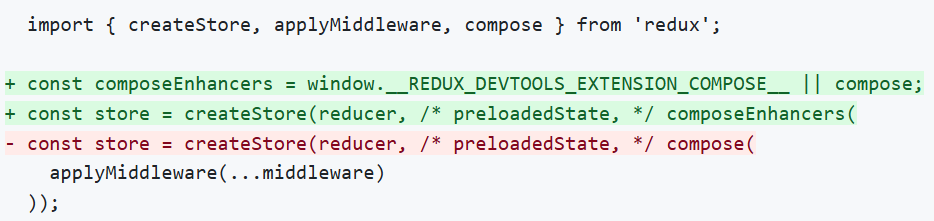
redux/store.js
1
2
3
4
5
6
7
8
9
10
11
12
13
14
15
16
17
18
|
import { applyMiddleware, combineReducers, compose, createStore } from 'redux'
import CityReducer from './reducers/CityReducer';
import TabbarReducer from './reducers/TabbarReducer';
import CinemaListReducer from './reducers/CinemaListReducer';
import reduxThunk from 'redux-thunk';
import reduxPromise from 'redux-promise';
const reducer = combineReducers({
CityReducer,
TabbarReducer,
CinemaListReducer
})
const composeEnhancers = window.__REDUX_DEVTOOLS_EXTENSION_COMPOSE__ || compose;
const store = createStore(reducer, composeEnhancers(applyMiddleware(reduxThunk, reduxPromise)))
|
浏览器查看 redux 的 store 中数据效果:
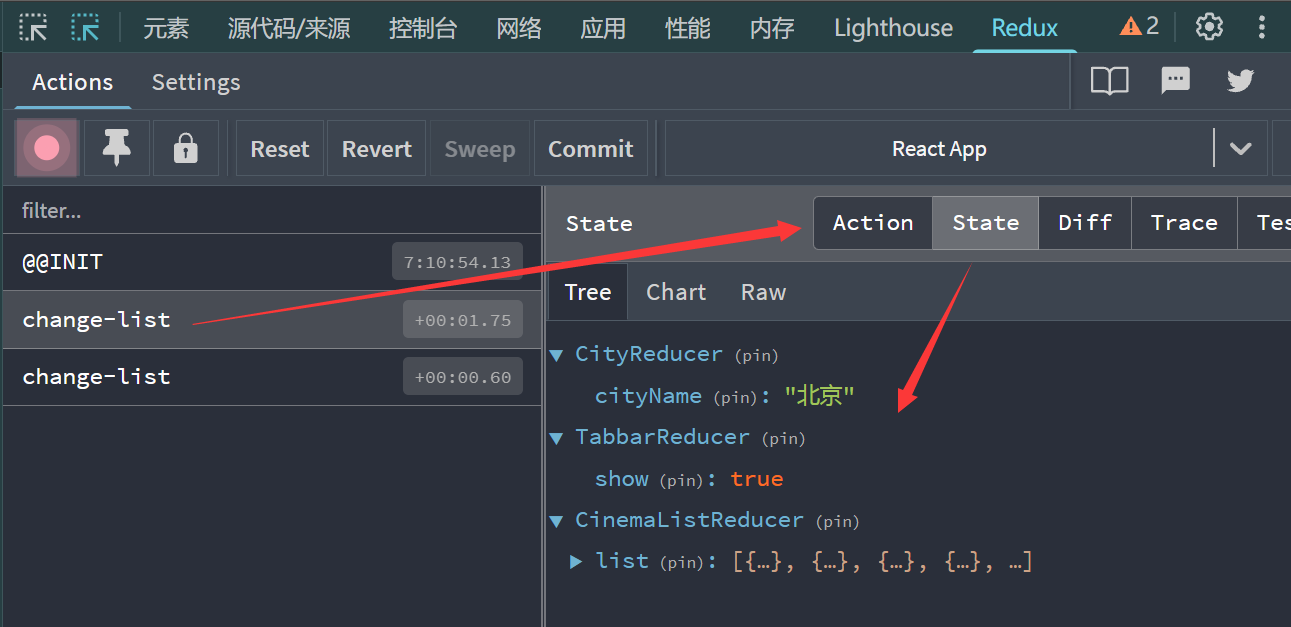
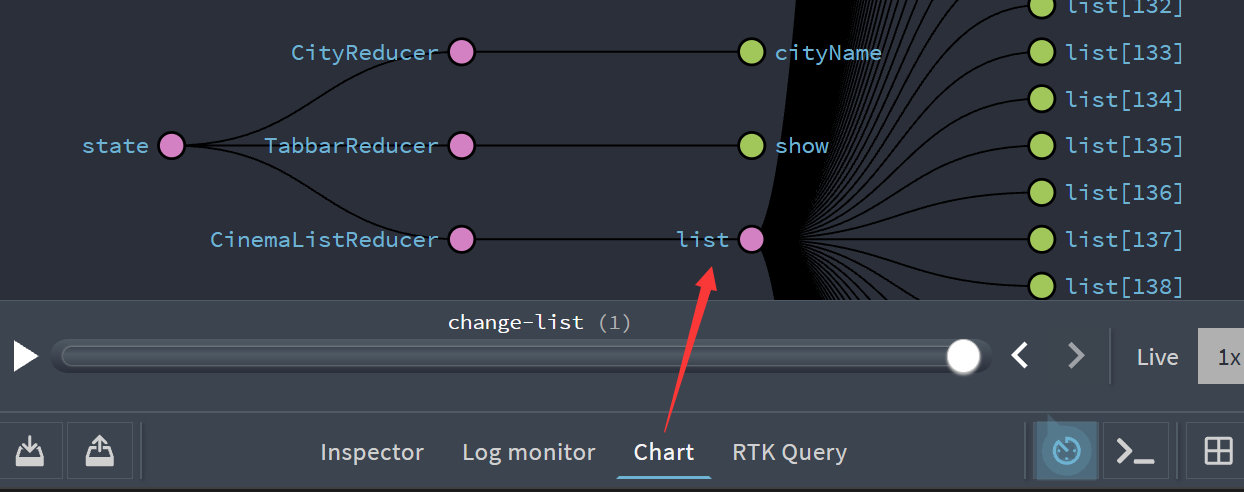
5. React-Redux 使用(★)
案例源码:https://github.com/janycode/react-router-v6-demo/commit/80e75b3fdf8e391c7ceb021a3f8ea65bb8fc06ad
5.1 模型
官网:https://github.com/reactjs/react-redux
(1)UI组件
- 只负责 UI 的呈现,不带有任何业务逻辑
- 没有状态(即:不使用 this.state 这个变量)
- 所有数据都由参数(this.props)提供
- 不使用任何 Redux 的 API
(2) 容器组件
- 负责管理数据和业务逻辑,不负责 UI 的呈现
- 带有内部状态
- 使用 Redux 的 API
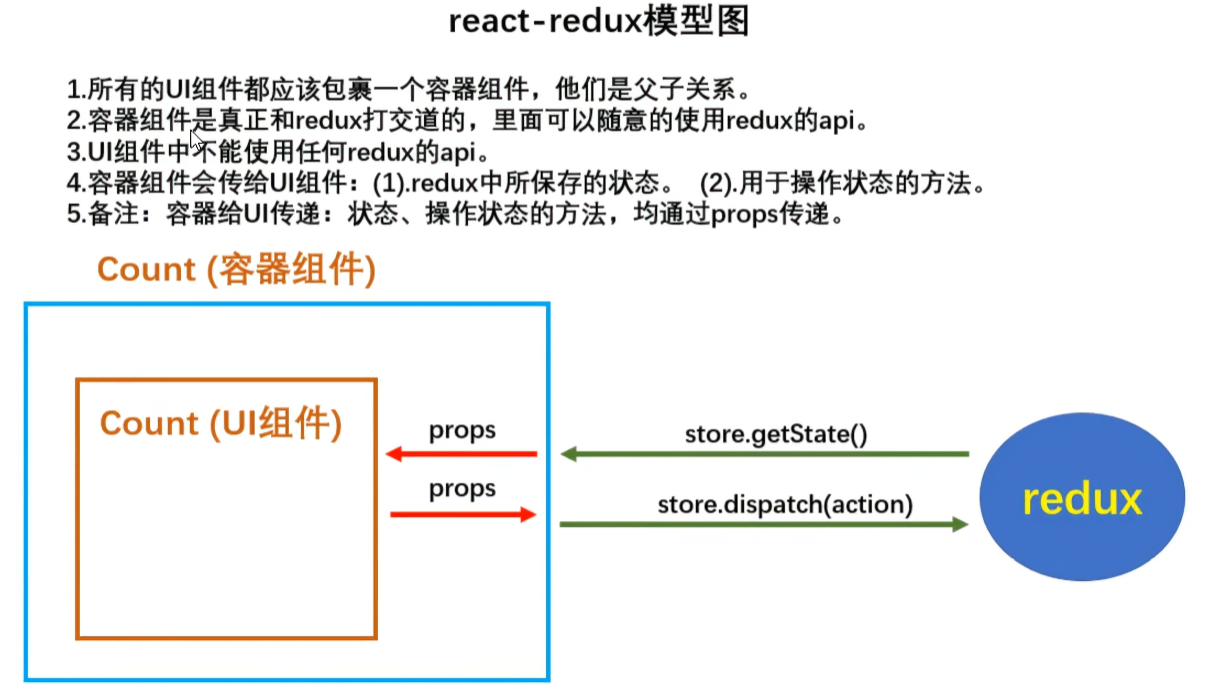
5.2 安装(v18降级兼容)
安装:npm i react-redux@8
核心版本兼容表:
| react 版本 |
兼容的 react-redux 版本 |
要求的 redux 版本 |
| 16.8/17/18 |
8.x / 9.x |
8.x 配 4.x/5.x;9.x 配 5.x |
| 19+ |
9.x 及以上 |
5.x 及以上 |
因此 **保留旧代码方案 ** :降级 React 到 18.x,继续用 redux@4.x + react-redux@8.x
1
2
3
4
|
npm i react@18 react-dom@18
npm i react-redux@8
|
然后重启服务:npm start - 实测无报错,旧代码功能正常。
package.json 版本情况:
1
2
3
4
5
6
7
8
9
10
11
| "dependencies": {
...
"react": "^18.3.1",
"react-dom": "^18.3.1",
"react-redux": "^8.1.3",
"react-router-dom": "^6.30.3",
"react-scripts": "5.0.1",
"redux": "^4.1.2",
"redux-promise": "^0.6.0",
"redux-thunk": "^2.4.2"
},
|
5.3 <Provider> 与 connect()()
(1)React-Redux 提供 <Provider> 组件,可以让容器组件拿到 state。
1
2
3
4
5
6
7
8
9
10
11
12
13
14
| import React from 'react';
import ReactDOM from 'react-dom/client';
import App from './App';
import { Provider } from 'react-redux';
import store from './redux/store';
const root = ReactDOM.createRoot(document.getElementById('root'));
root.render(
<React.StrictMode>
<Provider store={store}> {/* 包裹 App组件,并携带属性 store (公共状态管理) */}
<App />
</Provider>
</React.StrictMode>
);
|
(2)React-Redux 提供 connect()() 方法,用于从 UI 组件生成容器组件。connect 就是将这两种组件连起来(即拥有 store 的订阅发布能力)。
以 Cinema.js 为例:
1
2
3
4
5
6
7
8
9
10
11
12
|
const mapStateToProps = (state) => {
return {
list: state.CinemaListReducer.list,
cityName: state.CityReducer.cityName
}
}
const mapDispatchToProps = {
getCinemaListAction
}
export default connect(mapStateToProps, mapDispatchToProps)(Cinema)
|
Cinema.js 完整代码:
1
2
3
4
5
6
7
8
9
10
11
12
13
14
15
16
17
18
19
20
21
22
23
24
25
26
27
28
29
30
31
32
33
34
35
36
37
38
39
40
41
42
43
44
45
46
47
48
49
50
51
52
53
54
55
| import { useEffect } from 'react'
import { connect } from 'react-redux'
import { useNavigate } from 'react-router-dom'
import getCinemaListAction from '../redux/actionCreator/getCinemaListAction'
function Cinema(props) {
const navigate = useNavigate()
let {list, getCinemaListAction} = props
useEffect(() => {
if (list.length === 0) {
console.log("Cinema 请求数据");
getCinemaListAction()
} else {
console.log("默认 list 非空时,走的是 store 缓存");
}
}, [list, getCinemaListAction])
return (
<div>
<div style={{ height: "30px" }}>
<div>
<button style={{ float: 'left' }} onClick={() => {
navigate(`/city`)
}}>{props.cityName}</button>
</div>
<div style={{ float: 'right' }}>
<button onClick={() => {
navigate(`/cinemas/search`)
}}>搜索</button>
</div>
</div>
{
props.list.map(item =>
<dl key={item.cinemaId} style={{ padding: "10px" }}>
<dt>{item.name}</dt>
<dt style={{ fontSize: "12px", color: 'gray' }}>{item.address}</dt>
</dl>
)
}
</div>
)
}
const mapStateToProps = (state) => {
return {
list: state.CinemaListReducer.list,
cityName: state.CityReducer.cityName
}
}
const mapDispatchToProps = {
getCinemaListAction
}
export default connect(mapStateToProps, mapDispatchToProps)(Cinema)
|
5.4 原理
HOC(高阶组件)与 context 通信在react-redux 底层中的应用:
(1) connect 是HOC, 高阶组件
(2) Provider 组件,可以让容器组件拿到 state,使用了 context
HOC 不仅仅是一个方法,确切说应该是一个组件工厂,获取低阶组件,生成高阶组件。
(1) 代码复用,代码模块化
(2) 增删改props
(3) 渲染劫持
NotFound.js - 示例 jerryconnect 自定义。
1
2
3
4
5
6
7
8
9
10
11
12
13
14
15
16
17
18
19
20
21
22
23
24
25
26
27
28
29
30
31
32
33
| import { useEffect } from 'react';
function NotFound(props) {
useEffect(() => {
console.log(props);
}, [])
return (
<div>NotFound</div>
)
}
function jerryconnect(cb, obj) {
let value = cb()
return (MyComponent) => {
return (props) => {
return <div style={{ color: "red" }}> {/* 渲染拦截 */}
<MyComponent {...value} {...props} {...obj} /> {/* 增减属性 */}
</div>
}
}
}
export default jerryconnect(() => {
return {
a: 1,
b: 2
}
}, {
aa() { },
bb() { }
})(NotFound)
|

6. Redux 持久化
依托于 Redux 和 React-Redux。
参考基本用法:https://github.com/rt2zz/redux-persist?tab=readme-ov-file#basic-usage
选择性持久化:https://github.com/rt2zz/redux-persist?tab=readme-ov-file#blacklist--whitelist
6.1 安装
安装:npm i redux-persist - 版本v6.0.0
6.2 使用
案例源码:https://github.com/janycode/react-router-v6-demo/commit/40c1bdd795d946e60883072773a78486c71b25b2
src/redux/store.js - persistConfig, persistedReducer, store, persistor 按照官方说明最终导出 store, persistor
- 选择性持久化:persistConfig 中 whitelist 可以限制只持久化的 reducer
1
2
3
4
5
6
7
8
9
10
11
12
13
14
15
16
17
18
19
20
21
22
23
24
25
26
27
28
29
| import ...
import { applyMiddleware, combineReducers, compose, createStore } from 'redux'
import storage from 'redux-persist/lib/storage'
import { persistStore, persistReducer } from 'redux-persist'
const persistConfig = {
key: 'jerry',
storage,
whitelist: ['CityReducer']
}
const reducer = combineReducers({
CityReducer,
TabbarReducer,
CinemaListReducer
})
const persistedReducer = persistReducer(persistConfig, reducer)
const composeEnhancers = window.__REDUX_DEVTOOLS_EXTENSION_COMPOSE__ || compose;
const store = createStore(persistedReducer, composeEnhancers(applyMiddleware(reduxThunk, reduxPromise)))
let persistor = persistStore(store)
export {store, persistor}
|
src/index.js - <PersistGate> 标签包裹
1
2
3
4
5
6
7
8
9
10
11
12
13
14
15
| import ...
import { store, persistor } from './redux/store';
import { PersistGate } from 'redux-persist/integration/react'
const root = ReactDOM.createRoot(document.getElementById('root'));
root.render(
<React.StrictMode>
{/* React-Redux 提供Provider组件,可以让容器组件拿到state */}
<Provider store={store}> {/* 包裹 App组件,并携带属性 store */}
<PersistGate loading={null} persistor={persistor}>
<App />
</PersistGate>
</Provider>
</React.StrictMode>
);
|