
参考:
1. Mobx
1.1 介绍
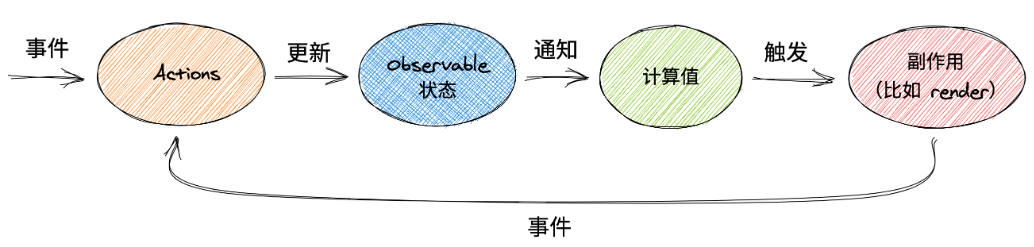
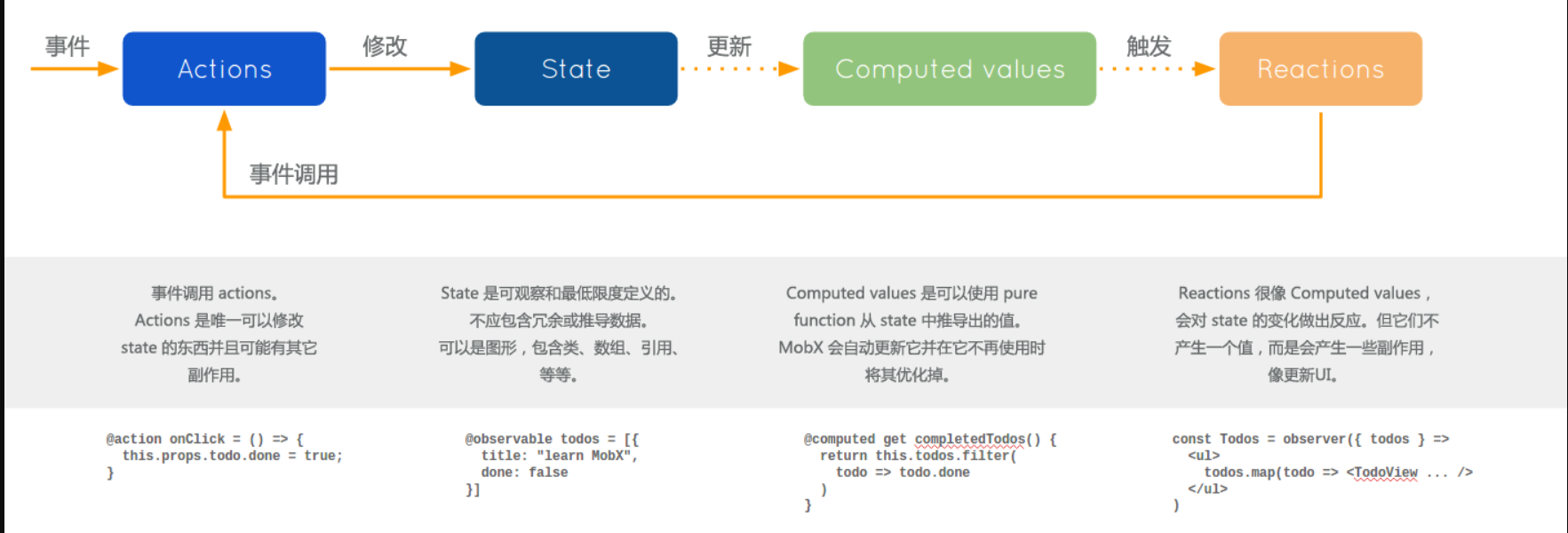
(1) Mobx是一个功能强大,上手非常容易的状态管理工具。
(2) Mobx背后的哲学很简单: 任何源自应用状态的东西都应该自动地获得。
(3) Mobx利用 getter 和 setter 来收集组件的数据依赖关系,从而在数据发生变化的时候精确知道哪些组件需要重绘,在界面的规模变大的时候,往往会有很多细粒度更新。
(vue 类似)
1.2 与 Redux 区别
- Mobx 写法上更偏向于 OOP(面相对象编程)
- 对一份数据直接进行修改操作,不需要始终返回一个新的数据
- 并非单一 store, 可以多 store
- Redux 默认以 JavaScript 原生对象形式存储数据,而 Mobx 使用可观察对象
优点:
a. 学习成本小
b. 面向对象编程, 而且对 TS 友好
缺点:
a. 过于自由:Mobx 提供的约定及模版代码很少,代码编写很自由,如果不做一些约定,比较容易导致团队代码风格不统一
b. 相关的中间件很少,逻辑层业务整合是问题。
比 Redux 简洁,好用。
1.3 安装
安装:npm i mobx@5 - 当前版本 v5.15.7
1.4 observable | autorun
普通类型监听
1
2
3
4
5
6
7
8
9
10
11
12
13
14
15
16
|
let observableNumber = observable.box(10)
let observableName = observable.box("jerry")
autorun(() => {
console.log(observableNumber.get());
})
autorun(() => {
console.log(observableName.get());
})
setTimeout(() => {
observableNumber.set(20)
}, 1000)
setTimeout(() => {
observableName.set("tom")
}, 3000)
|
输出:
对象类型监听
1
2
3
4
5
6
7
8
9
10
11
|
let obj = observable.map({
name: "jerry",
age: 18
})
autorun(() => {
console.log("对象的 name 属性改变了", obj.get("name"));
})
setTimeout(() => {
obj.set("name", "tom")
}, 2000)
|
输出:
1
2
| 对象的 name 属性改变了 jerry
对象的 name 属性改变了 tom
|
另一种精简的写法(推荐):
1
2
3
4
5
6
7
8
9
10
11
|
let obj = observable({
name: "jerry",
age: 18
})
autorun(() => {
console.log("对象的 name 属性改变了", obj.name);
})
setTimeout(() => {
obj.name = "tom"
}, 2000)
|
1.5 组件中使用
案例源码:https://github.com/janycode/react-router-v6-demo/commit/28889d39c67bebd58a44a0ffada55498eb8bf2ab
mobx/store.js
1
2
3
4
5
6
7
8
9
| import { observable } from 'mobx'
const store = observable({
isTabbarShow: true,
list: [],
cityName: "北京"
})
export default store
|
App.js
1
2
3
4
5
6
7
8
9
10
11
12
13
14
15
16
17
18
19
20
21
22
| import...
import { useEffect, useState } from 'react'
import store from './mobx/store'
import { autorun } from 'mobx'
function App(props) {
const [isShow, setIsShow] = useState(true)
useEffect(() => {
autorun(() => {
console.log("App autorun=", store.isTabbarShow);
setIsShow(store.isTabbarShow)
})
}, [])
return (
<BrowserRouter> {/* 指定 BrowserRouter 路由模式 */}
<MRouter /> {/* 路由组件封装 router/index.js */}
{isShow && <Tabbar />}
</BrowserRouter>
)
}
...
|
Detail.js - 会隐藏 Tabbar 的页面
1
2
3
4
5
6
7
8
9
10
11
12
13
14
15
16
17
18
19
20
21
22
23
24
| ...
import store from '../mobx/store';
function Detail(props) {
const params = useParams()
console.log("拿到参数", params.myid);
const navigate = useNavigate()
useEffect(() => {
store.isTabbarShow = false
return () => {
store.isTabbarShow = true
}
}, [params.myid])
return (
<div>Detail-id={params.myid}
<button onClick={() => {
navigate("/detail/888") //跳转当前组件,解析新的参数渲染新的内容
}}>猜你喜欢</button>
</div>
)
}
...
|
1.6 action+严格模式
案例源码:https://github.com/janycode/react-router-v6-demo/commit/f27fe7875b4abd57b6a92b4decbe86fec311bf62
第一种写法
实现
mobx/store.js
1
2
3
4
5
6
7
8
9
10
11
12
13
14
15
16
17
18
19
20
21
22
23
24
25
| import { observable, configure, action } from 'mobx'
configure({
enforceActions: 'always'
})
const store = observable({
isTabbarShow: true,
list: [],
cityName: "北京",
changeTabbarShow() {
this.isTabbarShow = true
},
changeTabbarHide() {
this.isTabbarShow = false
}
}, {
changeTabbarShow: action,
changeTabbarHide: action
})
export default store
|
views/Detail.js - 调用 action 方法去修改 store 值,不去直接修改。
1
2
3
4
5
6
7
8
9
10
11
12
13
14
15
16
17
18
19
20
21
22
23
24
25
26
27
| ...
import store from '../mobx/store';
function Detail(props) {
const params = useParams()
console.log("拿到参数", params.myid);
const navigate = useNavigate()
useEffect(() => {
store.changeTabbarHide()
return () => {
store.changeTabbarShow()
}
}, [params.myid])
return (
<div>Detail-id={params.myid}
<button onClick={() => {
navigate("/detail/888") //跳转当前组件,解析新的参数渲染新的内容
}}>猜你喜欢</button>
</div>
)
}
...
|
第二种写法-官方
步骤
需要支持 @ 装饰器:
①安装:npm i @babel/core @babel/plugin-proposal-decorators @babel/preset-env
②项目根目录下创建 .babelrc
1
2
3
4
5
6
7
8
9
10
11
| {
"presets": ["@babel/preset-env"],
"plugins": [
[
"@babel/plugin-proposal-decorators",
{
"legacy": true
}
]
]
}
|
③项目根目录下创建 config-overrides.js
1
2
3
4
5
6
7
8
9
10
11
12
13
14
15
16
| const path = require('path')
const { override, addDecoratorsLegacy } = require('customize-cra')
function resolve(dir) {
return path.join(__dirname, dir)
}
const customize = () => (config, env) => {
config.resolve.alias['@'] = resolve('src')
if (env === 'production') {
config.externals = {
'react': 'React',
'react-dom': 'ReactDOM'
}
}
return config
};
module.exports = override(addDecoratorsLegacy(), customize())
|
④然后安装:npm i customize-cra react-app-rewired
⑤修改 package.json
1
2
3
4
5
6
7
8
| ...
"scripts": {
"start": "react-app-rewired start",
"build": "react-app-rewired build",
"test": "react-app-rewired test",
"eject": "react-app-rewired eject"
},
...
|
⑥修改 vscode 配置:Implicit Project Config: Experimental Decorators

实现
mobx/store.js
1
2
3
4
5
6
7
8
9
10
11
12
13
14
15
16
17
18
19
| import { observable, configure, action } from 'mobx'
configure({
enforceActions: 'always'
})
class Store {
@observable isTabbarShow = true
@observable list = []
@action changeTabbarShow() {
this.isTabbarShow = true
}
@action changeTabbarHide() {
this.isTabbarShow = false
}
}
const store = new Store()
export default store
|
实测 Tabbar 的 show / hide 功能正常。
1.7 runInAction
案例源码:https://github.com/janycode/react-router-v6-demo/commit/0862a284ef4463a3a11d41a1f15f146359c27f10
- store 中在有异步的情况下需要使用
runInAction()
- 组件中使用
autorun 订阅数据变动、同时其返回值是个函数,用于取消订阅-防止重复触发
mobx/store.js
1
2
3
4
5
6
7
8
9
10
11
12
13
14
15
16
17
18
19
20
21
22
23
24
25
26
27
28
29
30
31
32
33
34
35
| import { observable, configure, action, runInAction } from 'mobx'
import axios from 'axios'
configure({
enforceActions: 'always'
})
class Store {
@observable isTabbarShow = true
@observable list = []
@action changeTabbarShow() {
this.isTabbarShow = true
}
@action changeTabbarHide() {
this.isTabbarShow = false
}
@action async getList() {
let list = await axios({
url: 'https://m.maizuo.com/gateway?cityId=110100&ticketFlag=1&k=9366495',
headers: {
'x-client-info': '{"a":"3000","ch":"1002","v":"5.2.1","e":"17689720181688867040133121","bc":"410100"}',
'x-host': 'mall.film-ticket.cinema.list',
},
}).then(res => {
return res.data.data.cinemas
})
runInAction(() => {
this.list = list
})
}
}
const store = new Store()
export default store
|
views/Cinema.js - 使用 autorun 订阅数据变动、同时返回值时个函数用于取消订阅-防止重复触发
1
2
3
4
5
6
7
8
9
10
11
12
13
14
15
16
17
18
19
20
21
22
23
24
25
26
27
28
29
30
31
32
33
34
35
36
37
38
39
40
41
42
43
44
45
46
47
48
49
50
51
52
53
54
55
56
57
58
59
60
| import { useEffect, useState } from 'react'
import { connect } from 'react-redux'
import { useNavigate } from 'react-router-dom'
import getCinemaListAction from '../redux/actionCreator/getCinemaListAction'
import { NavBar, Space, Toast } from 'antd-mobile'
import { CloseOutline, MoreOutline, SearchOutline } from 'antd-mobile-icons'
import { autorun } from 'mobx'
import store from '../mobx/store'
function Cinema(props) {
const [cinemaList, setCinemaList] = useState([])
const navigate = useNavigate()
useEffect(() => {
if (store.list.length === 0) {
console.log("Cinema 请求数据");
store.getList()
}
let unsubscribe = autorun(() => {
setCinemaList(store.list)
})
return () => {
unsubscribe()
}
}, [])
const right = (
<div style={{ fontSize: 24 }}>
<Space style={{ '--gap': '16px' }}>
<SearchOutline />
<MoreOutline />
</Space>
</div>
)
const back = () =>
Toast.show({
content: '点击了返回区域',
duration: 1000,
})
return (
<div>
<NavBar left={<div onClick={() => { navigate("/city") }}>{props.cityName}</div>} right={<div onClick={() => { navigate("/cinemas/search") }}><SearchOutline /></div>} back={null}>
影院
</NavBar>
{
//此时列表是 cinemaList
cinemaList.map(item =>
<dl key={item.cinemaId} style={{ padding: "10px" }}>
<dt>{item.name}</dt>
<dt style={{ fontSize: "12px", color: 'gray' }}>{item.address}</dt>
</dl>
)
}
</div>
)
}
...
|
1.8 mobx-react
安装:npm i mobx-react@5 - 基于 React18 和 mobx5 有版本不兼容,暂未继续验证…
推荐直接使用 mobx,不一定非得用 mobx-react(它的初衷是为类组件提供 store 公共状态管理,类组件 不如 函数组件)
(1) react 组件里使用 @observer
observer 函数/装饰器可以用来将 React 组件转变成响应式组件。
(2) 可观察的局部组件状态
@observable 装饰器在React组件上引入可观察属性。而不需要通过 React 的冗长和强制性的 setState 机制来管理。
1
2
3
4
5
6
7
8
9
10
11
12
13
14
15
16
17
18
19
20
21
| import { observer } from "mobx-react"
import { observable } from "mobx"
@observer class Timer extends React.Component {
@observable secondsPassed = 0
componentWillMount() {
setInterval(() => {
this.secondsPassed++
}, 1000)
}
componentWillReact() {
console.log("I will re-render, since the todo has changed!");
}
render() {
return (<span>Seconds passed: {this.secondsPassed} </span>)
}
}
ReactDOM.render(<Timer />, document.body)
|
(3) Provider 组件
它使用了 React 的上下文(context)机制,可以用来向下传递 stores。 要连接到这些 stores,需要传递一个 stores 名称的列表给 inject,这使得 stores 可以作为组件的 props 使用。this.props
1
2
3
4
5
6
7
8
9
10
11
12
13
14
15
16
17
18
19
20
21
22
23
24
25
26
27
28
29
30
31
| class Store {
@observable number = 0;
@action add = () => {
this.number++;
}
}
export default new Store()
@inject("Jerrystore")
@observer
class Child extends Component {
render() {
return <div>
Child --{this.props.Jerrystore.number}
</div>
}
}
@inject("Jerrystore")
class Middle extends Component {
render() {
return <div>
Middle-<button onClick={() => {
this.props.Jerrystore.add();
}}>test</button>
<Child />
</div>
}
}
<Provider Jerrystore={store}>
<Middle />
</Provider>
|
