09-React+AntDesign组件库

re269r227-react-logo-react-logo-import-io

参考:

Ant Design 是一个致力于提升『用户』和『设计者』使用体验的设计语言 ;旨在统一中台项目的前端 UI 设计,屏蔽不必要的设计差异和实现成本,解放设计和前端的研发资源; 包含很多设计原则和配套的组件库。

antd 版本 React 18 兼容性 关键说明 推荐度
5.x(最新) 完全兼容(官方适配) 基于 React 18 的 Concurrent Mode 优化,无兼容性问题,支持 React 18 所有新特性 ✅ 强烈推荐
4.x 兼容(需 ≥ 4.24.0) antd 4.24.0 及以上版本修复了 React 18 的兼容性问题;4.24.0 以下版本可能出现警告 / 异常 ⚠️ 仅适配老项目
3.x 及以下 不兼容 基于 React 16 编写,在 React 18 中会出现大量警告,部分组件功能异常 ❌ 不推荐

1. ant-design(PC端)

Ant Design(PC端):https://ant.design/index-cn/

1.1 安装

安装:npm i antd@5 - 版本 v5.29.3(基于 React18)

antd v5 版本无需引入 css。

1.2 使用

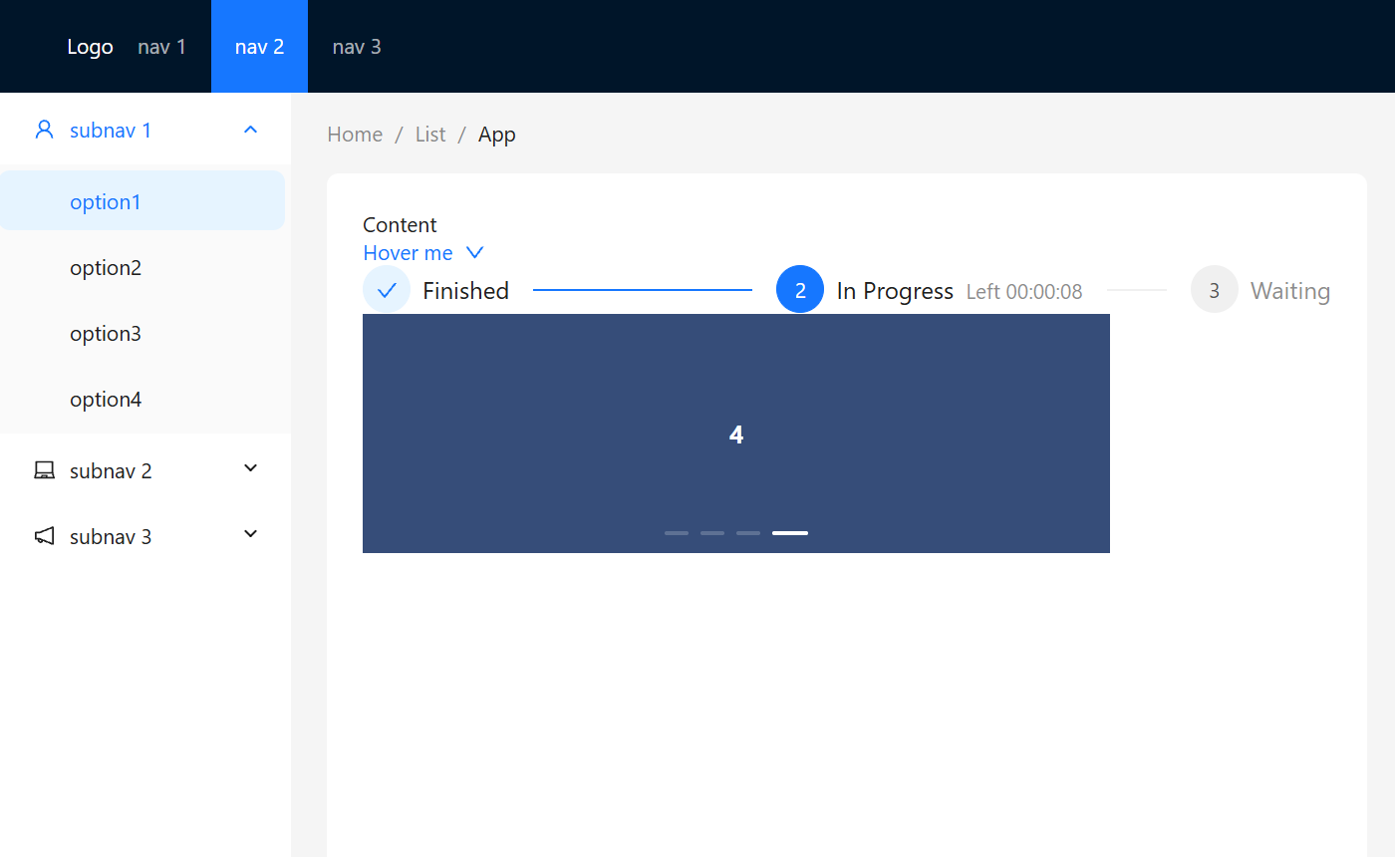
示例:按钮 和 24栅格布局

1
2
3
4
5
6
7
8
9
10
11
12
13
14
15
16
17
18
19
20
21
import React from 'react'
import { Button } from 'antd'
import { SearchOutlined } from '@ant-design/icons';
import { Col, Row } from 'antd';

// 验证 antd 组件库: v5 版本不需要额外引入 css
export default function Message() {
return (
<div>
{/* 演示 按钮使用 */}
<Button type='primary' icon={<SearchOutlined />} danger ghost={true} loading={false}>Primary</Button>
<div>
{/* 演示 24 栅格布局 */}
<Row>
<Col span={8}>col-8</Col>
<Col span={8} offset={8}>col-8</Col>
</Row>
</div>
</div>
)
}

示例:Layout 布局

1
2
3
4
5
6
7
8
9
10
11
12
13
14
15
16
17
18
19
20
21
22
23
24
25
26
27
28
29
30
31
32
33
34
35
36
37
38
39
40
41
42
43
44
45
46
47
48
49
50
51
52
53
54
55
56
57
58
59
60
61
62
63
64
65
66
67
68
69
70
71
72
73
74
75
76
77
78
79
80
81
82
83
84
85
86
87
88
89
90
91
92
93
94
95
96
97
98
99
100
101
102
103
104
105
106
107
108
109
110
111
112
113
114
115
116
117
118
119
120
121
122
123
124
125
126
127
128
129
130
131
132
133
134
135
136
137
138
139
140
141
142
143
144
145
146
147
148
149
150
151
152
153
154
155
156
157
158
159
160
161
162
163
164
165
166
167
168
169
170
171
172
173
174
175
176
import React from 'react';
import { LaptopOutlined, NotificationOutlined, UserOutlined, DownOutlined, SmileOutlined } from '@ant-design/icons';
import { Breadcrumb, Layout, Menu, theme, Dropdown, Space, Flex, Steps, Carousel } from 'antd';

const { Header, Content, Sider } = Layout;
const items1 = ['1', '2', '3'].map(key => ({
key,
label: `nav ${key}`,
}));
const items2 = [UserOutlined, LaptopOutlined, NotificationOutlined].map((icon, index) => {
const key = String(index + 1);
return {
key: `sub${key}`,
icon: React.createElement(icon),
label: `subnav ${key}`,
children: Array.from({ length: 4 }).map((_, j) => {
const subKey = index * 4 + j + 1;
return {
key: subKey,
label: `option${subKey}`,
};
}),
};
});
const items = [
{
key: '1',
label: (
<a target="_blank" rel="noopener noreferrer" href="https://www.antgroup.com">
1111
</a>
),
},
{
key: '2',
label: (
<a target="_blank" rel="noopener noreferrer" href="https://www.aliyun.com">
2222 (disabled)
</a>
),
icon: <SmileOutlined />,
disabled: true,
},
{
key: '3',
label: (
<a target="_blank" rel="noopener noreferrer" href="https://www.luohanacademy.com">
3333 (disabled)
</a>
),
disabled: true,
},
{
key: '4',
danger: true,
label: '4444-danger',
},
];
const App = () => {
const {
token: { colorBgContainer, borderRadiusLG },
} = theme.useToken();
return (
<Layout style={{height: '100vh'}}> {/* 设置整体布局为视口的 100% */}
<Header style={{ display: 'flex', alignItems: 'center' }}>
<div className="demo-logo" style={{ color: "white" }}>Logo</div>
<Menu
theme="dark"
mode="horizontal"
defaultSelectedKeys={['2']}
items={items1}
style={{ flex: 1, minWidth: 0 }}
/>
</Header>
<Layout>
<Sider width={200} style={{ background: colorBgContainer }}>
<Menu
mode="inline"
defaultSelectedKeys={['1']}
defaultOpenKeys={['sub1']}
style={{ height: '100%', borderInlineEnd: 0 }}
items={items2}
/>
</Sider>
<Layout style={{ padding: '0 24px 24px' }}>
<Breadcrumb
items={[{ title: 'Home' }, { title: 'List' }, { title: 'App' }]}
style={{ margin: '16px 0' }}
/>
<Content
style={{
padding: 24,
margin: 0,
minHeight: 280,
background: colorBgContainer,
borderRadius: borderRadiusLG,
}}
>
{/* 内容区域 */}
<div>Content</div>
{/* 下拉框 */}
<div>
<Dropdown menu={{ items }}>
<a onClick={e => e.preventDefault()}>
<Space>
Hover me
<DownOutlined />
</Space>
</a>
</Dropdown>
</div>
{/* 步骤条 */}
<div>
<StepApp></StepApp>
</div>
{/* 轮播 */}
<div style={{width:'500px'}}>
<CarouselApp></CarouselApp>
</div>
</Content>
</Layout>
</Layout>
</Layout>
);
};
export default App;


/* 步骤条实现 */
const content = 'This is a content.';
const stepItems = [
{
title: 'Finished',
content,
},
{
title: 'In Progress',
content,
subTitle: 'Left 00:00:08',
},
{
title: 'Waiting',
content,
},
];
const StepApp = () => (
<Flex vertical gap="large">
<Steps current={1} items={stepItems} />
</Flex>
);

/* 走马灯轮播实现 */
const contentStyle = {
margin: 0,
height: '160px',
color: '#fff',
lineHeight: '160px',
textAlign: 'center',
background: '#364d79',
};
const CarouselApp = () => (
<Carousel autoplay>
<div>
<h3 style={contentStyle}>1</h3>
</div>
<div>
<h3 style={contentStyle}>2</h3>
</div>
<div>
<h3 style={contentStyle}>3</h3>
</div>
<div>
<h3 style={contentStyle}>4</h3>
</div>
</Carousel>
);

image-20260126105510077

2. antd-design(移动端)

Ant Design(移动端):https://mobile.ant.design/zh

2.1 安装

安装:npm i antd-mobile - 目前最新版 v5.42.3

antd v5 版本无需引入 css。

2.2 使用

案例源码:https://github.com/janycode/react-router-v6-demo/commit/6bf201c6f07fbe1185e90906c71b797f43094876

Tabbar 选项卡

1
2
3
4
5
6
7
8
9
10
11
12
13
14
15
16
17
18
19
20
21
22
23
24
25
26
27
28
29
30
31
32
33
34
35
36
37
38
39
40
41
42
43
44
45
46
47
48
49
50
51
52
53
import { NavLink, useLocation, useNavigate } from 'react-router-dom'
import style from './Tabbar.module.css'
import { Badge, TabBar } from 'antd-mobile'
import {
AppOutline,
MessageOutline,
MessageFill,
UnorderedListOutline,
UserOutline,
} from 'antd-mobile-icons'

export default function Tabbar() {
const tabs = [
{
key: '/films',
title: '电影',
icon: <AppOutline />,
badge: Badge.dot,
},
{
key: '/cinemas',
title: '影院',
icon: <UnorderedListOutline />,
badge: '5',
},
{
key: '/messages',
title: '资讯',
icon: (active) => active ? <MessageFill /> : <MessageOutline />,
badge: '99+',
},
{
key: '/center',
title: '我的',
icon: <UserOutline />,
},
]
const location = useLocation()
const navigate = useNavigate()
return (
<footer className={style.tabbar}>
{/* activeKey 需要匹配二级路径因此需要做拼接和截取 */}
<TabBar activeKey={"/" + location.pathname.split("/")[1]} onChange={(key) => {
console.log("Tabbar key=", key); // key值对应路径,可以直接跳转
navigate(key)
}}>
{tabs.map(item => (
<TabBar.Item key={item.key} icon={item.icon} title={item.title} />
))}
</TabBar>
</footer>
)
}

image-20260126133109891

1
2
3
4
5
6
7
8
9
10
11
12
13
14
15
16
17
18
19
20
21
22
23
24
25
26
27
28
29
30
31
32
33
34
35
36
37
38
39
40
41
42
43
44
45
46
47
48
49
50
51
52
53
54
55
56
57
58
59
60
61
62
63
64
65
66
import { useEffect } from 'react'
import { connect } from 'react-redux'
import { useNavigate } from 'react-router-dom'
import getCinemaListAction from '../redux/actionCreator/getCinemaListAction'
import { NavBar, Space, Toast } from 'antd-mobile'
import { CloseOutline, MoreOutline, SearchOutline } from 'antd-mobile-icons'

function Cinema(props) {
const navigate = useNavigate()

let {list, getCinemaListAction} = props
useEffect(() => {
if (list.length === 0) {
//请求数据
console.log("Cinema 请求数据");
// actionCreator 里写异步请求数据
getCinemaListAction()
} else {
console.log("默认 list 非空时,走的是 store 缓存");
}
}, [list, getCinemaListAction])

const right = (
<div style={{ fontSize: 24 }}>
<Space style={{ '--gap': '16px' }}>
<SearchOutline />
<MoreOutline />
</Space>
</div>
)

const back = () =>
Toast.show({
content: '点击了返回区域',
duration: 1000,
})

return (
<div>
<NavBar left={<div onClick={() => { navigate("/city") }}>{props.cityName}</div>} right={<div onClick={() => { navigate("/cinemas/search") }}><SearchOutline /></div>} back={null}>
影院
</NavBar>
{
props.list.map(item =>
<dl key={item.cinemaId} style={{ padding: "10px" }}>
<dt>{item.name}</dt>
<dt style={{ fontSize: "12px", color: 'gray' }}>{item.address}</dt>
</dl>
)
}
</div>
)
}

//进入 Cinema 的 props 中携带,通过 props.list, props.cityName 调用
const mapStateToProps = (state) => {
return {
list: state.CinemaListReducer.list,
cityName: state.CityReducer.cityName
}
}
const mapDispatchToProps = {
getCinemaListAction //进入 Cinema 的 props 中携带,通过 props.getCinemaListAction() 调用
}
// connect(参数1-将来给孩子传的属性, 参数2-将来给孩子传的回调函数)
export default connect(mapStateToProps, mapDispatchToProps)(Cinema)

image-20260126133224073

Tabs 标签页

Swiper 走马灯

1
2
3
4
5
6
7
8
9
10
11
12
13
14
15
16
17
18
19
20
21
22
23
24
25
26
27
28
29
30
31
32
33
34
35
36
37
38
39
40
41
42
43
44
45
46
47
48
49
50
51
52
53
54
55
56
import { Swiper, Tabs } from 'antd-mobile';
import axios from 'axios';
import { useEffect, useState } from 'react';
import { Outlet, useLocation, useNavigate } from 'react-router-dom';
import style from './css/Film.module.css'; //导入 css module

export default function Film() {
const location = useLocation()
console.log("localtion=", location.pathname); // 当前路由路径: /films/nowplaying

const [filmList, setFilmList] = useState([])
useEffect(() => {
axios({
url: 'https://m.maizuo.com/gateway?cityId=410100&pageNum=1&pageSize=10&type=1&k=6167680',
headers: {
'x-client-info': '{"a":"3000","ch":"1002","v":"5.2.1","e":"17689720181688867040133121"}',
'x-host': 'mall.film-ticket.film.list',
},
}).then(res => {
console.log(res.data.data.films)
setFilmList(res.data.data.films)
})
}, [])

const navigate = useNavigate()
return (
<div>
{/* 轮播图 */}
<Swiper autoplay>
{
filmList.map(item =>
<Swiper.Item key={item.filmId}>
<img src={item.poster} style={{ width: '100%', height: '200px' }} />
</Swiper.Item>
)
}
</Swiper>
{/* 粘性定位:吸顶效果 */}
<div style={{ position: 'sticky', top: 0, backgroundColor: 'white', zIndex: 100 }}>
{/* 标签页切换 */}
<Tabs activeKey={location.pathname} onChange={(key) => {
console.log(key); // tab 里的 key值,即路径
navigate(key)
}} >
<Tabs.Tab title='正在热映' key='/films/nowplaying'>
</Tabs.Tab>
<Tabs.Tab title='即将上映' key='/films/comingsoon'>
</Tabs.Tab>
</Tabs>
</div>

{/* 路由容器,如加载子组件 Nowplaying 或 Comingsoon */}
<Outlet />
</div>
)
}

image-20260126133427912

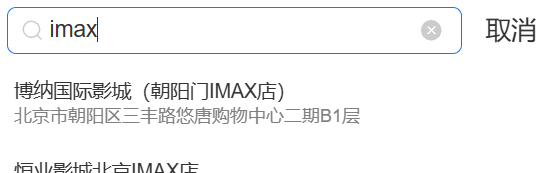
SearchBar 搜索框

1
2
3
4
5
6
7
8
9
10
11
12
13
14
15
16
17
18
19
20
21
22
23
24
25
26
27
28
29
30
31
32
33
34
35
36
37
38
39
40
41
42
43
44
45
46
47
48
49
50
51
52
53
54
55
56
57
58
59
60
import { SearchBar } from 'antd-mobile';
import { useEffect, useMemo, useRef, useState } from 'react';
import { useNavigate } from 'react-router-dom';
import getCinemaListAction from '../redux/actionCreator/getCinemaListAction';
import store from '../redux/store';

export default function Search() {
const [mytext, setMytext] = useState("")
const [cinemaList, setCinemaList] = useState(store.getState().CinemaListReducer.list)
const navigate = useNavigate()

useEffect(() => {
//console.log("Cinema:", store.getState().CinemaListReducer.list);
let list = store.getState().CinemaListReducer.list
if (list?.length === 0) {
//请求数据
console.log("Cinema 请求数据");
// actionCreator 里写异步请求数据
store.dispatch(getCinemaListAction())
} else {
console.log("默认 list 非空时,走的是 store 缓存");
}
// 订阅: redux-thunk 中异步请求数据,因为 store 是全局,订阅每次都会触发
let unsubscribe = store.subscribe(() => {
console.log("Cinema 订阅内容:", store.getState().CinemaListReducer.list);
setCinemaList(store.getState().CinemaListReducer.list)
})
return () => {
// 取消订阅:通过订阅的返回值,是个函数,调用就会取消订阅
unsubscribe()
}
}, [])

// 类似 vue 的计算属性,在 mytext 或 cinemaList 改变的时候才会触发重新计算
const getCinemaList = useMemo(() => { //使用{}代表包裹多行代码,就需要写 return;单行可省略return
return cinemaList.filter(
item =>
item.name.toUpperCase().includes(mytext.toUpperCase()) ||
item.address.toUpperCase().includes(mytext.toUpperCase()),
)
}, [mytext, cinemaList])

return (
<div>
<div style={{padding: '5px'}}>
<SearchBar placeholder='请输入内容' showCancelButton={() => true} onCancel={() => navigate(-1)} value={mytext} onChange={value => {
setMytext(value)
}} />
</div>
{
getCinemaList.map(item =>
<dl key={item.cinemaId} style={{ padding: "10px" }}>
<dt>{item.name}</dt>
<dt style={{ fontSize: "12px", color: 'gray' }}>{item.address}</dt>
</dl>
)
}
</div>
)
}

image-20260126133539597

List 列表

InfiniteScroll 无限滚动

1
2
3
4
5
6
7
8
9
10
11
12
13
14
15
16
17
18
19
20
21
22
23
24
25
26
27
28
29
30
31
32
33
34
35
36
37
38
39
40
41
42
43
44
45
46
47
48
49
50
51
52
53
54
55
56
57
58
59
60
61
62
63
64
65
66
67
68
69
70
71
72
73
74
import axios from 'axios'
import { useEffect, useRef, useState } from 'react'
import FilmItem from './FilmItem'
import { List, Image, InfiniteScroll } from 'antd-mobile'

export default function Nowplaying() {
const [filmList, setFilmList] = useState([])
// 存储值-不被页面刷新影响
const count = useRef(0)
const bottom = useRef(false) //最后一页小于10条只触发一次
const [hasMore, setHasMore] = useState(true)

const loadMore = async () => {
if (bottom.current) {
return
}
console.log("到底了"); //到底时会一直触发
count.current++
setHasMore(false) //防止到底一直触发
console.log("count.current=", count.current);
await axios({
url: `https://m.maizuo.com/gateway?cityId=410100&pageNum=${count.current}&pageSize=10&type=1&k=6167680`,
headers: {
'x-client-info': '{"a":"3000","ch":"1002","v":"5.2.1","e":"17689720181688867040133121"}',
'x-host': 'mall.film-ticket.film.list',
},
}).then(res => {
console.log("res.data=", res.data);
setFilmList([...filmList, ...res.data.data.films]) //展开赋值
//如 最后一页是 6 条,但请求最后一页会重复返回这 6 条,兼容处理
setHasMore(res.data.data.films.length > 0)
if (res.data.data.films.length < 10) {
bottom.current = true
}
})
}
return (
<div>
{/* InfiniteScroll 无限滚动组件 */}
<List>
{
filmList.map(item => (
<List.Item
key={item.filmId}
prefix={
<Image
src={item.poster}
//style={{ borderRadius: 20 }}
//fit='cover'
width={80}
//height={40}
/>
}
description={
<div>
{
// visibility 如果没有对应 grade 字段就起到占位的效果
item.grade ? <div>评分:{item.grade}</div>
: <div style={{ visibility: "hidden" }}></div>
}
<div>主演:{item.actors?.map(i => i.name).join(",")}</div>
<div>{item.nation} {item.runtime}分钟</div>
</div>
}
>
{item.name}
</List.Item>
))
}
</List>
<InfiniteScroll loadMore={loadMore} hasMore={hasMore} />
</div>
)
}

09-React+AntDesign组件库
https://janycode.github.io/2022/05/22/04_大前端/07_React/09-React+AntDesign组件库/
作者
Jerry(姜源)
发布于
2022年5月22日
许可协议