
1. Portal
1.1 介绍
Portals 提供了一个最好的在父组件包含的DOM结构层级外的DOM节点渲染组件的方法。
1
| ReactDOM.createPortal(child,container);
|
第一个参数child是可渲染的react子项,比如元素,字符串或者片段等。第二个参数container是一个DOM元素。
普通的组件,子组件的元素将挂载到父组件的DOM节点中。
1
2
3
4
5
6
7
8
| render() {
return (
<div>
{this.props.children}
</div>
);
}
|
有时需要将元素渲染到DOM中的不同位置上去,这是就用到的portal的方法。
1
2
3
4
5
6
7
| render(){
return ReactDOM.createPortal(
this.props.children,
domNode
)
}
|
一个典型的用法就是当父组件的dom元素有 overflow:hidden 或者 z-index 样式,而你又需要显示的子元素超出父元素的盒子。
举例来说,如对话框,悬浮框,和小提示。
虽然通过portal渲染的元素在父组件的盒子之外,但是渲染的dom节点仍在React的元素树上,在那个dom元素上的点击事件仍然能在dom树中监听到。
1.2 实际案例
Dialog 问题:左的层级比右的层级高时,Dialog 是右的子组件,此时 Dialog 层级再高也没有用
PortalDialog:解决该Dialog问题,会将组件生成在 传送的参数内,比如 document.body
createPortal() 类似传送门:将生成的代码传送到 第二个参数,即 document.body
案例源码:https://github.com/janycode/react-ts-demo/commit/b5504893157f61757d42a0434767fa205f388720
App.js
1
2
3
4
5
6
7
8
9
10
11
12
13
14
15
16
17
18
19
20
21
22
23
24
25
26
27
28
29
30
31
32
33
34
35
36
37
38
39
| import React, { Component } from 'react'
import './App.css'
import PortalDialog from './components/PortalDialog.js'
export default class App extends Component {
state = {
isShow: false
}
render() {
return (
<div className='box' onClick={() => {
console.log("box 身上会被冒泡上来,触发 click 事件");
}}>
<div className='left'>
</div>
<div className='right'>
<button onClick={() => {
this.setState({
isShow: !this.state.isShow
})
}}>ajax</button>
{/* {this.state.isShow && <Dialog></Dialog>} */}
{this.state.isShow && <PortalDialog onClose={() => {
this.setState({
isShow: false
})
}}>
<div>111</div>
<div>222</div>
<div>333</div>
</PortalDialog>}
</div>
</div>
)
}
}
|
App.css
1
2
3
4
5
6
7
8
9
10
11
12
13
14
15
16
17
18
19
20
21
22
23
24
25
26
27
| * {
margin: 0;
padding: 0;
}
.left,
.right {
height: 100vh;
}
.box {
display: flex;
}
.left {
width: 200px;
background: yellow;
position: relative;
z-index: 10;
}
.right {
flex: 1;
background: blue;
position: relative;
z-index: 5;
}
|
Dialog.js
1
2
3
4
5
6
7
8
9
10
11
| import React, { Component } from 'react'
export default class Dialog extends Component {
render() {
return (
<div style={{ width: '100%', height: '100%', position: 'fixed', left: 0, top: 0, background: 'rgba(0,0,0,0.7)', zIndex: 9999 }}>
Dialog
</div>
)
}
}
|
PortalDialog.js
1
2
3
4
5
6
7
8
9
10
11
12
13
14
15
16
| import React, { Component } from 'react'
import { createPortal } from 'react-dom'
export default class Dialog extends Component {
render() {
return createPortal(
<div style={{ width: '100%', height: '100%', position: 'fixed', left: 0, top: 0, background: 'rgba(0,0,0,0.7)', zIndex: 9999, color: 'white' }}>
Dialog
<div>loading-加载中</div>
{this.props.children}
<button onClick={this.props.onClose}>close</button>
</div>
, document.body)
}
}
|
效果:

2. forwardRef
2.1 介绍
引用传递(Ref forwading)是一种通过组件向子组件自动传递 引用ref 的技术。
对于应用者的大多数组件来说没什么作用。但是对于有些重复使用的组件,可能有用。
例如某些input组件,需要控制其focus,本来是可以使用ref来控制,但是因为该input已被包裹在组件中,这时就需要使用Ref forward来透过组件获得该input的引用。
可以透传多层。
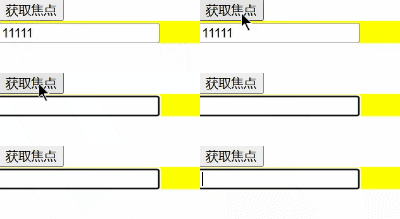
2.2 实际案例
1
2
3
4
5
6
7
8
9
10
11
12
13
14
15
16
17
18
19
20
21
22
23
24
25
26
27
28
29
30
31
32
33
34
35
36
37
38
39
40
41
42
43
44
45
46
| import React, { Component, createRef, forwardRef } from 'react'
export default class App extends Component {
mytext = createRef()
render() {
return (
<div>
<button onClick={() => {
console.log(this.mytext);
// 获取焦点并清空
this.mytext.current.focus()
this.mytext.current.value = ""
}}>获取焦点</button>
{/* // 针对 Child 类组件
<Child callback={(el) => {
console.log(el);
this.mytext = el
}} /> */}
<Child ref={this.mytext} />
</div>
)
}
}
const Child = forwardRef((props, ref) => {
return <div style={{background: 'yellow'}}>
<input defaultValue="11111" ref={ref} />
</div>
})
|
效果:
3. memo
3.1 介绍
Functional Component缓存:在计算机领域,记忆化是一种主要用来提升计算机程序速度的优化技术方案。它将开销较大的函数调用的返回结果存储起来,当同样的输入再次发生时,则返回缓存好的数据,以此提升运算效率。
作用:组件仅在它的 props 发生改变的时候进行重新渲染。通常来说,在组件树中 React 组件,只要有变化就会走一遍渲染流程。但是React.memo(),我们可以仅仅让某些组件进行渲染。
与普通组件区别:PureComponent 只能用于class 组件,memo 可用于functional 组件。
语法:
1
2
3
4
5
|
const Child2 = memo((props) => {
console.log("Child222..");
return <div>Child222-{props.name}</div>
})
|
3.2 实际案例
示例:
1
2
3
4
5
6
7
8
9
10
11
12
13
14
15
16
17
18
19
20
21
22
23
24
25
26
27
28
29
30
31
| import { Component, memo } from 'react';
export default class App extends Component {
state = {
name: "jerry"
}
render() {
return (
<div>
{this.state.name}
<button onClick={() => {
this.setState({
name: "tom"
})
}}>click</button>
<Child1></Child1>
<Child2 name={this.state.name}></Child2>
</div>
)
}
}
function Child1() {
console.log("Child111..");
return <div>Child111</div>
}
const Child2 = memo((props) => {
console.log("Child222..");
return <div>Child222-{props.name}</div>
})
|
