15-React+GraphQL库

re269r227-react-logo-react-logo-import-io

参考:

1. GraphQL

1.1 介绍

GraphQL 是 Facebook 开发的一种数据查询语言,在 2015 年公开发布,它是 REST API 的替代品。

GraphQL 既是一种用于 API 的查询语言,也是一个满足你查询数据的运行时。它对你的 api 中的数据提供了一套易于理解的完整描述,使得客户端能够准确的获得它需要的数据,而且没有任何冗余,也让 api 更容易的随着时间的推移而演进。

特点:

  • 请求需要的字段数据,不多不少
  • 获取多个资源,只需要一个请求
  • 描述所有可能类型的系统,便于维护,根据需求平滑演进,添加或隐藏字段。
    • restful 一个接口只能返回一个资源,graphql 一次可以获取多个资源
    • restful 用不同的 url 来区分资源,graphql 用类型区分资源

1.2 安装

前置:npm init

安装:npm i graphql@14 express@4 express-graphql@0.7 mongoose@5

版本:graphql 14.0.2,express 4.16.4,express-graphql 0.7.1,mongoose 5.13.14

1.3 基本使用

1
2
3
4
5
6
7
8
9
10
11
12
13
14
15
16
17
18
19
20
21
22
23
24
25
26
27
28
29
30
31
32
33
34
35
36
37
38
const express = require("express")
const { buildSchema } = require("graphql")
const graphqlHttp = require("express-graphql")
//定义图表
var Schema = buildSchema(`
type Query{
hello: String,
getName: String,
getAge: Int
}
`)
// 设置处理器
const root = {
hello: () => {
//通过数据库查
var str = "hello graphql-aaa"
return str
},
getName: () => {
return "jerry"
},
getAge: () => {
return 22
}
}

var app = express()
app.use("/home", (req, res) => {
res.send("home data111")
})
// 接口
app.use("/graphql", graphqlHttp({
schema: Schema,
rootValue: root,
graphiql: true //调试器
}))

app.listen(3000)

使用 node/node-dev/nodemon 启动后就可以请求接口 http://localhost:3000/graphql
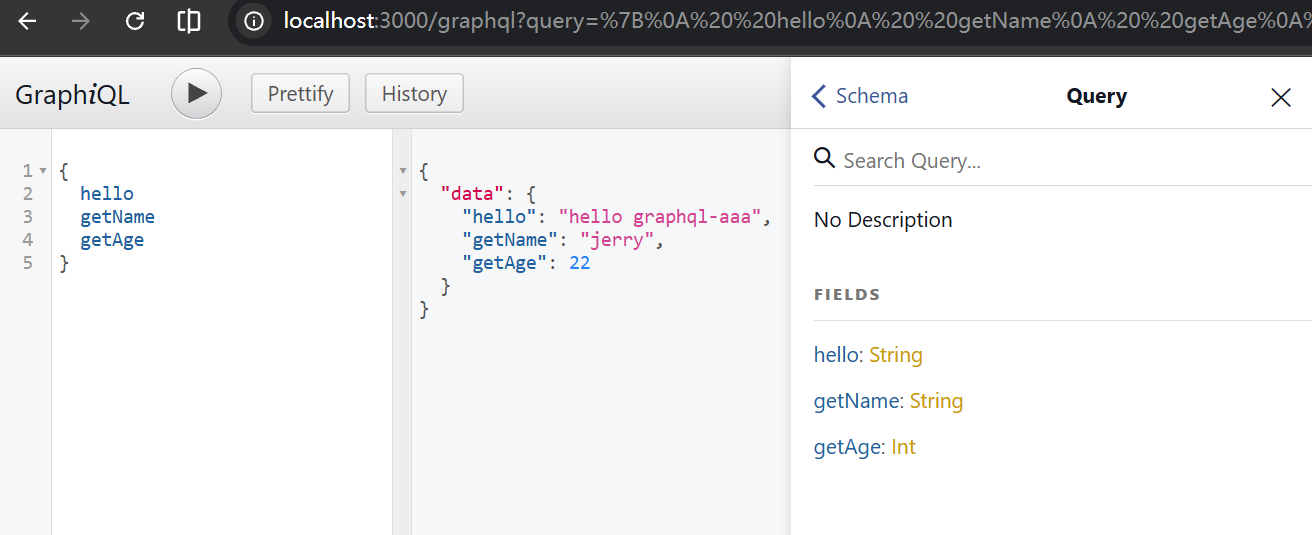
image-20260128103802400

1.4 查:自定义类型与传参

1
2
3
4
5
6
7
8
9
10
11
12
13
14
15
16
17
18
19
20
21
22
23
24
25
26
27
28
29
30
31
32
33
34
35
36
37
38
39
40
41
42
43
44
45
46
47
48
49
50
51
52
53
54
55
56
57
58
59
60
61
62
63
64
65
66
67
68
69
70
71
72
73
74
75
76
77
78
79
80
81
82
83
84
85
86
87
const express = require("express")
const { buildSchema } = require("graphql")
const graphqlHttp = require("express-graphql")
//定义图表
// type 类型:可以自定义类型
// type Query:定义查询方法
// getFilmDetail(id:Int!) 定义传参的方法,! 表示必传参数
var Schema = buildSchema(`
type Account{
name: String,
age: Int,
location: String
}
type Film{
id: Int,
name: String,
poster: String,
price: Int
}
type Query{
getName: String,
getAge: Int,
getAllNames: [String],
getAllAges: [Int],
getAccountInfo: Account,
getNowplayingList: [Film],
getFilmDetail(id:Int!): Film
}
`)
var faskeDb = [{
id: 1,
name: "aaa",
poster: "http://1111.jpg",
price: 100
},
{
id: 2,
name: "bbb",
poster: "http://2222.jpg",
price: 200
},
{
id: 3,
name: "ccc",
poster: "http://3333.jpg",
price: 300
}]
// 设置处理器
const root = {
getName: () => {
return "jerry"
},
getAge: () => {
return 22
},
getAllNames: () => {
return ["jerry", "tom", "spike"]
},
getAllAges() {
return [10, 20, 30]
},
getAccountInfo() {
return {
name: "jerry",
age: 22,
location: "china"
}
},
getNowplayingList() {
return faskeDb
},
getFilmDetail({ id }) {
console.log(id); //2
var res = faskeDb.filter(item => item.id === id)[0]
return res
}
}

var app = express()
// 接口
app.use("/graphql", graphqlHttp({
schema: Schema,
rootValue: root,
graphiql: true //调试器
}))

app.listen(3000)

image-20260128110033807

1.5 增删改

1
2
3
4
5
6
7
8
9
10
11
12
13
14
15
16
17
18
19
20
21
22
23
24
25
26
27
28
29
30
31
32
33
34
35
36
37
38
39
40
41
42
43
44
45
46
47
48
49
50
51
52
53
54
55
56
57
58
59
60
61
62
63
64
65
66
67
68
69
70
71
72
73
const express = require("express")
const { buildSchema } = require("graphql")
const graphqlHttp = require("express-graphql")
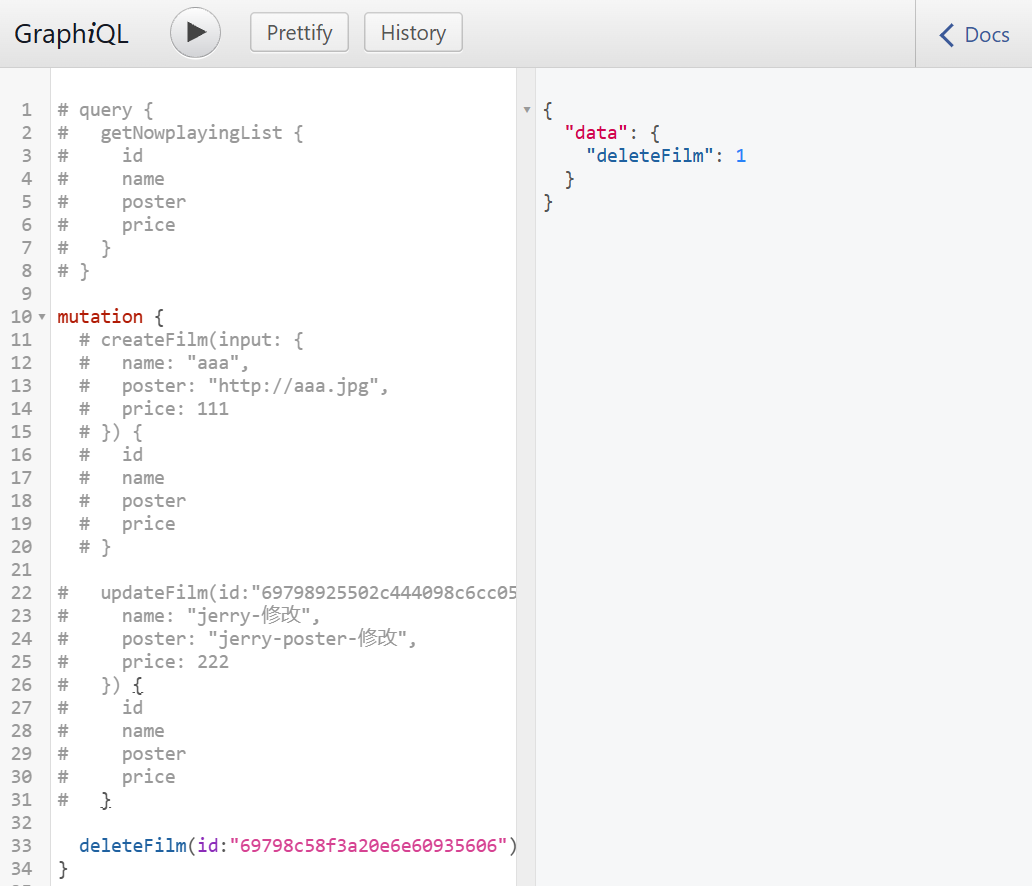
// 使用 input 定义要创建的类型
// 使用 Mutation 定义增删改数据的方法 和 返回值
var Schema = buildSchema(`
type Film{
id: Int,
name: String,
poster: String,
price: Int
}
input FilmInput{
name: String,
poster: String,
price: Int
}
type Query{
getNowplayingList: [Film],
}
type Mutation{
createFilm(input: FilmInput): Film,
updateFilm(id: Int!, input: FilmInput): Film,
deleteFilm(id: Int!): Int
}
`)
var faskeDb = [{
id: 1,
name: "aaa",
poster: "http://1111.jpg",
price: 100
},
{
id: 2,
name: "bbb",
poster: "http://2222.jpg",
price: 200
},
{
id: 3,
name: "ccc",
poster: "http://3333.jpg",
price: 300
}]
// 设置处理器
const root = {
getNowplayingList() {
return faskeDb
},
createFilm({ input }) {
var obj = { ...input, id: faskeDb.length + 1 }
faskeDb.push(obj)
return obj
},
updateFilm({ id, input }) {
faskeDb = faskeDb.map(item => item.id === id ? { ...item, ...input } : item)
return faskeDb.filter(item => item.id === id)[0]
},
deleteFilm({ id }) {
faskeDb = faskeDb.filter(item => item.id !== id)
return 1
}
}

var app = express()
// 接口
app.use("/graphql", graphqlHttp({
schema: Schema,
rootValue: root,
graphiql: true //调试器
}))

app.listen(3000)

image-20260128112028435

2. GraphQL + MongoDB

2.1 mongoose

前置:找到 mongod.exe 文件目录,并在需要存放数据的位置建 db 目录。

启动 mongoDB 数据库服务端:*.\mongod.exe –dbpath=E:\work\webProjects\react\code\react-graphql\db*

1
2
3
4
5
6
7
8
9
10
11
12
13
14
15
16
17
18
19
20
21
22
23
24
25
26
27
28
29
30
31
32
33
34
35
36
37
38
39
40
41
42
43
44
45
46
47
48
49
50
51
52
53
54
55
56
57
58
59
60
61
62
63
64
65
66
67
68
69
70
71
72
73
74
75
76
const express = require("express")
const { buildSchema } = require("graphql")
const graphqlHttp = require("express-graphql")

// 连接 mongodb 数据库
var mongoose = require("mongoose")
mongoose.connect("mongodb://localhost:27017/testdb", {
// 去掉无关的警告,使用如下两个参数
useNewUrlParser: true,
useUnifiedTopology: true
})
// 限制数据库这个 films 集合表,只能存三个字段
var FilmModel = mongoose.model("film", new mongoose.Schema({
name: String,
poster: String,
price: Number
}))
// 增删改查 返回 Promise 对象即可
// FilmModel.create()
// FilmModel.find()
// FilmModel.update()
// FilmModel.delete()

var Schema = buildSchema(`
type Film{
id: String,
name: String,
poster: String,
price: Int
}
input FilmInput{
name: String,
poster: String,
price: Int
}
type Query{
getNowplayingList: [Film],
}
type Mutation{
createFilm(input: FilmInput): Film,
updateFilm(id: String!, input: FilmInput): Film,
deleteFilm(id: String!): Int
}
`)

// 设置处理器
const root = {
getNowplayingList() {
return FilmModel.find()
},
createFilm({ input }) {
// 1.创建模型 2.操作数据库
// FilmModel.create({ ...input }).then(res => {
// console.log(res); //{_id:xxx, ...}
// })
return FilmModel.create({ ...input })
},
updateFilm({ id, input }) {
return FilmModel.updateOne({ _id: id }, { ...input })
.then(res => FilmModel.find({ _id: id }))
.then(res => res[0])
},
deleteFilm({ id }) {
return FilmModel.deleteOne({ _id: id }).then(res => 1)
}
}

var app = express()
// 接口
app.use("/graphql", graphqlHttp({
schema: Schema,
rootValue: root,
graphiql: true //调试器
}))

app.listen(3000)

image-20260128121154313

2.2 ajax 请求

graphql-server.js

1
2
3
4
5
6
7
8
9
10
11
...
var app = express()
// 接口
app.use("/graphql", graphqlHttp({
schema: Schema,
rootValue: root,
graphiql: true //调试器
}))
// 配置静态资源目录
app.use(express.static("public")) //添加此行,允许静态资源访问
app.listen(3000)

public/index.html - 普通 html 页面的增删改查操作

1
2
3
4
5
6
7
8
9
10
11
12
13
14
15
16
17
18
19
20
21
22
23
24
25
26
27
28
29
30
31
32
33
34
35
36
37
38
39
40
41
42
43
44
45
46
47
48
49
50
51
52
53
54
55
56
57
58
59
60
61
62
63
64
65
66
67
68
69
70
71
72
73
74
75
76
77
78
79
80
81
82
83
84
85
86
87
88
89
90
91
92
93
94
95
96
97
98
99
100
101
102
103
104
105
106
107
108
109
110
111
112
113
114
115
116
117
118
119
120
121
122
123
124
125
126
127
128
129
130
131
<!DOCTYPE html>
<html lang="en">

<head>
<meta charset="UTF-8">
<meta name="viewport" content="width=device-width, initial-scale=1.0">
<title>Document</title>
</head>

<body>
<h1>home</h1>
<button onclick="createData()">新增数据</button>
<button onclick="deleteData()">删除数据</button>
<button onclick="updateData()">修改数据</button>
<button onclick="getData()">查询数据</button>

<script>
function createData() {
const mymutation = `
mutation($input: FilmInput) {
createFilm(input: $input) {
id
name
poster
price
}
}`
fetch("/graphql", {
method: "POST",
headers: {
"Content-Type": "application/json",
"Accept": "application/json"
},
body: JSON.stringify({
query: mymutation,
variables: {
input: {
name: "ccc",
poster: "http://ccc.jpg",
price: 333
}
}
})
}).then(res => res.json()).then(res => {
console.log(res);
})
}
function deleteData() {
const mymutation = `
mutation($id: String!) {
deleteFilm(id: $id)
}`
fetch("/graphql", {
method: "POST",
headers: {
"Content-Type": "application/json",
"Accept": "application/json"
},
body: JSON.stringify({
query: mymutation,
variables: {
id: "6979916c0f4b5d059077930e",
input: {
name: "ddd-修改",
poster: "http://ddd-修改.jpg",
price: 444
}
}
})
}).then(res => res.json()).then(res => {
console.log(res);
})
}
function updateData() {
const mymutation = `
mutation($id: String!, $input: FilmInput) {
updateFilm(id: $id, input: $input) {
id
name
poster
price
}
}`
fetch("/graphql", {
method: "POST",
headers: {
"Content-Type": "application/json",
"Accept": "application/json"
},
body: JSON.stringify({
query: mymutation,
variables: {
id: "6979916c0f4b5d059077930e",
input: {
name: "ddd-修改",
poster: "http://ddd-修改.jpg",
price: 444
}
}
})
}).then(res => res.json()).then(res => {
console.log(res);
})
}
function getData() {
const myquery = `
query {
getNowplayingList {
id
name
poster
price
}
}`
fetch("/graphql", {
method: "POST",
headers: {
"Content-Type": "application/json",
"Accept": "application/json"
},
body: JSON.stringify({
query: myquery
})
}).then(res => res.json()).then(res => {
console.log(res);
})
}
</script>
</body>

</html>

15-React+GraphQL库
https://janycode.github.io/2022/05/22/04_大前端/07_React/15-React+GraphQL库/
作者
Jerry(姜源)
发布于
2022年5月22日
许可协议