参考:
1. DvaJS
1.1 介绍
dva 首先是一个基于 redux 和 redux saga 的数据流方案(可以理解为公共状态管理),然后为了简化开发体验,dva 还额外内置了 react router 和 fetch,所以也可以理解为一个轻量级的应用框架/脚手架。
数据流图:

1.2 安装
安装:npm i dva-cli -g
版本:dva -v
创建:dva new react-dva-demo
依赖:cd ./react-dva-demo; npm i
启动:npm start
1.3 使用
案例源码:https://github.com/janycode/react-dva-demo
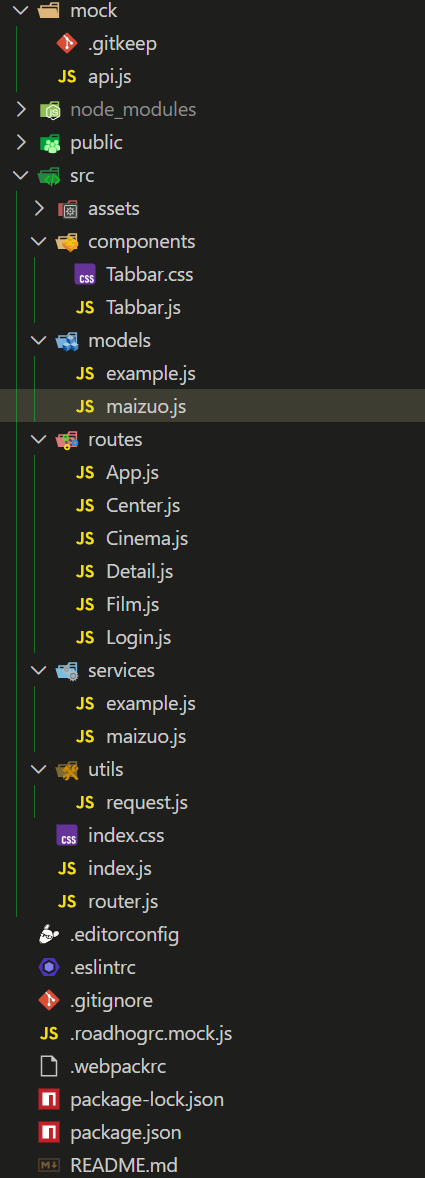
目录结构
核心应用
src/models/maizuo.js - 数据流模型
1
2
3
4
5
6
7
8
9
10
11
12
13
14
15
16
17
18
19
20
21
22
23
24
25
26
27
28
29
30
31
32
33
34
35
36
37
38
39
40
41
| import { getCinemaListService } from "../services/maizuo";
export default {
namespace: 'maizuo',
state: {
isShow: true,
list: []
},
reducers: {
hide(prevState, action) {
return { ...prevState, isShow: false }
},
show(prevState, action) {
return { ...prevState, isShow: true }
},
changeCinemaList(prevState, { payload }) {
return { ...prevState, list: payload }
}
},
subscriptions: {
setup({ dispatch, history }) {
console.log("初始化");
},
},
effects: {
*getCinemaList({ payload }, { call, put }) {
const res = yield call(getCinemaListService)
console.log(res.data.data.cinemas);
yield put({
type: "changeCinemaList",
payload: res.data.data.cinemas
})
}
},
};
|
src/index.js - 手动注册数据流模型
1
2
3
4
5
6
7
8
9
10
11
12
13
14
15
16
17
18
19
20
21
22
| import dva from 'dva';
import './index.css';
const app = dva({
history: require("history").createBrowserHistory()
});
app.model(require('./models/maizuo').default);
app.router(require('./router').default);
app.start('#root');
|
src/routes/App.js - connect 连接数据流模型,控制 Tabbar 显隐。
1
2
3
4
5
6
7
8
9
10
11
12
13
14
15
16
17
18
19
20
21
22
| import React, { Component } from 'react'
import Tabbar from '../components/Tabbar'
import { connect } from 'dva'
class App extends Component {
render() {
return (
<div>
{this.props.children}
{this.props.isShow && <Tabbar></Tabbar>}
</div>
)
}
}
export default connect((state) => {
console.log(state);
return {
a: 1,
isShow: state.maizuo.isShow
}
})(App)
|
src/routes/Cinema.js - connect 连接数据流模型,使用 dispatch 和 缓存
1
2
3
4
5
6
7
8
9
10
11
12
13
14
15
16
17
18
19
20
21
22
23
24
25
26
27
28
29
30
31
32
| import { connect } from 'dva'
import React, { Component } from 'react'
class Cinema extends Component {
componentDidMount() {
if (this.props.list.length === 0) {
this.props.dispatch({
type: "maizuo/getCinemaList"
})
} else {
console.log("走缓存", this.props.list);
}
}
render() {
return (
<div>
{
this.props.list.map(item =>
<li key={item.cinemaId}>{item.name}</li>
)
}
</div>
)
}
}
export default connect((state) => {
return {
list: state.maizuo.list
}
})(Cinema)
|
2. UmiJS
2.1 介绍
umi,中文可发音为乌米,是一个可插拔的企业级 react 应用框架。它是蚂蚁金服开源的 React 企业级前端应用框架,它旨在帮助开发者快速搭建和管理复杂的前端项目。umi 以路由为基础的,支持类 next.js 的约定式路由,以及各种进阶的路由功能,并以此进行功能扩展,比如支持路由级的按需加载。umi 在约定式路由的功能层面会更像 nuxt.js 一些。
开箱即用,省去了搭框架的时间。

2.2 安装
前置:先创建一个项目名称的空目录,在目录中执行安装:
基于 v3 的版本:https://v3.umijs.org/zh-CN/docs/getting-started
安装:yarn create @umijs/umi-app
依赖:yarn 启动:yarn start
基于 v4 的版本:https://umijs.org/docs/guides/getting-started
安装:npx create-umi@latest
依赖:npm i 启动:npm start
本文案例按照 UmiJS v3 的版本。
启动报错ERR_OSSL_EVP_UNSUPPORTED,可以将 node 降级到 v16 版本,或者在 package.json 中配置启动命令为如下两行:
1
2
3
4
5
| "scripts": {
"start": "set NODE_OPTIONS=--openssl-legacy-provider && umi dev",
"build": "set NODE_OPTIONS=--openssl-legacy-provider && umi build",
...
},
|
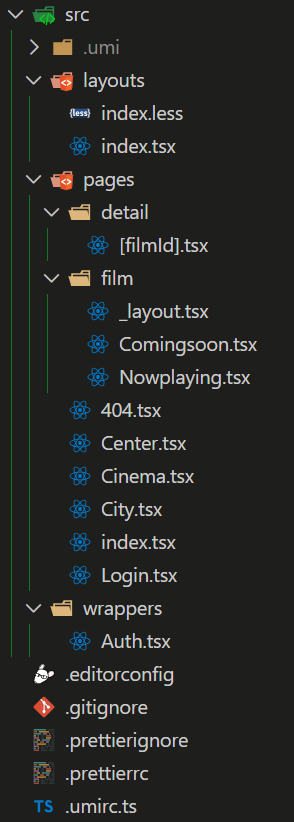
目录:
2.3 使用
案例源码:https://github.com/janycode/react-umi3-demo
路由
https://github.com/janycode/react-umi3-demo/commit/2fa98ef7d8a40dee0c02b5f72baec617b639ef24
.umirc.ts
umi 会根据 pages 目录自动生成路由配置。需要注释 .umirc.js 中 routes 相关, 否则自动配置不生效
基础路由:
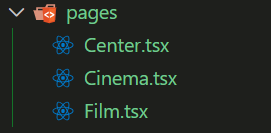
浏览器访问(组件首字母大写、访问时 url 中使用纯小写): - 注意index.tsx 首页需要为纯小写。
http://localhost:8000/film
http://localhost:8000/cinema
http://localhost:8000/center

重定向
src/pages/index.tsx
1
2
3
4
5
6
7
8
9
| import { Redirect } from 'umi'
const RedirectComp = Redirect as any
export default function index() {
return <RedirectComp to="/film" />
}
|
嵌套路由
如果不好用,就重启一下。
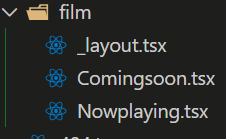
src/pages/film/_layout.tsx
1
2
3
4
5
6
7
8
9
10
11
12
13
14
15
16
17
18
19
20
| import { Redirect, useLocation } from 'umi';
const RedirectComp = Redirect as any;
export default function Film(props: any) {
const location = useLocation()
if (location.pathname === "/film" || location.pathname === "/film/") {
return <RedirectComp to="/film/nowplaying" />;
}
return (
<div>
<div style={{ width: '100%', height: '200px', background: 'yellow' }}>
大轮播
</div>
{props.children}
</div>
);
}
|
src/pages/film/Comingsoon.tsx
1
2
3
4
5
6
7
| import React from 'react'
export default function Comingsoon() {
return (
<div>Comingsoon</div>
)
}
|
src/pages/film/Nowplaying.tsx
1
2
3
4
5
6
7
| import React from 'react'
export default function Nowplaying() {
return (
<div>Nowplaying</div>
)
}
|
嵌套路由:
http://localhost:8000/#/film/nowplaying
http://localhost:8000/#/film/comingsoon
动态路由

src/pages/detail/[filmId].tsx
1
2
3
4
5
6
7
8
9
10
11
12
| import React from 'react'
import { useParams } from 'umi'
interface IParams {
filmId: string
}
export default function Detail(props: any) {
const params = useParams<IParams>()
console.log(params.filmId);
return <div>Detail-{params.filmId}</div>;
}
|
路由拦截
src/pages/Center.tsx - 给Center增加一个装饰器 .wrappers
1
2
3
4
5
6
7
8
9
10
11
12
13
14
15
16
17
18
19
20
| import React from 'react';
function Center(props: any) {
return (
<div>
Center
<button onClick={() => {
localStorage.removeItem('token');
props.history.push("/login")
}}
>
退出登陆
</button>
</div>
);
}
Center.wrappers = ['@/wrappers/Auth'];
export default Center;
|
src/wrappers/Auth.tsx
1
2
3
4
5
6
7
8
9
10
11
12
13
14
15
| import React from 'react';
import { Redirect } from 'umi';
const RedirectComp = Redirect as any;
export default function Auth(props: any) {
if (localStorage.getItem('token')) {
return (
<div>
{props.children} {/* 插槽替换的是 Center 组件 */}
</div>
);
}
return <RedirectComp to="/login" />;
}
|
hash 模式
.umirc.ts
1
2
3
4
|
history: {
type: "hash"
}
|
声明式导航
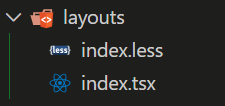
src/layouts/index.tsx
1
2
3
4
5
6
7
8
9
10
11
12
13
14
15
16
17
18
19
20
21
22
23
24
25
26
27
28
29
30
31
32
33
34
35
36
37
38
39
40
41
42
| import React from 'react'
import { NavLink } from 'umi'
import './index.less'
const NavLinkComp = NavLink as any;
export default function indexLayout(props: any) {
if (
props.location.pathname === '/city' ||
props.location.pathname.includes('/detail')
) {
return <div>{props.children}</div>;
}
return (
<div>
{props.children}
<ul>
<li>
<NavLinkComp to="/film" activeClassName="active">
电影
</NavLinkComp>
</li>
<li>
<NavLinkComp to="/cinema" activeClassName="active">
影院
</NavLinkComp>
</li>
<li>
<NavLinkComp to="/message" activeClassName="active">
资讯
</NavLinkComp>
</li>
<li>
<NavLinkComp to="/center" activeClassName="active">
我的
</NavLinkComp>
</li>
</ul>
</div>
);
}
|
src/layouts/index.less
编程式导航
1
2
3
| import { history } from 'umi';
history.push(`/detail/${item.id}`)
|
mock 功能
umi 里约定 mock 文件夹下的文件或者 page(s) 文件夹下的 _mock 文件即 mock 文件,文件导出接口定义,支持基于 require 动态分析的实时刷新,支持 ES6 语法,以及友好的出错提示。
1
2
3
4
5
6
7
8
9
|
export default {
'GET /api/users': { users: [1, 2] },
'/api/users/1': { id: 1 },
'POST /api/users/create': (req, res) => { res.end('OK'); },
}
|
mock/api.js
1
2
3
4
5
6
7
8
9
10
11
12
| export default {
"GET /users": { name: "jerry", age: 22, location: "china" },
'POST /users/login': (req, res) => {
console.log(req.body);
if (req.body.username === "admin" && req.body.password === "123") {
res.send({ ok: 1 })
} else {
res.send({ ok: 0 })
}
}
}
|
src/pages/Login.tsx
1
2
3
4
5
6
7
8
9
10
11
12
13
14
15
16
17
18
19
20
21
22
23
24
25
26
27
28
29
30
31
32
33
34
35
36
37
38
39
40
41
42
43
44
45
46
47
48
49
50
51
52
53
54
| import React, { useEffect, useRef, useState } from 'react';
export default function Login(props: any) {
useEffect(() => {
fetch('/users')
.then((res) => res.json())
.then((res) => {
console.log(res);
});
}, []);
const [username, setUsername] = useState('');
const [password, setPassword] = useState('');
return (
<div>
<h1>Login</h1>
<input type="text" onChange={(evt) => {
setUsername(evt.target.value);
}}
/>
<br />
<input type="password" onChange={(evt) => {
setPassword(evt.target.value);
}}
/>
<button onClick={() => {
console.log(username, password);
// mock 登陆
fetch('/users/login', {
method: 'POST',
headers: {
'Content-Type': 'application/json',
},
body: JSON.stringify({
username,
password,
}),
}).then((res) => res.json()).then((res) => {
console.log(res);
if (res.ok) {
localStorage.setItem('token', 'token123');
props.history.push('/center');
} else {
alert('用户名与密码不匹配');
}
});
}}
>
登陆
</button>
</div>
);
}
|
反向代理
.umirc.js
1
2
3
4
5
6
7
| proxy: {
'/ajax': {
target: 'https://m.maoyan.com',
changeOrigin: true
}
},
|
Antd-mobile 集成
解决版本冲突:.umirc.ts
1
2
3
4
|
antd: {
mobile: false
},
|
组件在页面中使用:
1
2
3
|
import {Button} from 'antd-mobile'
<Button type="primary">add</Button>
|
城市索引列表 src/pages/City.tsx
1
2
3
4
5
6
7
8
9
10
11
12
13
14
15
16
17
18
19
20
21
22
23
24
25
26
27
28
29
30
31
32
33
34
35
36
37
38
39
40
41
42
43
44
45
46
47
48
49
50
51
52
53
54
55
56
57
58
59
60
61
62
63
64
65
66
67
68
69
70
| import React, { useEffect, useState } from 'react';
import { IndexBar, List } from 'antd-mobile';
export default function City(props: any) {
const [cityList, setCityList] = useState<any>([]);
const filterCity = (cities: any) => {
const letterArr: string[] = [];
const newlist: any = [];
for (var i = 65; i < 91; i++) {
letterArr.push(String.fromCharCode(i));
}
for (var c in letterArr) {
var citiesItems = cities.filter(
(item: any) =>
item.pinyin.substring(0, 1).toUpperCase() === letterArr[c],
);
citiesItems.length &&
newlist.push({
title: letterArr[c],
items: citiesItems,
});
}
return newlist;
};
useEffect(() => {
fetch('https://m.maizuo.com/gateway?k=1418008', {
headers: {
'x-client-info':
'{"a":"3000","ch":"1002","v":"5.2.1","e":"17689720181688867040133121","bc":"440300"}',
'x-host': 'mall.film-ticket.city.list',
},
})
.then((res) => res.json())
.then((res) => {
console.log(res.data.cities);
setCityList(filterCity(res.data.cities));
});
}, []);
const changeCity = (item: any) => {
console.log(item);
props.history.push(`/cinema`)
};
return (
<div style={{ height: window.innerHeight }}>
<IndexBar>
{cityList.map((group: any) => {
const { title, items } = group;
return (
<IndexBar.Panel index={title} title={title} key={title}>
<List>
{items.map((item: any, index: number) => (
<List.Item key={index} onClick={() => changeCity(item)}>
{item.name}
</List.Item>
))}
</List>
</IndexBar.Panel>
);
})}
</IndexBar>
</div>
);
}
|
效果:

Dva 集成
- 按目录约定注册 model,无需手动 app.model
- 文件名即 namespace,可以省去 model 导出的 namespace key
- 无需手写 router.js,交给 umi 处理,支持 model 和 component 的按需加载
- 内置 query-string 处理,无需再手动解码和编码
- 内置 dva-loading 和 dva-immer,其中 dva-immer需通过配置开启(简化 reducer 编写)
.umirc.ts
集成同步数据流
案例源码:https://github.com/janycode/react-umi3-demo/commit/bdde457dcedc2705baece0346e18158c0f388083
src/models/CityModel.ts - 传递 cityId 和 cityName
- 目录命名必须为
models 才能自动注册 src/models/xxx:携带城市名称 和 id 到 cinema 页面
- 【同步数据流】放 reducers 中即可被 dispatch
1
2
3
4
5
6
7
8
9
10
11
12
13
14
15
16
17
18
| export default {
namespace: "city",
state: {
cityName: "北京",
cityId: "110100"
},
reducers: {
changeCity(prevState: any, action: any) {
console.log('action=', action);
return {
...prevState,
cityName: action.payload.cityName,
cityId: action.payload.cityId
}
}
}
}
|
src/pages/City.tsx - 注意命名空间必须携带。
1
2
3
4
5
6
7
8
9
10
11
12
13
14
15
16
17
18
19
20
21
22
23
24
25
26
27
28
29
30
31
32
33
34
35
36
37
38
39
40
41
42
43
44
45
46
47
48
49
50
51
52
53
54
55
56
57
58
59
60
61
62
63
64
65
66
67
68
69
70
71
72
73
74
75
76
77
78
79
80
| import React, { useEffect, useState } from 'react';
import { IndexBar, List } from 'antd-mobile';
import { connect } from 'umi';
function City(props: any) {
const [cityList, setCityList] = useState<any>([]);
const filterCity = (cities: any) => {
const letterArr: string[] = [];
const newlist: any = [];
for (var i = 65; i < 91; i++) {
letterArr.push(String.fromCharCode(i));
}
for (var c in letterArr) {
var citiesItems = cities.filter(
(item: any) =>
item.pinyin.substring(0, 1).toUpperCase() === letterArr[c],
);
citiesItems.length &&
newlist.push({
title: letterArr[c],
items: citiesItems,
});
}
return newlist;
};
useEffect(() => {
fetch('https://m.maizuo.com/gateway?k=1418008', {
headers: {
'x-client-info':
'{"a":"3000","ch":"1002","v":"5.2.1","e":"17689720181688867040133121","bc":"440300"}',
'x-host': 'mall.film-ticket.city.list',
},
})
.then((res) => res.json())
.then((res) => {
console.log(res.data.cities);
setCityList(filterCity(res.data.cities));
});
}, []);
const changeCity = (item: any) => {
console.log(item);
props.dispatch({
type: 'city/changeCity',
payload: {
cityName: item.name,
cityId: item.cityId
}
});
props.history.push(`/cinema`)
};
return (
<div style={{ height: window.innerHeight }}>
<IndexBar>
{cityList.map((group: any) => {
const { title, items } = group;
return (
<IndexBar.Panel index={title} title={title} key={title}>
<List>
{items.map((item: any, index: number) => (
<List.Item key={index} onClick={() => changeCity(item)}>
{item.name}
</List.Item>
))}
</List>
</IndexBar.Panel>
);
})}
</IndexBar>
</div>
);
}
export default connect()(City)
|
集成异步数据流
案例源码:
src/models/CinemaModel.ts - 【异步数据流】要放在 effects 中使用生成器函数,才能被 dispatch
1
2
3
4
5
6
7
8
9
10
11
12
13
14
15
16
17
18
19
20
21
22
23
24
25
26
27
28
29
30
31
32
33
34
35
36
37
38
39
40
41
42
43
44
45
46
47
| export default {
namespace: 'cinema',
state: {
list: [],
},
reducers: {
changeList(prevState: any, action: any) {
console.log('cinema action=', action);
return {
...prevState,
list: action.payload,
};
},
clearList(prevState: any, action: any) {
return {
...prevState,
list: [],
};
},
},
effects: {
*getList(action: any, { call, put }: any): any {
console.log('getList', action);
var res = yield call(requestCinemaList, action.payload.cityId);
yield put({
type: 'changeList',
payload: res,
});
},
},
};
async function requestCinemaList(cityId: string) {
var res = await fetch(
`https://m.maizuo.com/gateway?cityId=${cityId}&ticketFlag=1&k=8862890`,
{
headers: {
'x-client-info':
'{"a":"3000","ch":"1002","v":"5.2.1","e":"17689720181688867040133121","bc":"440300"}',
'x-host': 'mall.film-ticket.cinema.list',
},
},
).then((res) => res.json());
return res.data.cinemas;
}
|
src/pages/Cinema.tsx
- 请求数据 与 清空数据(携带参数请求为带条件的数据)
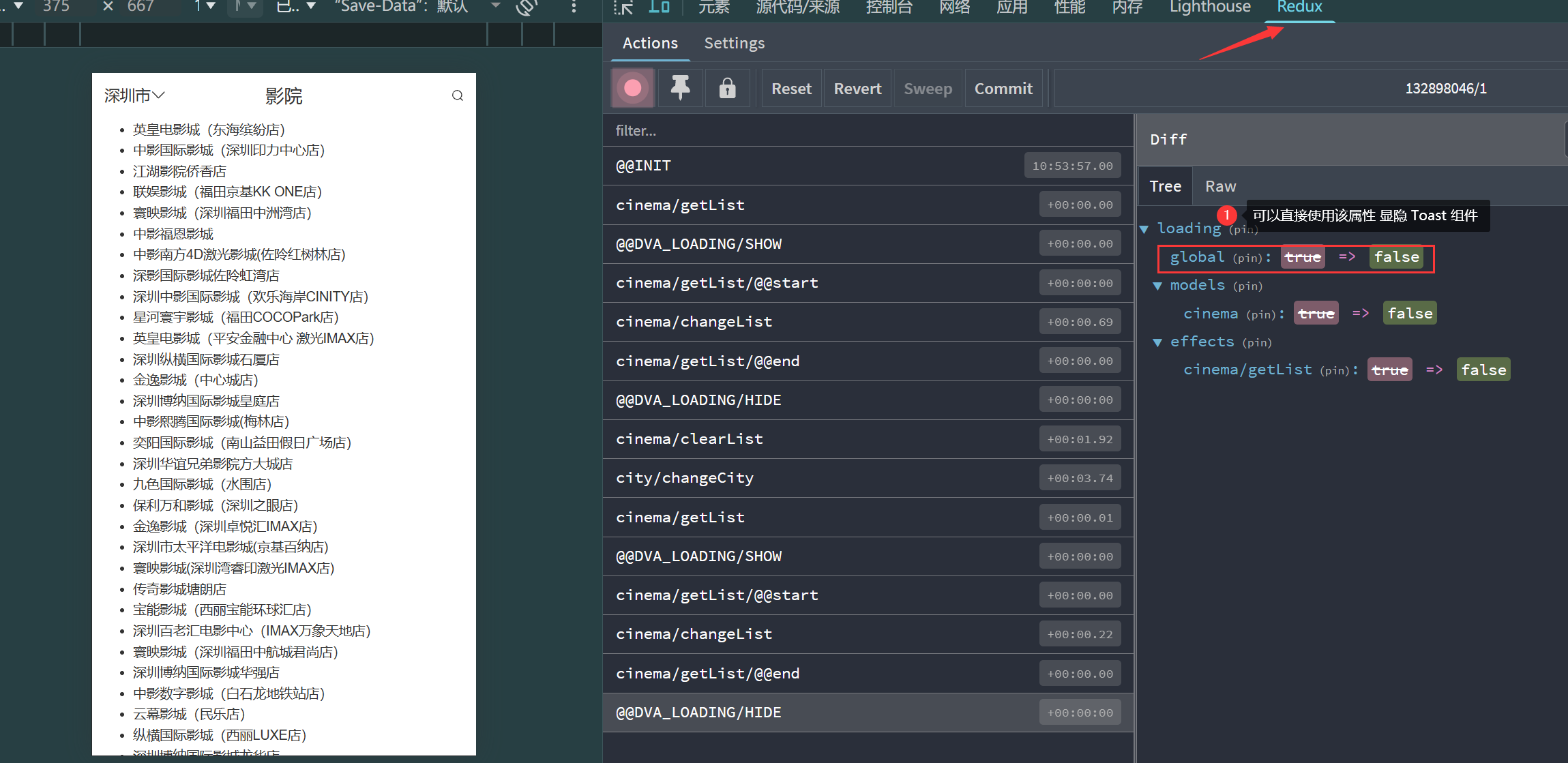
- 控制 antd-mobile 的 DotLoading 组件,Umi 的 state 中会默认携带
state.loading.global 参数来关联显隐 加载中…
1
2
3
4
5
6
7
8
9
10
11
12
13
14
15
16
17
18
19
20
21
22
23
24
25
26
27
28
29
30
31
32
33
34
35
36
37
38
39
40
41
42
43
44
45
46
47
48
49
50
51
52
53
54
55
56
57
58
59
60
61
62
63
64
65
66
67
68
69
70
| import { NavBar, DotLoading } from 'antd-mobile';
import { DownOutline, SearchOutline } from 'antd-mobile-icons';
import { useEffect } from 'react';
import { connect, history } from 'umi';
function Cinema(props: any) {
useEffect(() => {
if (props.list.length === 0) {
props.dispatch({
type: "cinema/getList",
payload: {
cityId: props.cityId
}
})
} else {
console.log("cinema list 走缓存");
}
}, []);
const back = () => {
props.dispatch({
type:"cinema/clearList"
})
history.push('/city');
};
return (
<div>
<NavBar
onBack={back}
back={
<div>
{props.cityName}
<DownOutline />
</div>
}
backIcon={false}
right={<SearchOutline />}
>
影院
</NavBar>
{
props.loading &&
/* 加载中 白点... */
<span style={{ fontSize: 14 }}>
<DotLoading />
</span>
}
<ul>
{props.list.map((item: any) => (
<li key={item.cinemaId}>{item.name}</li>
))}
</ul>
</div>
);
}
const MapStateToProps = (state: any) => {
console.log(state);
return {
a: 1,
loading: state.loading.global,
cityName: state.city.cityName,
cityId: state.city.cityId,
list: state.cinema.list,
};
};
export default connect(MapStateToProps)(Cinema);
|
默认开启 Redux 插件
Umi默认开启了 Redux 插件,可以追踪到数据流: