01-json-server实现增删改查

参考:

json-server -w db.json -p 8000

注意:db.json 即在当前 db.json 目录下启动,如果附带其他路径,会出现一个很莫名其妙的问题。

问题:

  1. 如果 json 数据中 id 主键为数字时,会导致 修改、删除 接口调用操作 json 文件时找不到该接口,报 404 问题。
  2. 如果手动修改了 db.json 文件保存之后,最好手动重启 json-server,否则关联父级或子级查询效果会不达预期。

介绍

json-server 可用于快速mock一个 REST API 服务器,让开发者能够专注于前端开发,同时轻松模拟后端 API,提高了开发效率和测试的准确性。

起步

  1. 使用 npm 全局安装 json-server :npm i -g json-server
  2. 可以通过查看版本号,来测试是否安装成功:json-server -v

此时使用命令 json-server -v 如果报错的话,则需要修改一下 windows 本机的脚本执行策略(允许执行脚本命令):

1
2
Get-ExecutionPolicy                //查看当前执行策略
Set-ExecutionPolicy RemoteSigned //修改执行策略

image-20251212112108851

再次验证(已OK):

image-20251212112215485

  1. 创建 json 数据——db.json

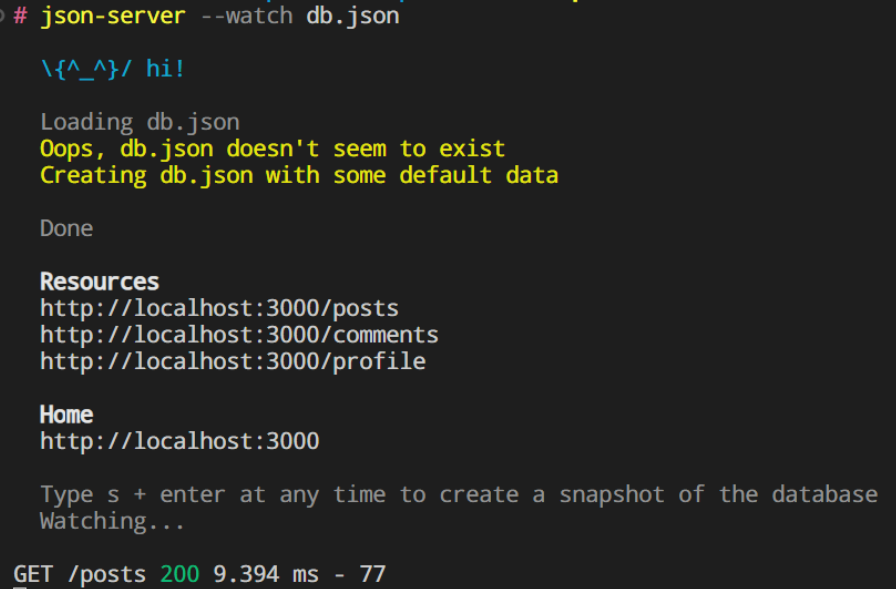
在任意一个文件夹下(此处假设我创建了一个server文件夹),进入到该文件夹里面,执行代码 json-server --watch db.json

  1. 此时文件夹下多出一个db.json文件

image-20260129234229131

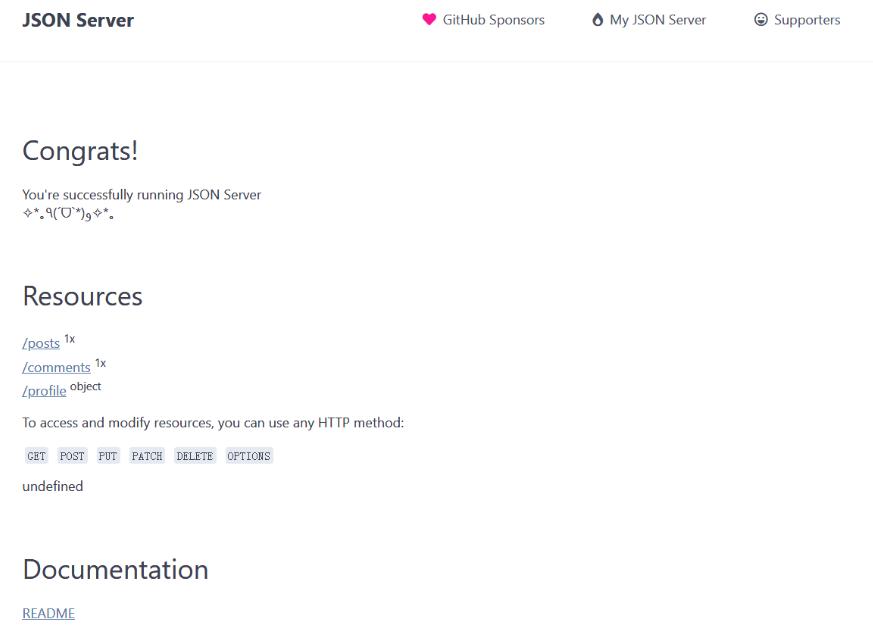
访问 http://localhost:3000/

image-20260129234353576

分别点击/posts /comments /profile /db链接,我们可以看到访问不同地址时不同的json数据。其中 /db返回的是整个json文件的数据。
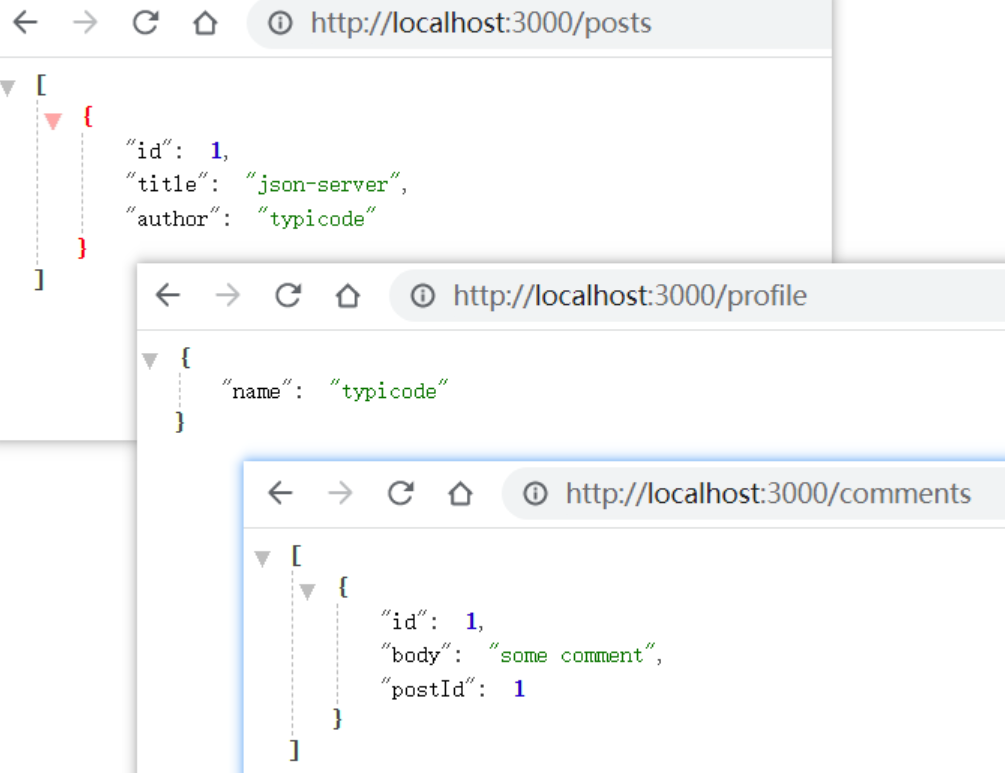
image-20260129234421005

指定端口号

json-server 默认是 3000 端口,我们也可以自己指定端口,指令如下:

1
json-server --watch db.json --port 3004

如果不想每次用这么长的指令,可以在db.json同级文件夹新建一个package.json,在script配置添加运行命令:

1
2
3
4
5
{
"scripts": {
"mock": "json-server db.json --port 3004"
}
}

运行的时候, 直接在当前文件夹下执行 npm run mock

操作数据

json-server 支持 restful 风格的 api ,可以通过不同的请求方式,对数据进行增删改查等不同的操作。

先修改db.json文件:

1
2
3
4
5
6
7
8
9
10
11
12
13
14
15
16
17
18
19
20
21
22
23
24
25
26
27
28
29
30
31
32
33
34
35
36
37
38
39
40
41
42
43
44
45
46
47
48
49
50
51
52
53
54
55
56
57
58
59
60
61
62
63
64
65
66
67
68
69
70
71
72
73
74
75
76
77
78
79
80
81
82
83
84
85
86
87
88
89
90
91
92
93
94
95
96
97
98
99
100
101
102
103
104
105
106
107
108
109
110
111
112
113
114
115
116
117
118
119
120
121
122
123
124
125
126
127
128
129
130
131
132
133
134
135
136
137
138
139
{
"users": [
{
"id": 1,
"name": "liaoyi",
"phone": "13246561111",
"age": 22,
"classId": "1002"
},
{
"name": "林更新",
"age": "44",
"id": 4,
"classId": "1003"
},
{
"name": "李响",
"phone": "18779752222",
"age": "26",
"id": 5,
"classId": "1003"
},
{
"name": "陈温柔",
"phone": "18779753333",
"age": "22",
"id": 6,
"sex": "0",
"classId": "1004"
},
{
"name": "夏琪",
"phone": "13246574444",
"age": "22",
"id": 7,
"classId": "1004"
}
],
"class": [
{
"id": "1",
"title": "前端",
"staff": [
"1002",
"1004"
]
},
{
"id": "2",
"title": "后端",
"staff": [
"1003"
]
}
],
"fruits": [
{
"id": 1,
"name": "苹果",
"price": 1.28
},
{
"id": 2,
"name": "橘子",
"price": 3.88
},
{
"id": 3,
"name": "宁夏西瓜",
"price": 1.98
},
{
"id": 4,
"name": "麒麟西瓜",
"price": 3.98
},
{
"id": 5,
"name": "红蛇果",
"price": 2.5
},
{
"id": 6,
"name": "黑皮西瓜",
"price": 0.98
},
{
"id": 7,
"name": "红心火龙果",
"price": 2.69
},
{
"id": 8,
"name": "国产火龙果",
"price": 1.69
},
{
"id": 9,
"name": "海南荔枝",
"price": 9.9
},
{
"id": 10,
"name": "陕西冬枣",
"price": 5.39
},
{
"id": 11,
"name": "软籽石榴",
"price": 2.39
},
{
"id": 12,
"name": "蜜橘",
"price": 1.99
},
{
"id": 13,
"name": "海南香蕉",
"price": 1.45
}
],
"person": [
{
"name": {
"firstname": "liao",
"lastname": "yi"
},
"pwd": "qwerst54"
},
{
"name": {
"firstname": "wang",
"lastname": "wu"
},
"pwd": "adasff11"
}
]
}

get 获取数据

浏览器可以直接访问GET请求,我们可以直接在浏览器访问就能看到返回的json数据。

获取所有用户数据(对象数组): [http://localhost:3004/users](http://localhost:3004/users)

获取所有水果数据:http://localhost:3004/fruits

获取数据

根据 id 获取 users 数据:http://localhost:3004/users/1
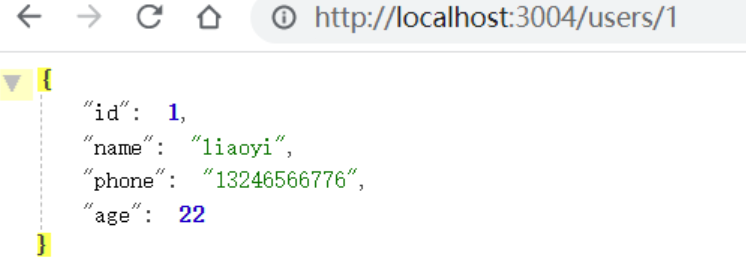
image-20260129234532731

上面的请求写法还可以通过get请求的query参数通过?方式来写:

1
http://localhost:3004/users?id=1

以此类推,我们可以传入不同的条件:

1
2
// 查找名字为 'liaoyi' 的用户
http://localhost:3004/users?name=liaoyi

多个条件

也可以指定多个条件,用&符号连接:

1
http://localhost:3004/fruits?name=橘子&price=3.88

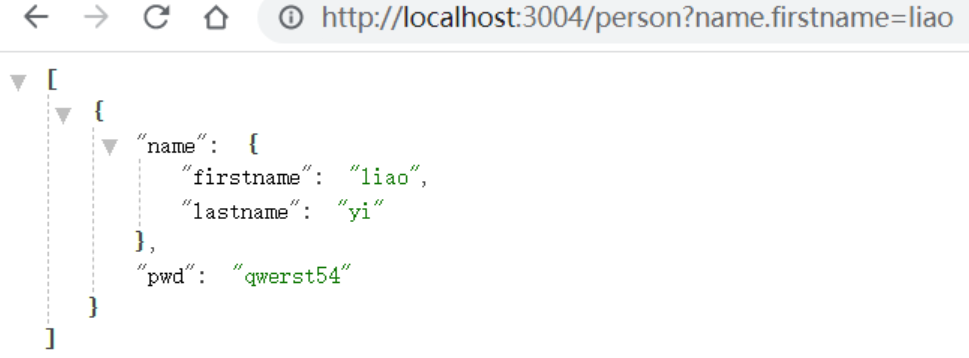
甚至还可以使用对象取属性值 obj.key 的方式:

1
http://localhost:3004/person?name.firstname=liao

image-20260129234631414

分页

分页采用 _page 来设置页码, _limit 来控制每页显示条数。如果没有指定 _limit ,默认每页显示10条。

我们可以依次输入地址查看下面接口中返回不同的结果:

1
2
3
http://localhost:3004/fruits?_page=1&_limit=5
http://localhost:3004/fruits?_page=1&_limit=10
http://localhost:3004/fruits?_page=2&_limit=5

排序

排序采用_sort来指定要排序的字段, _order 来指定排序是正排序还是逆排序(asc | desc ,默认是asc)。

1
2
http://localhost:3004/fruits?_sort=price
http://localhost:3004/fruits?_sort=price&_order=desc

获取局部数据

采用 _start 来指定开始位置, _end 来指定结束位置、或者是用_limit来指定从开始位置起往后取几个数据。和 Array.slice() 方法类似。

1
2
3
4
5
# 使用 _end
http://localhost:3004/fruits?_start=2&_end=4

# 使用 _limit
http://localhost:3004/fruits?_start=2&_limit=4

获取符合某个范围的数据

  1. 使用 _gte_lte 来设置一个取值范围 :
1
http://localhost:3004/fruits?id_gte=4&id_lte=6
  1. 使用 _ne 来获取不包含某个值的数据:
1
http://localhost:3004/fruits?id_ne=1&id_ne=10
  1. 采用 _like 来设置匹配某个字符串(或正则表达式):
1
http://localhost:3004/fruits?name_like=果

搜索功能

采用q来设置搜索内容:

1
http://localhost:3004/fruits?q=瓜

除get请求外,其他请求方式需要我们通过 api 调试工具或者代码的方式来使用。

post 新增数据

1
2
3
4
5
6
7
8
9
10
11
12
13
14
15
16
17
<template>
<el-button @click="add"> 发送请求 </el-button>
</template>

<script setup>
import axios from 'axios'
const url = 'http://localhost:3004/users'
const add = async () => {
const data = {
name: '林更新',
phone: '18779756000',
age: '22'
}
const { data: res } = await axios({ method: 'post', url, data })
console.log('res', res)
}
</script>

当然你也可以使用 api 调试工具来测试接口,这里我使用 apifox:

image-20260129234819898

delete 删除数据

通过id删除users里id为3的用户数据:

1
2
3
4
5
6
7
8
9
10
11
12
13
14
<template>
<el-button @click="deleteUser"> 删除用户 </el-button>
</template>

<script setup>
import axios from 'axios'

const userId = 3
const url = `http://localhost:3004/users/${userId}`
const deleteUser = async () => {
const res = await axios({ method: 'delete', url })
console.log('res', res)
}
</script>

put 修改数据 (替换)

PUT方法会更新整个资源对象,前端没有给出的字段,会自动清空。

1
2
3
4
5
6
7
8
9
10
11
12
13
14
15
16
17
18
<template>
<el-button @click="reviseUser"> put 修改用户 </el-button>
</template>

<script setup>
import axios from 'axios'

const userId = 4
const url = `http://localhost:3004/users/${userId}`
const reviseUser = async () => {
const data = {
"name": "林更新",
"age": "44"
}
const res = await axios({ method: 'put', url, data })
console.log('res', res)
}
</script>

但是使用put修改后会有一个问题,只会保留提交的字段,没有提交的字段在json中将会被删除,如下图,我们更改了id为4的用户,只提交了name和age,原来的json文件中,phone字段被删除了:
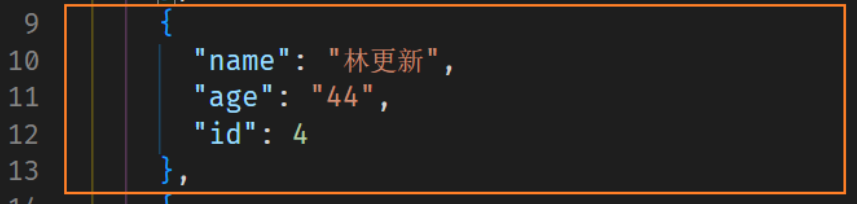
image-20260129234900971

这时候我们就要用到 patch 请求了:

patch 修改数据(部分)

只修改请求的字段,没有请求的字段将会被保留。

1
2
3
4
5
6
7
8
9
10
11
12
13
14
15
16
17
18
19
<template>
<el-button @click="reviseUser"> patch修改用户 </el-button>
</template>

<script setup>
import axios from 'axios'

const userId = 8
const url = `http://localhost:3004/users/${userId}`
const reviseUser = async () => {
const data = {
name: "陈温柔",
age: "22",
sex: "0"
}
const res = await axios({ method: 'patch', url, data })
console.log('res', res)
}
</script>

关联检索

_embed 方式检索关联子级数据

注意: 这里 _embed 需要和子表名 (要关联的子集属性名) 匹配,同时确保关联的 id 如 classId 的值为 字符串(如果为数字则关联不上)

1
http://localhost:3004/classes?_embed=users

得到的数据:

1
2
3
4
5
6
7
8
9
10
11
12
13
14
15
16
17
18
19
20
21
22
23
24
25
26
27
28
29
30
31
32
33
34
35
36
37
38
39
40
41
42
43
44
45
46
47
48
49
50
51
52
53
54
55
56
57
58
[
{
"id": "1",
"title": "前端",
"staffIds": [
"1001",
"1004",
"1005"
],
"users": [
{
"id": "1001",
"name": "liaoyi",
"phone": "13246566776",
"age": 22,
"classId": "1"
},
{
"name": "陈温柔",
"phone": "18779756000",
"age": "22",
"id": "1004",
"sex": "0",
"classId": "1"
},
{
"name": "夏琪",
"phone": "13246579999",
"age": "22",
"id": "1005",
"classId": "1"
}
]
},
{
"id": "2",
"title": "后端",
"staffIds": [
"1002",
"1003"
],
"users": [
{
"name": "林更新",
"age": "44",
"id": "1002",
"classId": "2"
},
{
"name": "李响",
"phone": "18779756778",
"age": "26",
"id": "1003",
"classId": "2"
}
]
}
]

_expand 方式检索关联父级数据

实测无效,关键字还是 _embed 既可以检索子级也可以检索父级,如:children 中有 rightId

http://localhost:8000/rights?_embed=children

http://localhost:8000/children?_embed=right

这里的 _expand=class 匹配的其实是为了和 users 对象中的 classId做关联,但是已经存在 classId 字段了,我们需要写出 class, 比如检索的是 repaId 我们旧写成 repa:

1
2
// class 是一个别名
http://localhost:3004/users?_expand=class

得到的数据:

1
2
3
4
5
6
7
8
9
10
11
12
13
14
15
16
17
18
19
20
21
22
23
24
25
26
27
28
29
30
31
32
33
34
35
36
37
38
39
40
41
42
43
44
45
46
47
48
49
50
51
52
53
54
55
56
57
58
59
60
61
62
63
64
65
66
67
68
69
70
71
72
73
74
75
76
77
78
79
80
[
{
"id": 1,
"name": "liaoyi",
"phone": "13246566776",
"age": 22,
"classId": "1",
"class": {
"id": "1",
"title": "前端",
"staff": [
"7",
"6",
"1"
]
}
},
{
"name": "林更新",
"age": "44",
"id": 4,
"classId": "2",
"class": {
"id": "2",
"title": "后端",
"staff": [
"4",
"5"
]
}
},
{
"name": "李响",
"phone": "18779756778",
"age": "26",
"id": 5,
"classId": "2",
"class": {
"id": "2",
"title": "后端",
"staff": [
"4",
"5"
]
}
},
{
"name": "陈温柔",
"phone": "18779756000",
"age": "22",
"id": 6,
"sex": "0",
"classId": "1",
"class": {
"id": "1",
"title": "前端",
"staff": [
"7",
"6",
"1"
]
}
},
{
"name": "夏琪",
"phone": "13246579999",
"age": "22",
"id": 7,
"classId": "1",
"class": {
"id": "1",
"title": "前端",
"staff": [
"7",
"6",
"1"
]
}
}
]

01-json-server实现增删改查
https://janycode.github.io/2022/05/22/04_大前端/08_JsonServer/01-json-server实现增删改查/
作者
Jerry(姜源)
发布于
2022年5月22日
许可协议