
参考:
免费测试api接口:https://jsonplaceholder.typicode.com/
随机猫咪API接口:https://api.thecatapi.com/v1/images/search?size=med&mime_types=jpg&format=json&has_breeds=true&order=RANDOM&page=0&limit=10
随机狗子API接口:https://pro-api.thedogapi.com/v1/images/search?size=med&mime_types=jpg&format=json&has_breeds=true&order=RANDOM&page=0&limit=5
NBA球员榜:https://tiyu.baidu.com/api/match/playerranking/match/NBA/tabId/60
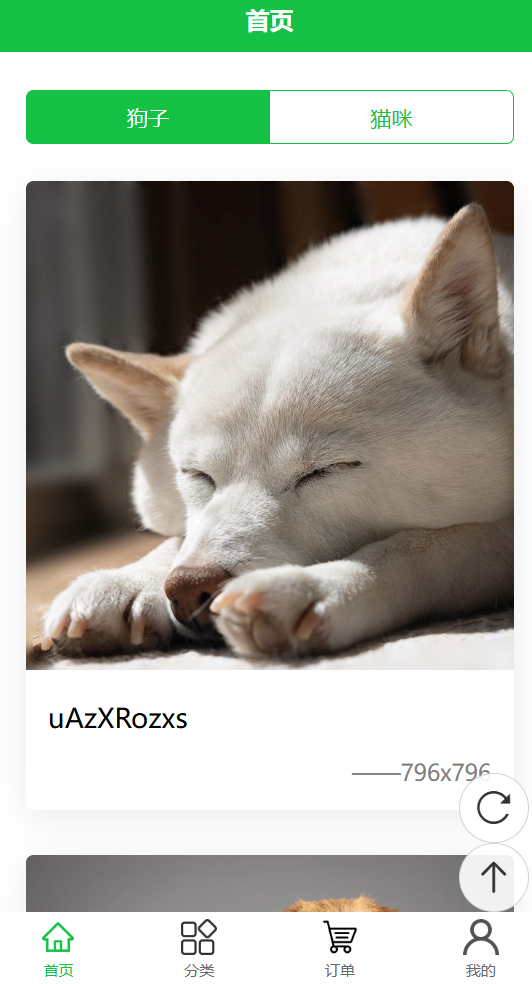
1. 萌宠项目 demo
1.1 单页实现 demo
- 页面布局、数据请求、数据渲染
- 懒加载:图片懒加载、页面触底懒加载
- 下拉刷新、点击刷新、回到顶部
env(safe-area-inset-bottom) - 不同设备兼容适应底部的安全区域
1
2
3
4
5
6
7
8
9
10
11
12
13
14
15
16
17
18
19
20
21
22
23
24
25
26
27
28
29
30
31
32
33
34
35
36
37
38
39
40
41
42
43
44
45
46
47
48
49
50
51
52
53
54
55
56
57
58
59
60
61
62
63
64
65
66
67
68
69
70
71
72
73
74
75
76
77
78
79
80
81
82
83
84
85
86
87
88
89
90
91
92
93
94
95
96
97
98
99
100
101
102
103
104
105
106
107
108
109
110
111
112
113
114
115
116
117
118
119
120
121
122
123
124
125
126
127
128
129
130
131
132
133
134
135
136
137
138
139
140
141
142
143
144
145
146
147
148
149
150
151
152
153
154
155
156
157
158
159
160
161
162
163
164
165
166
167
168
169
170
171
172
173
174
175
176
177
178
179
180
181
182
183
184
185
186
187
188
189
190
191
192
193
194
195
196
197
198
199
200
201
202
203
204
205
206
207
208
209
210
211
212
213
| <template>
<view class="container">
<view class="menu">
<uni-segmented-control
:current="current"
:values="values"
@clickItem="onClickItem"
styleType="button"
activeColor="#14c145"></uni-segmented-control>
</view>
<view class="layout">
<view class="box" v-for="(item, index) in pets" key="item._id">
<view class="pic">
<image
:src="item.url"
mode="widthFix"
@click="onPreview(index)"
lazy-load></image>
</view>
<view class="text">{{ item.id }}</view>
<view class="author">——{{ item.width }}x{{ item.height }}</view>
</view>
</view>
<view class="float">
<view class="item" @click="onRefresh">
<uni-icons type="refreshempty" size="30"></uni-icons>
</view>
<view class="item" @click="onTop">
<uni-icons type="arrow-up" size="30"></uni-icons>
</view>
</view>
<view class="loadMore">
<uni-load-more status="loading"></uni-load-more>
</view>
</view>
</template>
<script setup>
import { computed, ref } from "vue";
import { onLoad, onReachBottom, onPullDownRefresh } from "@dcloudio/uni-app";
const pets = ref([]);
const current = ref(0);
const items = ref(["猫咪", "狗子"]);
const classify = [
{
key: "dog",
value: "狗子",
url: "https://pro-api.thedogapi.com/v1/images/search?mime_types=jpg&page=0&limit=5",
},
{
key: "cat",
value: "猫咪",
url: "https://api.thecatapi.com/v1/images/search?mime_types=jpg&page=0&limit=5",
},
];
const values = computed(() => classify.map((item) => item.value));
const onClickItem = (e) => {
console.log(e);
current.value = e.currentIndex;
pets.value = [];
network(e.currentIndex);
};
const onPreview = (index) => {
let urls = pets.value.map((item) => item.url);
uni.previewImage({
urls: urls,
});
};
const onRefresh = () => {
console.log("刷新");
uni.startPullDownRefresh();
};
const onTop = () => {
console.log("顶部");
uni.pageScrollTo({
scrollTop: 0,
duration: 100,
});
};
onReachBottom(() => {
console.log("触底了,重新请求追加数据");
network();
});
onPullDownRefresh(() => {
console.log("下拉刷新");
pets.value = [];
network();
});
function network(index = 0) {
uni.showNavigationBarLoading();
uni
.request({
url: classify[index].url,
})
.then((res) => {
console.log(res);
if (res.statusCode === 200) {
pets.value = [...pets.value, ...res.data];
console.log(pets.value);
} else {
uni.showToast({
title: res.errMsg,
icon: "none",
duration: 2000,
});
}
})
.catch((err) => {
consolog.err(err);
uni.showToast({
title: "服务器繁忙",
icon: "none",
duration: 2000,
});
})
.finally(() => {
console.log("成功或失败都会执行");
uni.hideNavigationBarLoading();
uni.stopPullDownRefresh();
});
}
onLoad(() => {
network();
});
</script>
<style lang="scss" scoped>
.container {
.menu {
padding: 50rpx 50rpx 0;
}
.layout {
padding: 50rpx;
.box {
margin-bottom: 60rpx;
box-shadow: 0 10rpx 50rpx rgba(0, 0, 0, 0.08);
border-radius: 10rpx;
overflow: hidden;
.pic {
image {
width: 100%;
}
}
.text {
padding: 30rpx;
font-size: 36rpx;
}
.author {
padding: 0 30rpx 30rpx;
text-align: right;
color: gray;
font-size: 30rpx;
}
}
}
.loadMore {
padding-bottom: calc(env(safe-area-inset-bottom) + 50rpx);
}
.float {
position: fixed;
right: 30rpx;
bottom: 100rpx;
//不同设备兼容适应底部的安全区域
padding-bottom: env(safe-area-inset-bottom);
.item {
width: 90rpx;
height: 90rpx;
background: rgba(255, 255, 255, 0.9);
border-radius: 50%;
display: flex;
justify-content: center;
align-items: center;
font-size: 20rpx;
border: 1px solid lightgray;
}
}
}
</style>
|
1.2 扩展组件 uni-ui
uni-icons 需要点击安装,会自动跳入 HbuilderX,选择项目进行安装。(参考右下角刷新、返回顶部图标)
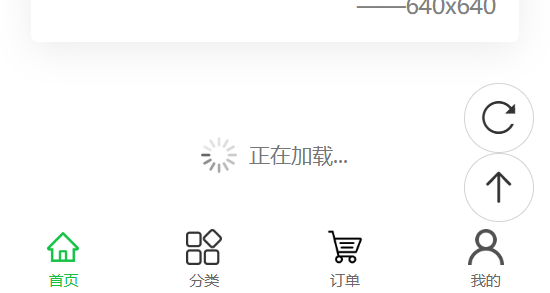
uni-load-more 用于列表中,做滚动加载使用,展示 loading 的各种状态。
uni-segmented-control 分段器,即页面内部选项卡。

更多扩展组件参考:https://uniapp.dcloud.net.cn/component/uniui/uni-ui.html
2. 壁纸项目 demo
先搭结构 -> 再写样式 -> 渲染数据 -> 交互行为。
案例源码:https://github.com/janycode/uniapp-vue3-wallpaper-demo
2.1 创建工程
uniapp创建基于 vue3 的默认模版项目。
梳理目录结构:
1
2
3
4
5
6
7
8
9
10
11
12
13
14
15
16
17
| common/
images/
style/
common-style.scss
pages/
index/
index.vue
static/
logo.png
.gitignore
App.vue
main.js
manifest.json
pages.json
README.md
uni.promisify.adaptor.js
uni.scss
|
pages/index/index.vue
1
2
3
4
5
6
7
8
9
10
11
| <template>
<view class="homeLayout">
index
</view>
</template>
<script setup>
</script>
<style lang="scss" scoped>
</style>
|
common-style.scss
1
2
3
4
5
| view,
swiper,
swiper-item {
box-sizing: border-box;
}
|
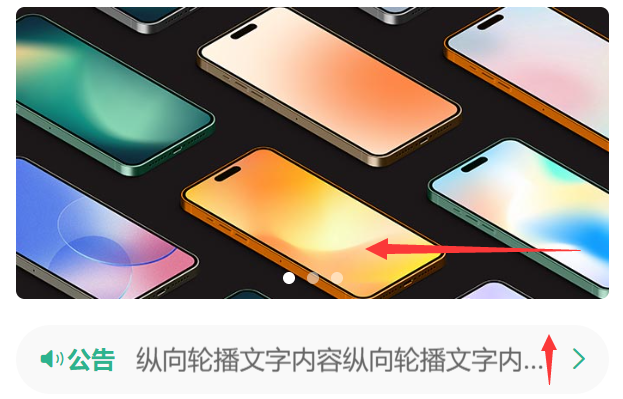
2.2 swiper 轮播
首页轮播:左右滚动轮播
首页轮播:上下滚动轮播
1
2
3
4
5
6
7
| swiper {
width: 750rpx;
height: 340rpx;
&-item { // &代表父级 swiper,等价于 swiper-item
...
}
}
|
2.3 自定义组件
首页公共标题:具名插槽
1
2
|
<uni-dateformat :date="Date.now()" format="dd日"></uni-dateformat>
|
- scroll-view 横向左右滑动(3个条件):①
scroll-x ②父级nowrap不换行 ③image行级块
1
2
3
4
5
6
7
8
9
10
11
12
13
14
15
16
17
18
19
| <scroll-view scroll-x>
<view class="box" v-for="item in 8">
<image src="/common/images/wallpaper/preview_small.webp" mode="aspectFill"></image>
</view>
</scroll-view>
//scss
scroll-view {
white-space: nowrap; //不换行
.box {
width: 200rpx;
height: 445rpx;
display: inline-block; //行级块
margin-right: 15rpx;
image {
width: 100%;
height: 100%;
border-radius: 10rpx;
}
|


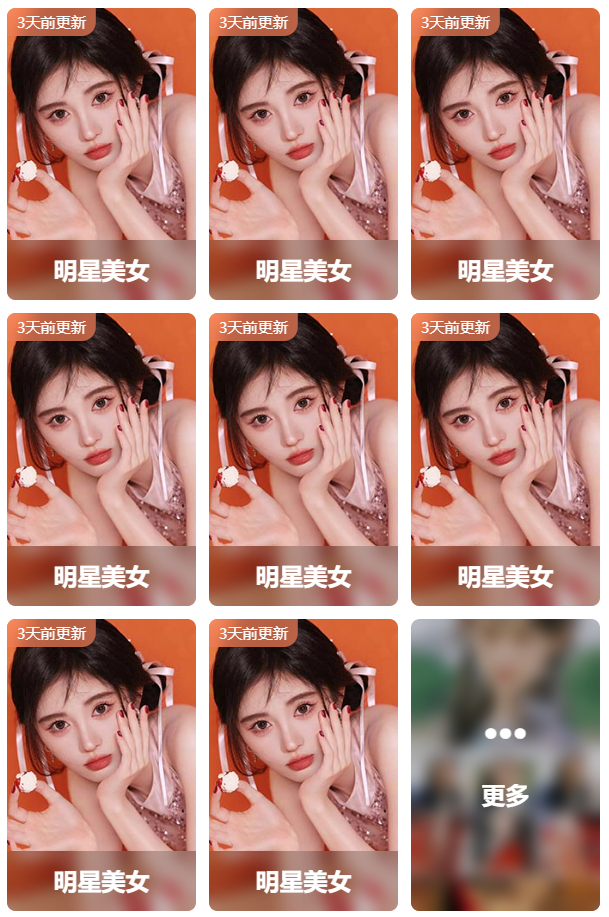
首页专题精选:磨砂背景、定位布局、缩放最小字体
首页专题精选:复用组件,props传值做more更多效果
- 父级加圆角、子级是 image 图像会盖住,需要加 overflow: hidden;
- 毛玻璃效果
1
2
3
| // 毛玻璃效果
background: rgba(0, 0, 0, 0.2);
backdrop-filter: blur(10rpx); //半透明模糊效果属性
|
1
2
3
| font-size: 22rpx; //字体最小12px,因此不能设置到小于24rpx
transform: scale(0.8); //此时使用缩放可以对字体进行缩小
transform-origin: left top; //以左上角为基准缩小
|
2.4 页面与路由
底部选项卡 tabBar:创建页面、设置 tabBar 路由和图标和高亮

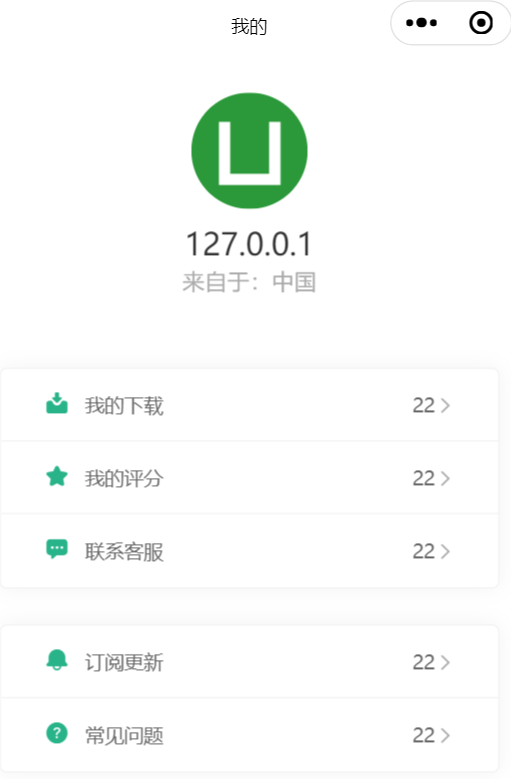
我的:页面布局
2.5 条件编译(★)
条件编译处理跨端兼容
1
2
3
4
5
6
7
|
<button open-type="contact">联系客服</button>
<button @click="clickContact">拨打电话</button>
|
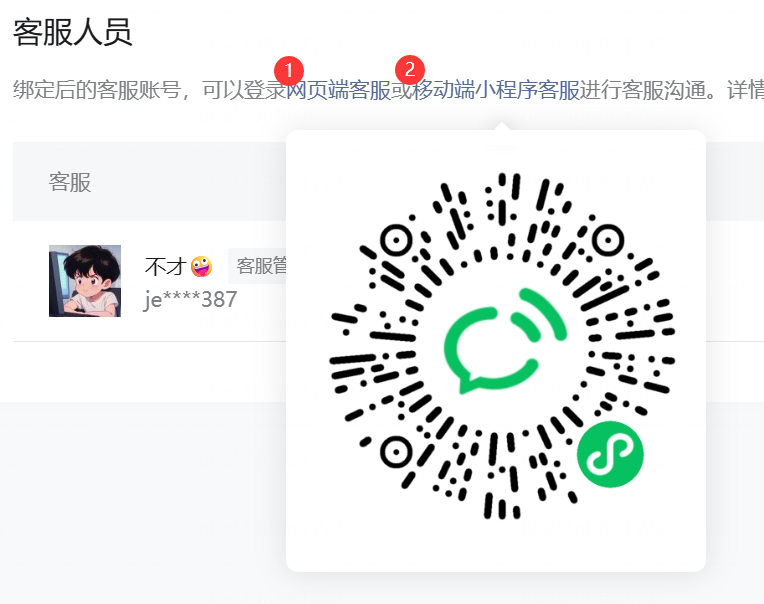
2.6 小程序客服
button 组件中 open-type="concat" 就可以支持打开客服,以微信小程序为例。
1
| <button open-type="contact">打开客服会话</button>
|
前置设置,如微信小程序:
① manifest.json
- 微信小程序 AppID:wx51c55a4653bba442
- √ 上传时自动代码压缩
② 微信小程序后台添加客服
③ 微信开发工具中设置 AppID
- 【基本信息】-【AppId】
- 【真机调试】即可在线与客服人员沟通
④ 登陆客服系统进行收发消息
2.7 拨打电话
拨打电话API
1
2
3
4
5
6
7
8
| <button @click="clickContact">拨打电话</button>
// 拨打电话 js
const clickContact = () => {
uni.makePhoneCall({
phoneNumber: '114' //仅为示例
});
}
|
2.8 CSS 样式技巧(★)
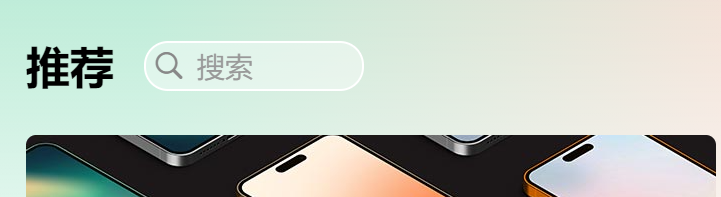
渐变色
/common/style/common-style.scss
1
2
3
4
5
| .pageBg {
// 背景渐变:多重渐变层叠样式
background: linear-gradient(to bottom, transparent 0, #fff 400rpx), linear-gradient(to right, #beecd8 20%, #F4E2D8);
min-height: 80vh; //最小高度
}
|
/pages/xx/xx.vue
1
2
3
| <template>
<view class="homeLayout pageBg">
...
|
全局主题色
创建 /common/style/base-style.scss
1
2
3
4
5
6
7
8
9
10
11
12
| $brand-theme-color: #28B389; //品牌主题颜色
$border-color: #e0e0e0; //边框颜色
$border-color-light: #efefef; //边框亮色
$text-font-color-1: #000; //文字主色
$text-font-color-2: #676767; //文字主色
$text-font-color-3: #a7a7a7; //文字主色
$text-font-color-4: #e4e4e4; //文字主色
// @mixin flex {
// }
|
uni.scss 中引入
1
2
3
| ...
// 自定义全局颜色,引入自己定义的,不污染默认全局样式
@import "@/common/style/base-style.scss"; //注意:末尾分号
|
使用全局主题色:
1
2
3
4
| //样式穿透到原生组件内部
:deep(.uni-icons) {
color: $brand-theme-color !important;
}
|
fit-content 按内容自动宽度
有多少内容宽度就多大,兼容性也可以。
1
2
3
4
5
6
7
8
9
| //父级的下一级子元素 view
&>view {
position: absolute;
left: 0;
right: 0;
margin: auto; // 配合 left 0 right 0 就在中间了
width: fit-content; //有多少内容宽度就多大,兼容性也可以
color: #fff;
}
|
去掉行高
1
| line-height: 1em; //默认行高去掉,取值1em即可
|
增加手指点击面积
1
| padding: 2rpx 12rpx; //给元素多增加点内边距,可以增加手指点击面积
|
弹性布局:空盒子占位
1
2
3
| display: flex;
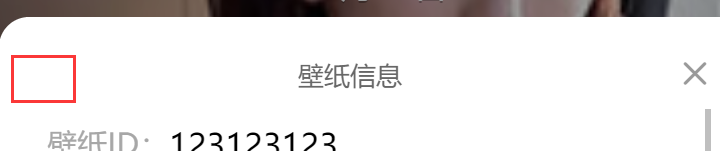
justify-content: space-between; //头部:空盒子占位 + 壁纸信息 + 关闭按钮,空盒子是技巧
align-items: center;
|
不挤压兄弟元素
1
2
3
4
| .value {
flex: 1; //占用剩余宽度
width: 0; //兼容性写法:不挤压左侧 label 的宽度
}
|
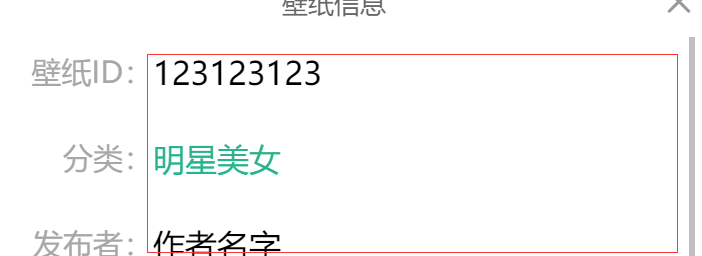
标签样式
1
2
3
| <view class="value tabs">
<view class="tab" v-for="item in 3">标签名</view>
</view>
|
1
2
3
4
5
6
7
8
9
10
11
12
13
| .tabs {
display: flex;
flex-wrap: wrap;
.tab { //标签样式
border: 1px solid $brand-theme-color;
color: $brand-theme-color;
font-size: 22rpx;
padding: 10rpx 30rpx;
border-radius: 40rpx;
line-height: 1em;
margin: 0 10rpx 10rpx 0;
}
}
|

父级圆角子级图像
1
2
| border-radius: 10rpx; //父级加圆角、子级是图像会盖住,需要加 overflow: hidden;
overflow: hidden;
|
底部安全区通用样式
1
2
3
4
5
| ...
<view class="safe-area-inset-bottom"></view>
</view>
</template>
|
common/style/common-style.scss
1
2
3
4
| // 底部安全区通用设置
.safe-area-inset-bottom {
height: env(safe-area-inset-bottom);
}
|
注意:底部弹窗时,在小程序会有一个 padding 值,让弹窗与手机底部有间隔镂空了,需要改原生组件(如果有此情况则需要处理)
位置:uni_modules/uni_popup/components/uni-popup/uni-popup.vue
搜索:底部弹出样式处理
1
2
3
4
5
6
7
8
9
10
11
12
13
14
15
16
17
18
|
bottom(type) {
this.popupstyle = 'bottom'
this.ani = ['slide-bottom']
this.transClass = {
position: 'fixed',
left: 0,
right: 0,
bottom: 0,
backgroundColor: this.bg
}
if (type) return
this.showPopup = true
this.showTrans = true
},
|
2.9 自定义头部 - 高度(兼容性)
自定义头部导航栏布局:通过获取系统信息和胶囊按钮尺寸,兼容设置自定义头部导航栏的尺寸
utils/system.js - 兼容 H5、微信小程序、抖音小程序 的 自定义头部区域高度。
1
2
3
4
5
6
7
8
9
10
11
12
13
14
15
16
17
18
19
20
21
22
23
24
25
26
27
|
const SYSTEM_INFO = uni.getSystemInfoSync()
export const getStatusBarHeight = () => SYSTEM_INFO.statusBarHeight || 15
export const getTitleBarHeight = () => {
if (uni.getMenuButtonBoundingClientRect) {
let { top, height } = uni.getMenuButtonBoundingClientRect()
return height + (top - getStatusBarHeight()) * 2
} else {
return 40
}
}
export const getNavBarHeight = () => getStatusBarHeight() + getTitleBarHeight()
export const getLeftIcon = () => {
let { leftIcon: { left, width } } = tt.getCustomButtonBoundingClientRect()
return left + parseInt(width)
return 0
}
|
components/custom-nav-bar/custom-nav-bar.vue 自定义头部组件:
1
2
3
4
5
6
7
8
9
10
11
12
13
14
15
16
17
18
19
20
21
22
23
24
25
26
27
28
29
30
31
32
33
34
35
36
37
38
39
40
41
42
43
44
45
46
47
48
49
50
51
52
53
54
55
56
57
58
59
60
61
62
63
64
65
66
67
68
69
70
71
72
73
74
75
76
| <template>
<view class="layout">
<view class="navbar">
<view class="statusBar" :style="{height: getStatusBarHeight() + 'px'}"></view>
<view class="titleBar" :style="{height: getTitleBarHeight() + 'px', marginLeft: getLeftIcon() + 'px'}">
<view class="title">标题</view>
<view class="search">
<uni-icons class="icon" type="search" color="#888" size="18"></uni-icons>
<text class="text">搜索</text>
</view>
</view>
</view>
<view class="fill" :style="{height: getNavBarHeight() + 'px'}">
</view>
</view>
</template>
<script setup>
import { computed, ref } from 'vue'
import { getStatusBarHeight, getTitleBarHeight, getNavBarHeight, getLeftIcon } from '@/utils/system.js'
</script>
<style lang="scss" scoped>
.layout {
.navbar {
position: fixed;
top: 0;
left: 0;
width: 100%;
z-index: 10;
background: linear-gradient(to bottom, transparent 0, #fff 400rpx), linear-gradient(to right, #beecd8 20%, #F4E2D8);
.statusBar {
border: 1px solid red;
}
.titleBar {
display: flex;
align-items: center;
padding: 0 30rpx;
border: 1px solid green;
.title {
font-size: 22px;
font-weight: 700;
color: $text-font-color-1;
}
.search {
width: 220rpx;
height: 50rpx;
border-radius: 60rpx;
background: rgba(255, 255, 255, 0.4);
border: 1px solid #fff;
margin-left: 30rpx;
color: #999;
font-size: 28rpx;
display: flex;
align-items: center;
.icon {
margin-left: 5rpx;
}
.text {
padding-left: 10rpx;
}
}
}
}
.fill {}
}
</style>
|
2.10 request 请求封装(★)
utils/request.js
1
2
3
4
5
6
7
8
9
10
11
12
13
14
15
16
17
18
19
20
21
22
23
24
25
26
27
28
29
30
31
32
33
34
35
36
37
38
39
40
| const BASE_URL = 'https://www.xxx.com/api/'
export function request(config = {}) {
let { url, method = 'GET', header = {}, data = {} } = config
url = BASE_URL + url
header['access-key'] = 'xxm_jerry_123'
header['token'] = 'token123'
return new Promise((resolve, reject) => {
uni.request({
url,
method,
header,
data,
success: res => {
if (res.data.errCode === 0) {
resolve(res.data)
} else if (res.data.errCode === 400) {
uni.showModal({
title: '错误提示',
content: res.data.errMsg,
showCancel: false
})
reject(res.data)
} else {
uni.showToast({
title: res.data.errMsg,
icon: 'none'
})
reject(res.data)
}
},
fail: err => {
reject(err)
}
})
})
}
|
api/apis.js
1
2
3
4
5
6
7
8
9
10
11
12
13
14
15
16
17
18
19
20
21
| import { request } from '../utils/request'
export function apiGetBanner() {
return request({ url: '/homeBanner' })
}
export function apiGetDayRandom() {
return request({ url: '/randomWall' })
}
export function apiGetNotice(data) {
return request({
url: '/wallNewsList',
method: 'post',
data
})
}
export function apiGetClassify(data) {
return request({ url: '/classify', data })
}
|
使用:
1
2
3
4
5
6
7
| import { apiGetBanner } from '../../api/apis'
const bannerList = ref([])
const getBanner = async () => {
let res = await apiGetBanner()
bannerList.value = res.data
}
|
2.11 对象传值 props 默认值
1
2
3
4
5
6
7
8
9
10
11
12
13
|
defineProps({
item: {
type: Object,
default () {
return {
name: '默认名称',
picurl: '/common/images/1.jpg',
updateTime: Date.now()
}
}
}
})
|
2.12 时间日期换算工具类
utils/common.js - 借助 ai 生成并验证,返回结果需求:”1分钟”、”25分钟”、”3小时”、”5天”、”2月”,超3个月返回null
1
2
3
4
5
6
7
8
9
10
11
12
13
14
15
16
17
18
19
20
21
22
23
24
25
26
27
28
29
30
31
32
33
34
35
36
37
38
39
40
41
42
43
|
export default function formatTimeDiff(timestamp) {
const targetTime = timestamp.toString().length === 10 ? timestamp * 1000 : timestamp
const now = Date.now()
const diffMs = Math.abs(now - targetTime)
const minute = 60 * 1000
const hour = 60 * minute
const day = 24 * hour
const month = 30 * day
const threeMonths = 3 * month
if (diffMs < minute) {
return '1分钟'
} else if (diffMs < hour) {
const minutes = Math.floor(diffMs / minute)
return `${minutes}分钟`
} else if (diffMs < day) {
const hours = Math.floor(diffMs / hour)
return `${hours}小时`
} else if (diffMs < month) {
const days = Math.floor(diffMs / day)
return `${days}天`
} else if (diffMs < threeMonths) {
const months = Math.floor(diffMs / month)
return `${months}月`
} else {
return null
}
}
|
2.13 触底加载&防抖(★)
1
2
3
4
5
6
7
8
9
10
11
12
13
14
15
16
17
| <script setup>
import { onLoad, onReachBottom } from '@dcloudio/uni-app'
onLoad(e => {
console.log(e)
let { id=null, name='' } = e
console.log(id, name)
})
onReachBottom(() => {
console.log('触底了')
})
</script>
|
2.14 大对象跨页面传值
uni.setStorageSync(key, data) - 将 data 存储在本地缓存中指定的 key 中,会覆盖掉原来该 key 对应的内容,这是一个同步接口。const data = uni.getStorageSync(key) - 从本地缓存中同步获取指定 key 对应的内容。uni.removeStorageSync(key) - 从本地缓存中同步移除指定 key。
1
2
3
4
5
6
7
8
9
10
11
| const classList = ref([])
const getClassList = async () => {
let res = await apiGetClassify()
classList.value = res.data
uni.setStorageSync('storageClassList', classList.value)
}
onUnload(()=>{
uni.removeStorageSync("storgClassList")
})
|
2.15 骨架屏
骨架屏,一般用于页面在请求远程数据尚未完成时,在内容加载出来前展示与内容布局结构一致的灰白块,提升用户视觉体验。如B占首页下划时。
插件地址:https://ext.dcloud.net.cn/plugin?id=15145
官方文档:https://www.uvui.cn/components/skeletons.html
2.16 解决请求加载数据过多(★)
节约流量、提升用户体验。
① 对于 image 上的 v-if 可以控制加载的图片
② 并且缓存用户看过的图
③ 以及实现预加载上一张、本张、下一张
1
2
3
4
5
6
| <swiper circular @change="swiperChange">
<swiper-item v-for="item in 5" :key="item">
<image v-if="readImgs.includes(index)" :src="xxx" mode="aspectFill"></image>
</swiper-item>
</swiper>
|
1
2
3
4
5
6
7
8
9
10
11
12
13
14
15
16
17
18
19
20
21
| function readImgsFun() {
readImgs.value.push(
currentIndex.value <= 0 ? classList.value.length - 1 : currentIndex.value - 1,
currentIndex.value,
currentIdex.value >= classList.value.length - 1 ? 0 : currentIndex.value + 1
)
readImgs.value = [...new Set(readImgs.value)]
}
const swiperChange = e => {
console.log(e.detail.current)
readImgsFun()
}
const readImgs = ref([])
onLoad(e => {
readImgsFun()
})
|
2.17 小程序下载图片
前置:
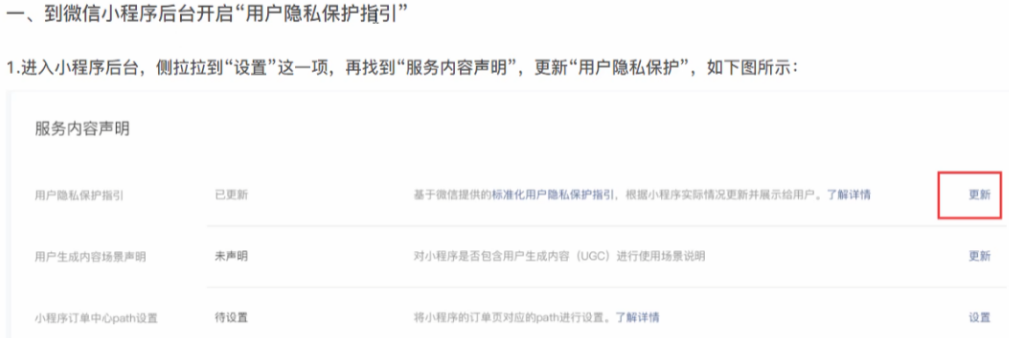
- 安全域名配置:微信小程序后台 - 开发管理 - 服务器域名 - downloadFile 域名添加。
- 隐私协议配置:微信小程序后台 - 设置 - 服务内容声明 - 用户隐私协议设置 - 按要求填写、选择所需要的权限即可保存。
1
2
3
4
5
6
7
8
9
10
11
12
13
14
15
16
17
18
19
20
21
22
23
24
25
26
27
28
29
30
31
32
33
34
35
36
37
38
39
40
41
42
43
44
45
46
47
48
49
50
51
52
53
54
55
56
57
58
59
60
61
62
63
64
65
66
67
68
69
70
71
72
73
74
75
76
77
|
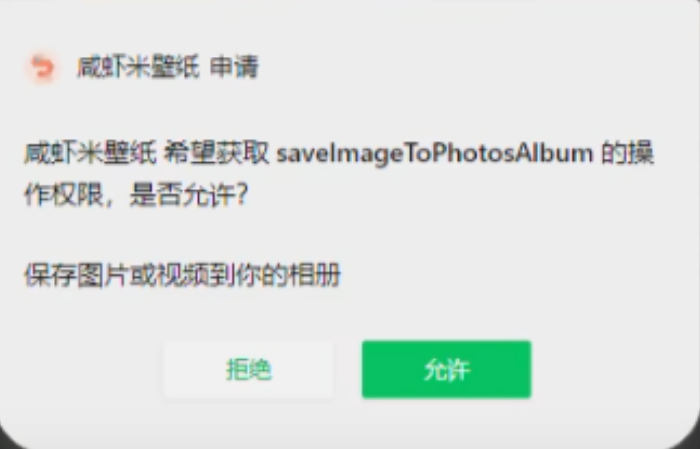
const clickDownload = async () => {
uni.showModal({
content: '请长按保存壁纸',
showCancel: false
})
try {
uni.showLoading({
title: '下载中...',
mask: true
})
let { classid, _id: wallId } = currentInfo.value
let res = await apiWriteDownload({ classid, wallId })
if (res.errCode !== 0) throw res
uni.getImageInfo({
src: currentInfo.value.picurl,
success: res => {
uni.saveImageToPhotosAlbum({
filePath: res.path,
success: res => {
uni.showToast({
title: '保存成功,请到相册查看',
icon: 'none'
})
},
fail: err => {
if (err.errMsg === 'saveImageToPhotosAlbum:fail cancel') {
uni.showToast({
title: '保存失败,请重新点击下载',
icon: 'none'
})
return
}
uni.showModal({
title: '授权提示',
content: '需要授权保存相册',
success: res => {
if (res.confirm) {
uni.openSetting({
success: setting => {
console.log(setting)
if (setting.authSetting['scope.writePhotosAlbum']) {
uni.showToast({
title: '获取授权成功',
icon: 'none'
})
} else {
uni.showToast({
title: '获取权限失败',
icon: 'none'
})
}
}
})
}
}
})
},
complete: () => {
uni.hideLoading()
}
})
}
})
} catch (err) {
console.log(err)
uni.hideLoading()
}
}
|
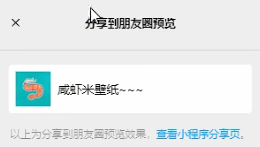
2.18 分享给好友|朋友圈
onShareAppMessage 小程序中用户点击分享后,在 js 中定义 onShareAppMessage 处理函数(和 onLoad 等生命周期函数同级),设置该页面的分享信息。
onShareTimeline 监听用户点击右上角转发到朋友圈。
imageUrl - 可以是变量url / 网络图片 / 本地图片(本地需要使用 static/ 目录下图片,因为会被打包,否则拿不到)
页面无需参数-分享
1
2
3
4
5
6
7
8
9
10
11
12
13
14
15
| import {onShareAppMessage,onShareTimeline} from "@dcloudio/uni-app"
onShareAppMessage((e)=>{
return {
title:"好看的手机壁纸",
path:"/pages/classify/classify"
}
})
onShareTimeline(()=>{
return {
title:"好看的手机壁纸",
imageUrl: '/static/images/logo.jpg'
}
})
|
页面需要参数-分享
1
2
3
4
5
6
7
8
9
10
11
12
13
14
15
16
17
18
19
20
21
22
23
| let pageName;
onLoad((e) => {
let { id=null, name=null, type=null } = e;
pageName = name
uni.setNavigationBarTitle({ title:name })
getClassList();
})
onShareAppMessage((e) => {
return {
title:"精美壁纸-"+pageName,
path:"/pages/classlist/classlist?id="+queryParams.classid+"&name="+pageName
}
})
onShareTimeline(() => {
return {
title:"精美壁纸-"+pageName,
query:"id="+queryParams.classid+"&name="+pageName
}
})
|
2.19 文章详情 - 富文本渲染
<rich-text> - 官方自带的富文本组件<mp-html> - 插件市场的富文本组件,功能更丰富,如文章内图片点击可以放大等【推荐】
pages/notice/detail.vue
1
2
3
4
5
6
7
8
9
10
11
12
13
14
15
16
17
18
19
20
21
22
23
24
25
26
27
28
29
30
31
32
33
34
35
36
37
38
39
40
41
42
43
44
45
46
47
48
49
50
51
52
53
54
55
56
57
58
59
60
61
62
63
64
65
66
67
68
69
70
71
72
73
74
75
76
77
78
79
80
81
82
83
| <template>
<view class="noticeLayout">
<view class="title">
<view class="tag" v-if="detail.select">
<uni-tag inverted text="置顶" type="error" />
</view>
<view class="font">{{detail.title}}</view>
</view>
<view class="info">
<view class="item">{{detail.author}}</view>
<view class="item">
<uni-dateformat :date="detail.publish_date" format="yyyy-MM-dd hh:mm:ss"></uni-dateformat>
</view>
</view>
<view class="content">
<mp-html :content="detail.content" />
</view>
<view class="count">
阅读 {{detail.view_count}}
</view>
</view>
</template>
<script setup>
import {apiNoticeDetail} from "@/api/apis.js"
import { ref } from "vue";
import {onLoad} from "@dcloudio/uni-app"
const detail = ref({})
let noticeId
onLoad((e)=>{
noticeId = e.id
getNoticeDetail();
})
const getNoticeDetail = ()=>{
apiNoticeDetail({id:noticeId}).then(res=>{
detail.value = res.data
console.log(res);
})
}
</script>
<style lang="scss" scoped>
.noticeLayout{
padding:30rpx;
.title{
font-size: 40rpx;
color:#111;
line-height: 1.6em;
padding-bottom:30rpx;
display: flex;
.tag{
transform: scale(0.8);
transform-origin: left center;
flex-shrink: 0;
}
.font{
padding-left:6rpx;
}
}
.info{
display: flex;
align-items: center;
color:#999;
font-size: 28rpx;
.item{
padding-right: 20rpx;
}
}
.content{
padding:50rpx 0;
}
.count{
color:#999;
font-size: 28rpx;
}
}
</style>
|

2.20 搜索页
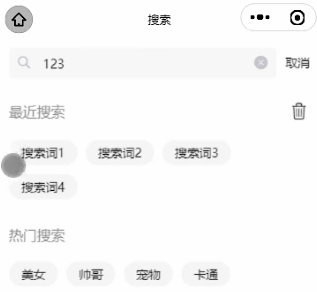
包含搜素框、最近搜索、热门搜索。
uni-search-bar - 官方搜索栏组件uv-empty - 插件市场组件,该组件用于需要加载内容,但是加载的第一页数据就为空,提示一个 没有内容 的场景。
搜索历史核心逻辑:
1
2
|
historySearch.value = [...new Set([queryParams.value.keyword, ...historySearch.value])].slice(0, 10)
|
pages/search/search.vue
1
2
3
4
5
6
7
8
9
10
11
12
13
14
15
16
17
18
19
20
21
22
23
24
25
26
27
28
29
30
31
32
33
34
35
36
37
38
39
40
41
42
43
44
45
46
47
48
49
50
51
52
53
54
55
56
57
58
59
60
61
62
63
64
65
66
67
68
69
70
71
72
73
74
75
76
77
78
79
80
81
82
83
84
85
86
87
88
89
90
91
92
93
94
95
96
97
98
99
100
101
102
103
104
105
106
107
108
109
110
111
112
113
114
115
116
117
118
119
120
121
122
123
124
125
126
127
128
129
130
131
132
133
134
135
136
137
138
139
140
141
142
143
144
145
146
147
148
149
150
151
152
153
154
155
156
157
158
159
160
161
162
163
164
165
166
167
168
169
170
171
172
173
174
175
176
177
178
179
180
181
182
183
184
185
186
187
188
189
190
191
192
193
194
195
196
197
198
199
200
| <template>
<view class="searchLayout">
<view class="search">
<uni-search-bar @confirm="onSearch" @cancel="onClear" @clear="onClear" focus placeholder="搜索"
v-model="queryParams.keyword">
</uni-search-bar>
</view>
<view v-if="!classList.length || noSearch">
<view class="history" v-if="historySearch.length">
<view class="topTitle">
<view class="text">最近搜索</view>
<view class="icon" @click="removeHistory">
<uni-icons type="trash" size="25"></uni-icons>
</view>
</view>
<view class="tabs">
<view class="tab" v-for="tab in historySearch" :key="tab" @click="clickTab(tab)">{{tab}}</view>
</view>
</view>
<view class="recommend">
<view class="topTitle">
<view class="text">热门搜索</view>
</view>
<view class="tabs">
<view class="tab" v-for="tab in recommendList" :key="tab" @click="clickTab(tab)">{{tab}}</view>
</view>
</view>
</view>
<view class="noSearch" v-if="noSearch">
<uv-empty mode="search" icon="http://cdn.uviewui.com/uview/empty/search.png"></uv-empty>
</view>
<view v-else>
<view class="list">
<navigator :url="`/pages/preview/preview?id=${item._id}`" class="item" v-for="item in classList"
:key="item._id">
<image :src="item.smallPicurl" mode="aspectFill"></image>
</navigator>
</view>
<view class="loadingLayout" v-if="noData || classList.length">
<uni-load-more :status="noData?'noMore':'loading'" />
</view>
</view>
</view>
</template>
<script setup>
import { ref } from 'vue'
import { onLoad, onUnload, onReachBottom } from '@dcloudio/uni-app'
import { apiSearchData } from '@/api/apis.js'
const queryParams = ref({
pageNum: 1,
pageSize: 12,
keyword: ''
})
const historySearch = ref(uni.getStorageSync('historySearch') || [])
const recommendList = ref(['美女', '帅哥', '宠物', '卡通'])
const noData = ref(false)
const noSearch = ref(false)
const classList = ref([])
const onSearch = () => {
uni.showLoading()
historySearch.value = [...new Set([queryParams.value.keyword, ...historySearch.value])].slice(0, 10)
uni.setStorageSync('historySearch', historySearch.value)
initParams(queryParams.value.keyword)
searchData()
console.log(queryParams.value.keyword)
}
const onClear = () => {
initParams()
}
const clickTab = value => {
initParams(value)
onSearch()
}
const removeHistory = () => {
uni.showModal({
title: '是否清空历史搜索?',
success: res => {
if (res.confirm) {
uni.removeStorageSync('historySearch')
historySearch.value = []
}
}
})
}
const searchData = async () => {
try {
let res = await apiSearchData(queryParams.value)
classList.value = [...classList.value, ...res.data]
uni.setStorageSync('storgClassList', classList.value)
if (queryParams.value.pageSize > res.data.length) noData.value = true
if (res.data.length === 0 && classList.value.length === 0) noSearch.value = true
console.log(res)
} finally {
uni.hideLoading()
}
}
const initParams = (value = '') => {
classList.value = []
noData.value = false
noSearch.value = false
queryParams.value = {
pageNum: 1,
pageSize: 12,
keyword: value || ''
}
}
onReachBottom(() => {
if (noData.value) return
queryParams.value.pageNum++
searchData()
})
onUnload(() => {
uni.removeStorageSync('storgClassList', classList.value)
})
</script>
<style lang="scss" scoped>
.searchLayout {
.search {
padding: 0 10rpx;
}
.topTitle {
display: flex;
justify-content: space-between;
align-items: center;
font-size: 32rpx;
color: #999;
}
.history {
padding: 30rpx;
}
.recommend {
padding: 30rpx;
}
.tabs {
display: flex;
align-items: center;
flex-wrap: wrap;
padding-top: 20rpx;
.tab {
background: #F4F4F4;
font-size: 28rpx;
color: #333;
padding: 10rpx 28rpx;
border-radius: 50rpx;
margin-right: 20rpx;
margin-top: 20rpx;
}
}
.list {
display: grid;
grid-template-columns: repeat(3, 1fr);
gap: 5rpx;
padding: 20rpx 5rpx;
.item {
height: 440rpx;
image {
width: 100%;
height: 100%;
display: block;
}
}
}
}
</style>
|
2.21 跳转外部小程序
1
2
3
4
5
6
7
8
9
10
11
12
| <swiper circular indicator-dots indicator-color="rgba(255,255,255,0.5)" indicator-active-color="#fff" autoplay>
<swiper-item v-for="item in bannerList" :key="item._id">
<navigator v-if="item.target == 'miniProgram'" :url="item.url" target="miniProgram" :app-id="item.appid" class="like">
<image :src="item.picurl" mode="aspectFill"></image>
</navigator>
<navigator v-else :url="`/pages/classlist/classlist?${item.url}`" class="like">
<image :src="item.picurl" mode="aspectFill"></image>
</navigator>
</swiper-item>
</swiper>
|
