01-ClaudeCode学习和使用
参考资料:
1. 安装
1 | |
1 | |
1 | |
2. 启动
1 | |
报错:
Unable to connect to Anthropic services
Failed to connect to api.anthropic.com: ERR_BAD_REQUEST解决:
国内第一次使用claude code的新手,都遇到过这样的报错。而成为了使用claude code的第一道门槛。
解决办法:找到配置文件,在
C:\Users\用户名\.claude.json下面,打开加入一行(记得上一行的逗号不要落下):
"hasCompletedOnboarding": true重新打开 powershell 进行启动
claude,启动成功。
接下来就是进入到自己的项目目录下,使用 claude 启动 ClaudeCode。
3. API配置与模型切换
参考步骤:https://www.runoob.com/claude-code/claude-code-setup.html
CC Switch下载:https://github.com/farion1231/cc-switch/releases
–> 重启命令行终端,powershell。
常用模型推荐:
- longcat: https://longcat.chat/platform/usage
- 阿里云百炼
切换模型:
- 在提示框输入
/model - 或启动时用
claude --model sonnet
- 确认模型配置无误:
/status - 静默执行所有命令(不询问)⚠️危险慎用!:
claude --dangerously-skip-permissions
常见命令汇总
| 命令 | 说明 | 示例 |
|---|---|---|
/init |
在项目根目录生成 CLAUDE.md 文件,用于定义项目级指令和上下文 | /init |
/status |
查看当前模型、API Key、Base URL 等配置状态 | /status |
/model <模型名称> |
切换模型 | /model qwen3-coder-next |
/clear |
清除对话历史,开始全新对话 | /clear |
/plan |
进入规划模式,仅分析和讨论方案,不修改代码 | /plan |
/compact |
压缩对话历史,释放上下文窗口空间 | /compact |
/config |
打开配置菜单,可设置语言、主题等 | /config |
CLAUDE.md
/init 命令会生成这个文件,模版可以参考如下进行修改。
1 | |
真正的重心还是:
模型质量、提示词工程、skills、个人认知综合能力。
CLAUDE.md 强制追加
来源于 ☆star 数达 90k+ 的开源项目:https://github.com/forrestchang/andrej-karpathy-skills
1 | |
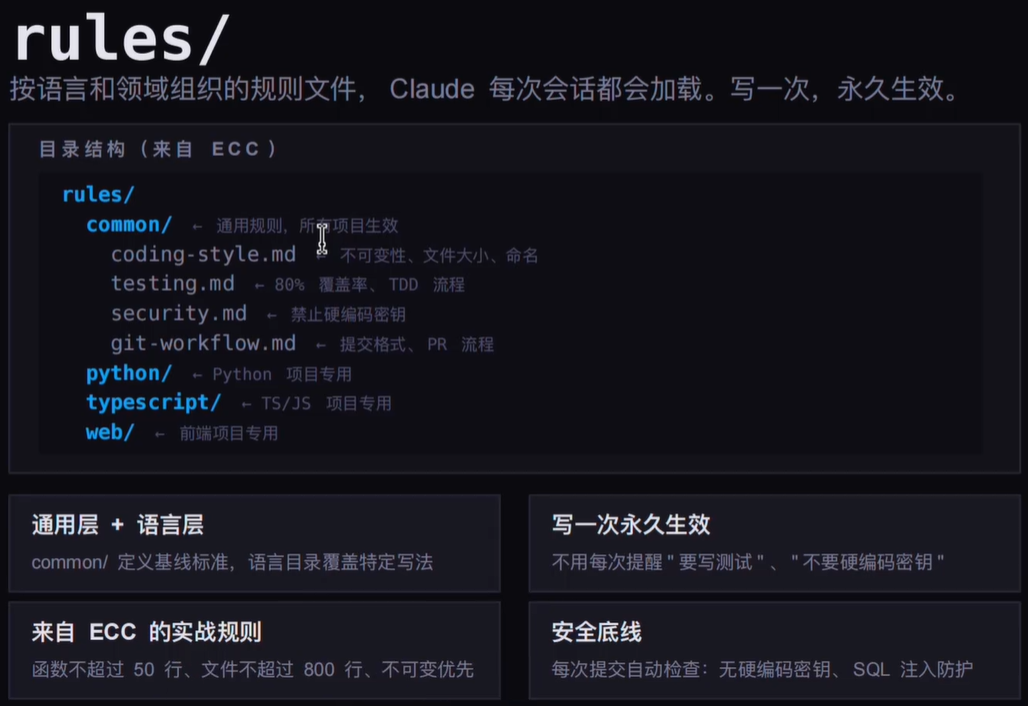
三大文件
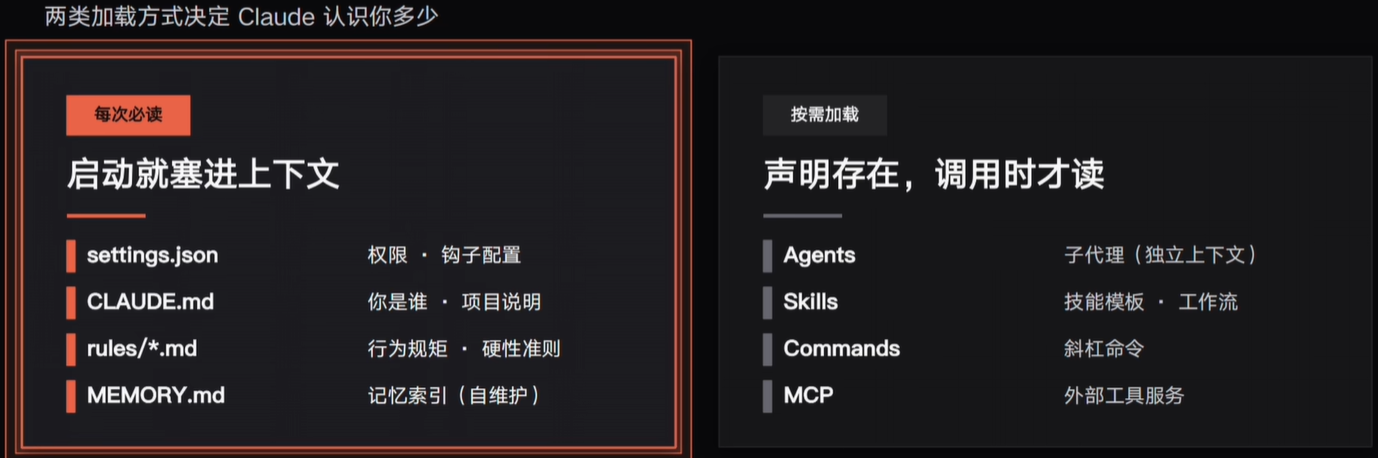
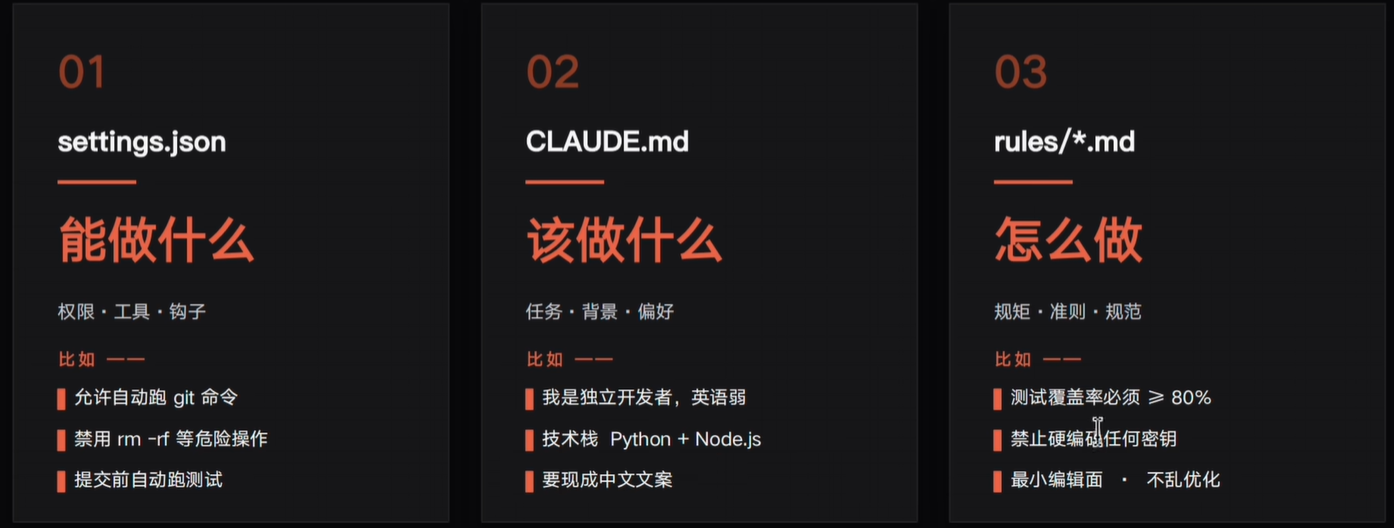
- CLAUDE.md
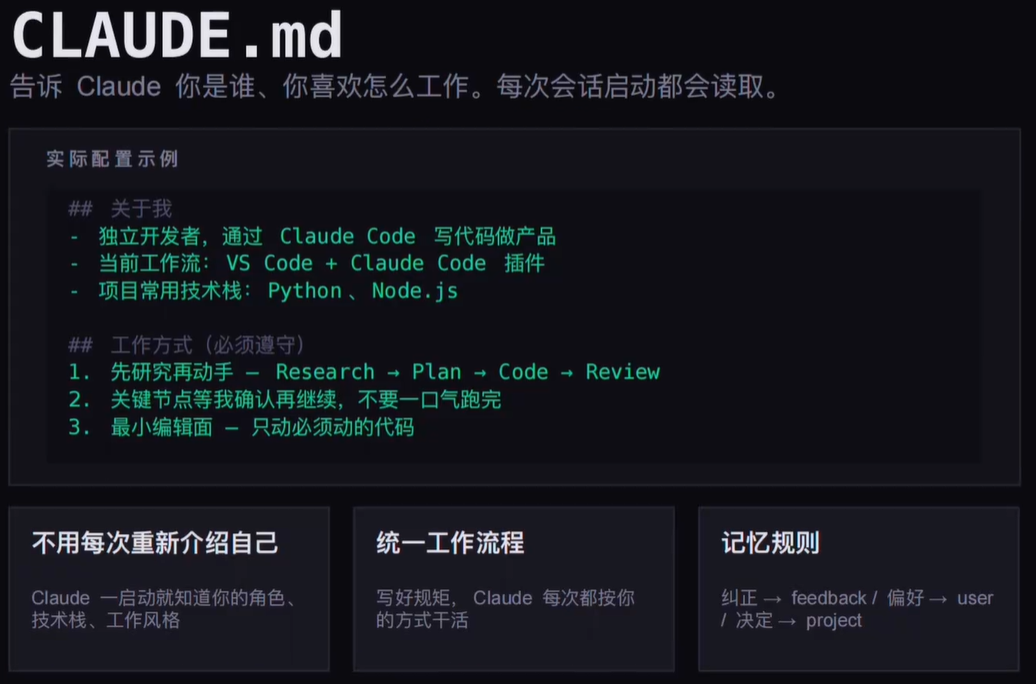
- settings.json
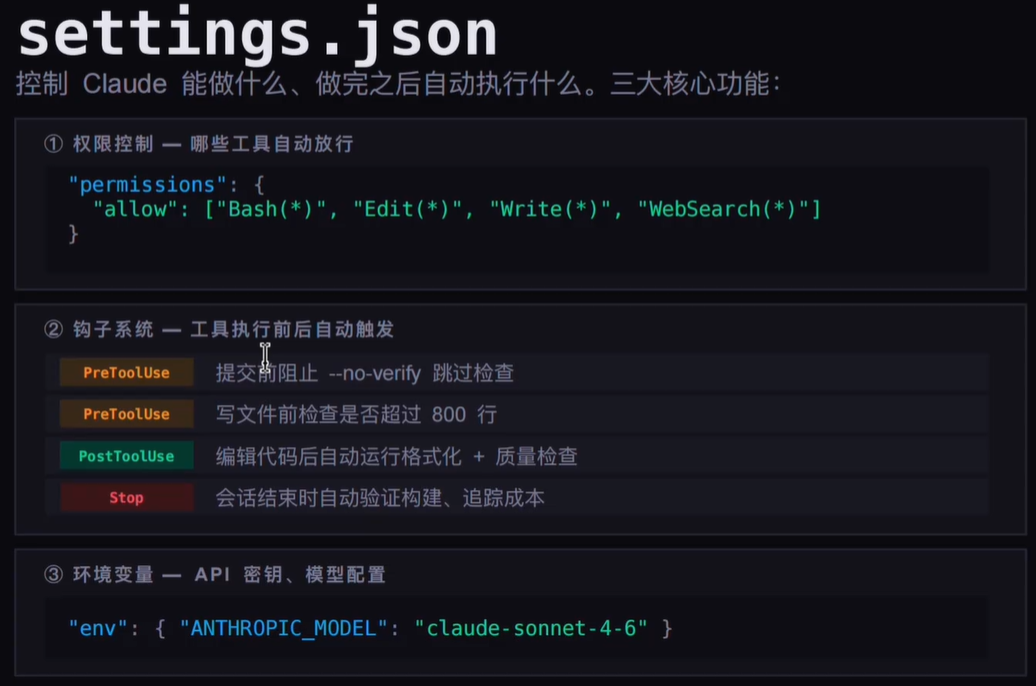
- rules/
Skills
安装 find-skill :
1 | |
安装 项目对应的技能:
1 | |
代码优化,使用技能:
1 | |
4. 项目结构
设置 ClaudeCode 默认语言为中文。
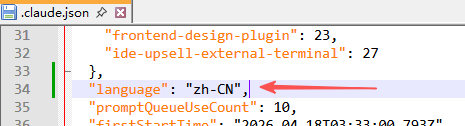
如果不达预期,就使用提示词让其记住,以后本项目的所有对话全部使用中文,包括文档。
使用该提示词:
请全局记住:所有回复、代码注释和文档内容都使用中文,确保在不同的项目和不同的会话中都能生效。
对 Claude 最友好的项目结构:
1 | |
只有在同一个目录下打开前后端项目,才能让 AI 更好的理解项目,进行前后端互通协作编码。
为了让 ClaudeCode 更好用,更听话,不仅需要这个友好的项目结构,而且也需要结合 TRAE 生成 CLAUDE.md 核心文件(基础规范,每次对话都会携带)。
让 ClaudeCode 更好用:
- 后端项目、前端项目 以平级的方式放在一个 父目录(新建)下。
- 借助于 TRAE 中 Auto 模型就行,使用
计划模式让其分析代码并生成 CLAUDE.md,提示词:
/plan 帮我深度分析当前目录下的后端项目 xxx 和前端项目 xxx-web,然后在当前目录下重新生成一个详细的 CLAUDE.md 文件,用于 ClaudeCode 开发使用。
5. IDEA 插件使用
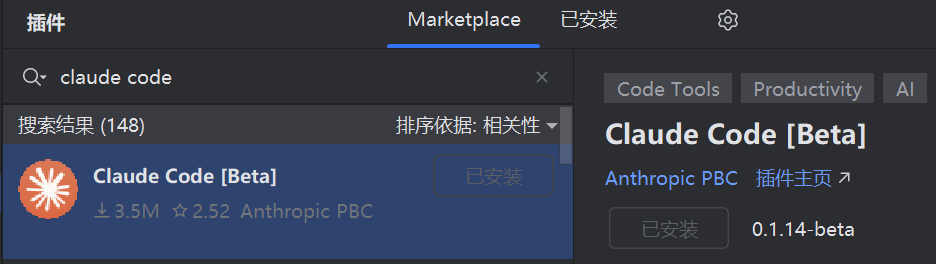
认准 Claude Code [Beta] 为官方插件。
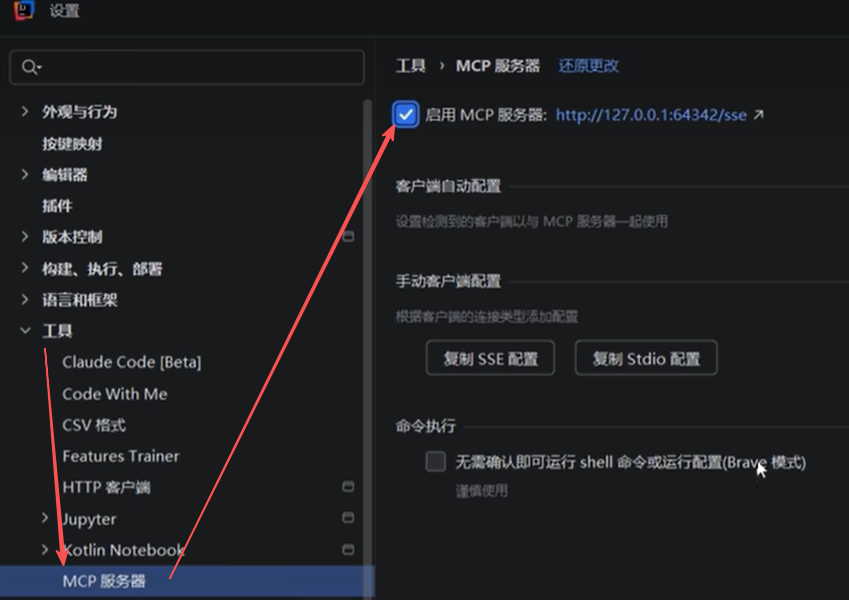
MCP 需要 IDEA 2026版本(注意同版本的 jetBrain 的产品都需要爆破)
6. 场景与命令
6.1 打开终端,第一件事
场景一:直接开干,进交互会话
1 | |
最朴素的用法,没什么好说的,进去之后就是一个对话界面,适合什么任务还没想好、先看看再说的时候
场景二:进去就想开始一个具体任务,别废话
1 | |
带上初始 prompt 启动,进去直接干活,不用再手打一遍,节省那两秒进入状态的摩擦
场景三:昨天聊了一半,今天接着搞,不想重建上下文
你昨天花了半小时跟 Claude 交代清楚了背景、需求、限制条件,今天不想再说一遍
1 | |
-c 是 continue,继承上次这个目录里的对话,上下文全在,不用重新交代背景,接着聊
如果你同时跑好几个任务,不同任务开了不同会话,想恢复某个具体的
1 | |
按名字恢复,直接带上今天要干啥,非常顺,不用先进去再打指令
场景四:写脚本,或者 CI 里跑,压根不需要交互
1 | |
-p 是 print mode,执行完自动退出,不会等你输入,适合塞进 shell 脚本或者 CI 流水线
这才是 Claude Code 在自动化场景里的正确用法,把它当成一个接受文本、输出分析的命令行工具来用
场景五:想在隔离环境里折腾,不影响主分支
让 Claude 帮你做一个比较大的改动,但又怕改乱了,想在一个独立的地方跑
1 | |
-w 是 worktree,Claude 会在一个独立的 git worktree 里工作,改啥都不影响你的主分支,做完了满意再合并
加 --tmux 还可以开一个专属 tmux 窗口,多任务并行的时候特别好使
1 | |
6.2 上下文快撑爆了,但任务还没做完
用 Claude Code 干活久了一定会遇到:对话越来越长,响应越来越慢,甚至出现截断
这时候很多人直接 /clear 重开,其实是错的,上下文这么多是有积累价值的,不一定要全扔掉
想保留同一个对话,只是释放一下空间
1 | |
Claude 把前面的对话压缩成一个摘要,继续往下聊,上下文占用大幅下降,任务还在继续,不割裂
可以加说明,告诉它哪些是重点
1 | |
加了说明之后,Claude 会在摘要里优先保留你说的那部分,不会把重要决策给压没了
想彻底开一个新对话,不拖历史包袱
1 | |
上下文清空,全新开始,但原来的对话不是删了,随时可以 /resume 找回来
/clear 和 /compact 的核心区别:一个是新建,一个是压缩同一个,别用错
想知道现在上下文用了多少,哪块最占地方
1 | |
弹出一个彩色格子可视化图,一眼看出哪些工具、哪些文件在吃上下文,还会给优化建议,比如”这个工具输出太长了可以换一个”
6.3 想换模型,或者调整思考深度
有时候你就问个语法问题,没必要上 Opus 跑半天烧钱;有时候做架构分析,Sonnet 给的答案太浅根本不够用
会话里临时换模型
1 | |
不带参数弹出选择器,上下键选,回车确认,不用退出重进
也可以直接指定
1 | |
启动时就指定模型
1 | |
调整努力级别,控制思考深度和 Token 消耗
这个很多人不知道,--effort 可以控制 Claude 在这个任务上”花多大力气”
1 | |
会话里也可以随时调
1 | |
不带参数弹交互滑块,左右键调,实时生效,不用等这一条回答完
同一个任务,low 和 xhigh 的回答质量差距很明显,遇到搞不定的问题先试试调高 effort,不要上来就换模型
6.4 权限弹窗每次都要确认,烦透了
改个文件弹一次确认,创建一个新文件又弹,跑个命令再弹
这个问题有三种解法,对应三种不同的场景
场景一:完全信任这个任务,让 Claude 放飞自我
1 | |
名字起得很直白,危险操作,会跳过所有权限确认,Claude 想改啥就改啥,想执行啥命令就执行
在你完全清楚任务范围、完全信任 Claude 判断的时候用,别无脑开着跑不熟悉的任务
场景二:先只让它分析,不让它动文件
让 Claude 给方案,你看完没问题再让它动手
1 | |
计划模式,Claude 只能读文件、思考、输出方案,不能执行任何修改,零风险
会话里也可以随时进入
1 | |
场景三:指定哪些操作不用问,其他的还是要确认
比如你允许它自由读文件和跑 git 命令,但文件写入还是要确认
1 | |
也可以反过来,直接禁掉某些工具
1 | |
这种细粒度控制比”全开”或”全关”更实用,自动模式适合你日常开发
1 | |
auto 模式会自动减少弹窗,只在真正有风险的操作上提示,不像 default 那么烦
6.5 想让 Claude 永远记住你的编码规范
每次开新会话都要重新交代”用 TypeScript、不要 any、接口用 interface 不用 type、注释写中文”,这事真的很烦
方法一:启动时追加规则到系统提示
1 | |
追加而不是替换,Claude 原本的能力不受影响,只是加了你的约束
规则多了写成文件更好管理,跟项目放一起,团队共用
1 | |
方法二:彻底替换系统提示,完全自定义
1 | |
这个是完全替换,Claude Code 原有的一些默认行为也会变,慎用,适合非常明确需要定制化角色的场景
方法三:初始化 CLAUDE.md,一劳永逸
这是我最推荐的做法
1 | |
Claude 帮你生成一个 CLAUDE.md 文件,放在项目根目录,把项目背景、技术栈、编码规范、注意事项全写进去
以后每次在这个项目里启动 Claude Code,它自动读取这个文件,再也不用重复交代背景
这就是为啥团队里推行了 CLAUDE.md 之后,每个人用起来都更顺,新人入项也更快上手
方法四:管理个人记忆文件
1 | |
这个是管理你个人级别的 Claude 记忆,可以跨项目记住你的个人偏好,比如”我不喜欢过度注释”、”我习惯函数式风格”这类
6.6 想看 Claude 改了什么,不想瞎猜
Claude 一顿操作下来改了七八个文件,你不知道具体改了啥,这种感觉很不安全
交互式 diff 查看器
1 | |
弹出一个可视化的 diff 界面,左右箭头在”当前整体 git diff”和”Claude 每一轮的改动”之间切换,上下箭头翻文件,清清楚楚
比你自己跑 git diff 可读性强多了,尤其是改了很多文件的时候
回退到某个节点,反悔了
Claude 这一轮改的方向你觉得不对,想撤回到之前的状态
1 | |
弹出对话历史,选一个你想回到的节点,会话状态和代码改动都一起回退,是真正的”悔棋”,不只是对话层面
对话分叉,两条路都试试
你想让 Claude 试试方案 A,同时也想保留主线去试方案 B,又不想开两个会话从头交代背景
1 | |
从当前对话的这个节点分叉出去,在分支里折腾,主线不动,两条路都可以走
6.7 代码改完怎么做质量把关
代码简化和重构
让 Claude 帮你改完之后,可以让它自己做一轮质量审查
1 | |
会并行跑三个审查 Agent,分别从不同角度审,结果汇总之后直接帮你修,不只是给建议
可以聚焦某个方向
1 | |
安全审查
1 | |
自动分析当前分支相对主分支的改动,找 SQL 注入、XSS、不当鉴权、敏感数据泄露这类问题,结果直接输出
做完一个功能上线之前跑一遍,比人工 review 快多了,也比 SonarQube 覆盖面更灵活
Review PR
1 | |
默认检测当前分支对应的 PR,也可以直接传 PR 号或者 URL,本地做一次轻量级 review
6.8 大规模并行改动,一个人干一个团队的活
这是 Claude Code 里最被低估的功能,很多人不知道有 /batch
场景:你要把整个项目从 CommonJS 改成 ESM
这种改动散落在几十个文件里,一个一个改没完没了
1 | |
Claude 会先分析整个代码库,把任务拆成 5 到 30 个独立的工作单元,给你看计划
你确认之后,它会为每个单元各派一个后台 Agent,每个 Agent 在独立的 git worktree 里工作,并行执行,每个 Agent 做完还会自动跑测试、开 PR
几十个文件的改动,可能就是你喝杯水的时间
其他适合 /batch 的场景:
全局替换某个 API 调用方式、给所有函数补单元测试、把所有日志调用从 console.log 改成统一的 logger、删除所有废弃的 TODO 注释……凡是”全局性、重复性、可以拆分并行”的改动,都可以用
查看和管理后台任务
1 | |
列出所有正在跑的后台 Agent 任务,可以查进度、停掉某个任务
6.9 CI 自动修复 PR,躺着等绿灯
这是我目前觉得最爽的一个功能
你提了一个 PR,CI 跑红了,或者 reviewer 留了评论,你不想自己手动改
1 | |
Claude 会在云端开一个 session,自动监听你这个 PR 的 CI 状态和 reviewer 评论,有失败就自动修,修完直接 push
你就去喝咖啡,回来看绿灯就行
可以加说明,只修特定类型的问题
1 | |
需要你装了 gh CLI,而且账号有 Claude Code on the web 的权限
6.10 会话管理,同时跑多个任务
启动时就给会话起名
1 | |
起了名字,会话列表里一眼认出来,/resume 的时候不用猜是哪个
会话里随时改名
1 | |
改了名字,终端标题栏也会跟着变
恢复某个具体的会话
1 | |
弹出历史会话列表,有名字显示名字,没名字显示自动生成的摘要
导出会话记录
1 | |
把当前对话导出成纯文本,做技术方案存档或者给别人看的时候很有用
6.11 脚本和 CI 里用 Claude Code
基础的非交互调用
1 | |
控制花费和轮次,防止失控
1 | |
裸模式,更快启动,适合简单脚本
1 | |
--bare 跳过插件、MCP、hooks 的自动发现,启动快很多,适合不需要那些能力的简单脚本调用
输出 JSON,给下游程序解析
1 | |
返回的是结构化 JSON,直接喂给下游脚本处理,不用自己去解析纯文本
批量处理多个文件
1 | |
在 CI 里加一步代码审查
1 | |
6.12 几个平时不太注意但挺有用的
问个旁路问题,不污染主对话上下文
你正在让 Claude 搞一件事,突然想顺嘴问个无关的小问题,但又不想把它加进上下文影响任务
1 | |
Claude 回答完,这条问答不会被计入主对话的上下文,不影响后续任务的理解,我用这个贼频繁
复制最后一条回复
1 | |
有代码块的话弹出选择器,可以只复制某个代码块,不用全选,/copy 2 是复制倒数第二条
SSH 远程连接的时候剪贴板不通,/copy 会问你要不要写成文件,也很方便
当前 Session 烧了多少钱
1 | |
看 Token 消耗和花费,我跑完大任务都会瞄一眼,养成这个习惯能避免月底账单惊喜
当前版本和更新
1 | |
登录和认证状态
1 | |
清理项目本地状态
跑了太多任务,本地 Claude Code 状态积了一堆历史垃圾,想清干净重来
1 | |
6.13 调试和排查
Claude Code 本身出了问题,或者响应不对劲,怎么排查
开启详细日志
1 | |
会输出每一轮的详细过程,能看到 Claude 在做什么决定,工具调用是什么参数
调试模式,可以过滤分类
1 | |
把调试日志写到文件
1 | |
日志会持续写入这个文件,方便事后分析,不用翻终端滚动
诊断安装和配置
1 | |
自动检测 Claude Code 的安装状态和配置,结果有状态图标,哪里有问题一眼看出来,按 f 可以让 Claude 自动修复。
